
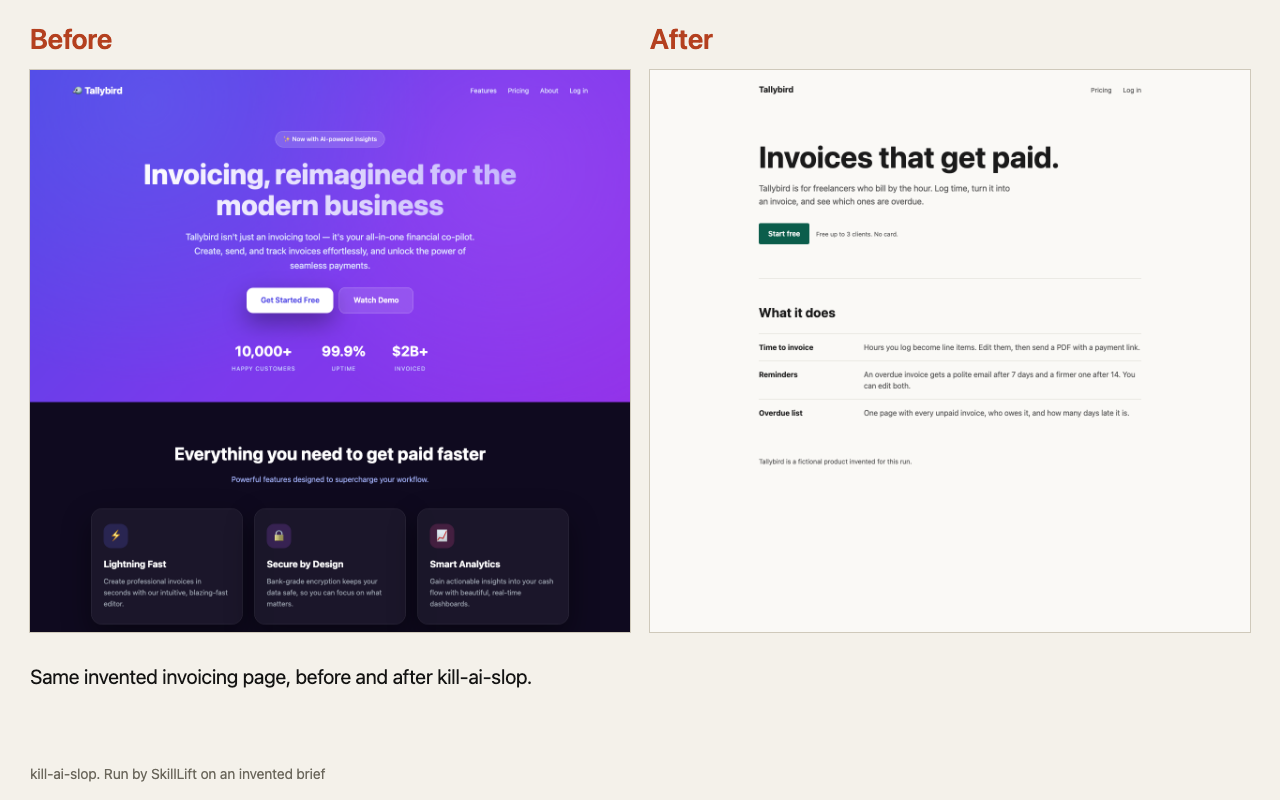
This picture is from one run by SkillLift on an invented brief. It is not from the project.
Kill AI Slop
Finds the tics that make a page look AI-made, such as glow, pastel icon tiles and invented stats, and removes them.
Kill AI Slop · yetone · Apache-2.0
Install
For any agent
npx skills add yetone/kill-ai-slop
Commands are copied word for word from the project's README. Read them before you run them.
We ran it once
The brief: Invented: a landing page for a fictional invoicing tool called Tallybird. First written without the skill as a typical AI-looking page (purple gradient, three icon cards), then redone with the skill. Output labelled as a run on an invented brief; kept off the page itself so the visual is unaltered.
The scanner flagged 12 tell groups (19 hits) in the baseline: indigo gradient, gradient-clip headline, emoji, glass pills, big shadows, invented stat row and others. Following fixes.md, the redo became a flat off-white page with one green accent, a short headline, a plain labelled list instead of icon cards, and no invented numbers.
What we thought: It does what the listing says: the scanner is a local read-only grep that found the obvious tells in seconds, and the fix guide led to a calmer, more specific page. But it only strips decoration and offers no design of its own, so the after page is plain rather than good, and the real work (writing true specifics) is left to the user. Useful for cleaning a vibe-coded page; not a design tool.
Open the full outputOne run by an AI agent on 2026-11-02, at commit f6e2ae3. No person has judged it, and your result will differ.
Why it was picked
A field guide naming 22 visual and wording habits of AI products, each with what to do instead. Reading it changes how you see every AI page afterwards.
Why it exists
Most people feel something is off and cannot name it. This gives each problem a name and a fix.
What you get
A report of problems found in your project, then the fixes.
How it works
- Install the skill.
- Ask it to scan your project.
- Read the report and approve the fixes.
What it needs
Node.js, for the install command.
In short
Pick this when your page looks like every other AI page.
Worth knowing
Its project page also offers a line that tells your agent to fetch and follow instructions from the web. We show the ordinary install instead. There is no finished output to show: it edits your own project.