

Free
Cash Runway
Answer a few plain questions. Get a live Excel forecast that says if your money lasts 90 days, and which day is tightest.
Install
Install the "Cash Runway" skill into ~/.claude/skills/cash-runway.
Download each file and save it under that folder:
https://skilllift.pages.dev/packs/cash-runway/SKILL.md → SKILL.md
https://skilllift.pages.dev/packs/cash-runway/NOTICE.txt → NOTICE.txt
https://skilllift.pages.dev/packs/cash-runway/references/style.md → references/style.md
https://skilllift.pages.dev/packs/cash-runway/assets/overview.html → assets/overview.html
https://skilllift.pages.dev/packs/cash-runway/assets/sample-en.json → assets/sample-en.json
https://skilllift.pages.dev/packs/cash-runway/assets/sample-zh.json → assets/sample-zh.json
https://skilllift.pages.dev/packs/cash-runway/scripts/make.py → scripts/make.py
https://skilllift.pages.dev/packs/cash-runway/scripts/build_workbook.py → scripts/build_workbook.py
https://skilllift.pages.dev/packs/cash-runway/scripts/labels.py → scripts/labels.py
https://skilllift.pages.dev/packs/cash-runway/scripts/model.py → scripts/model.py
https://skilllift.pages.dev/packs/cash-runway/scripts/formula_eval.py → scripts/formula_eval.py
https://skilllift.pages.dev/packs/cash-runway/scripts/verify.py → scripts/verify.py
https://skilllift.pages.dev/packs/cash-runway/scripts/shot.mjs → scripts/shot.mjs
https://skilllift.pages.dev/packs/cash-runway/scripts/preview.mjs → scripts/preview.mjs
https://skilllift.pages.dev/packs/cash-runway/scripts/check.mjs → scripts/check.mjs
https://skilllift.pages.dev/packs/cash-runway/scripts/test_no_verdict.py → scripts/test_no_verdict.py
Then read SKILL.md, tell me what it does, and remind me to start a new session.
Unpack it into ~/.claude/skills
Same skill, different brief
The left is the preview. The right was made by a separate agent from a different brief, using only the installed skill and without seeing the preview.
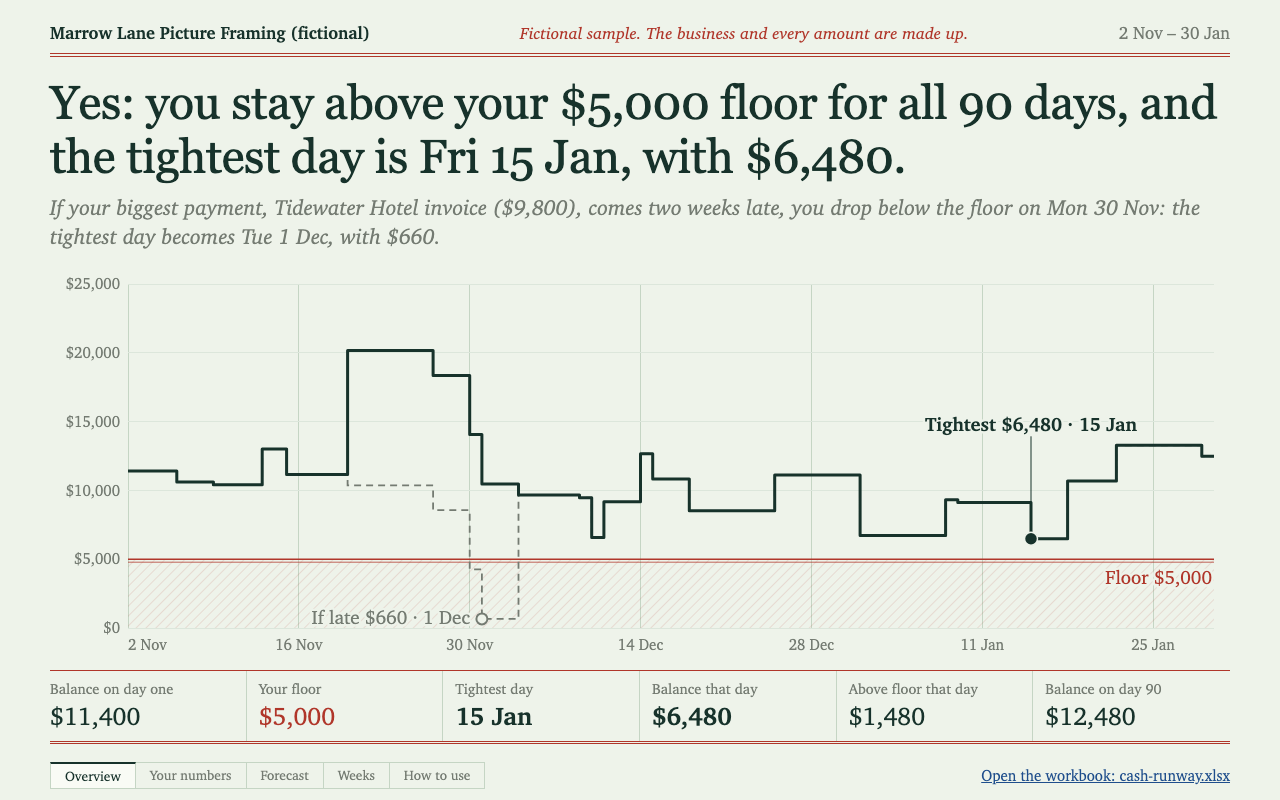
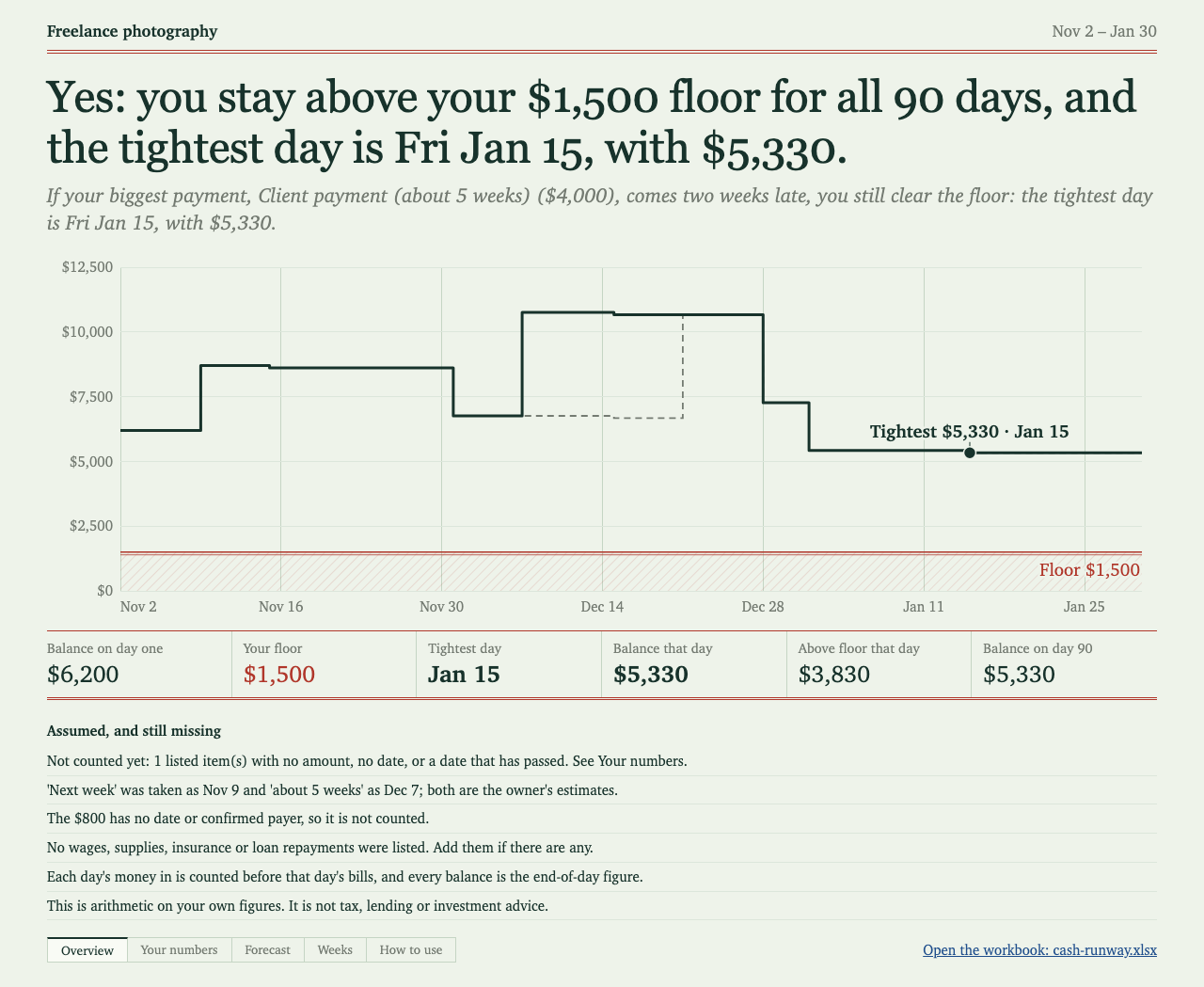
One test run on a fictional brief. Letterforms can differ on systems without the same fonts.
Turns a freelancer's or small shop owner's plain answers into a real Excel forecast that says whether their money lasts the next 90 days and which day is tightest. Live formulas, a balance chart with the floor and lowest point marked, a dated forecast, a weekly summary, a how-to sheet, a what-if for the biggest payment arriving two weeks late, a quick-read overview picture and a plain message. Use when someone asks about cash flow, cash runway, "will I have enough money", or a simple money forecast for a small business.
What it must pass before delivery
- Every amount came from the person. Every date came from them, or is listed as an assumption with their words.
make.pyprinted no PROBLEM lines and exited 0, andcheck.mjspasses.- Nothing is "not counted". If something had to stay that way, the person was told there is no answer yet, and why.
- The answer sentence matches what they would see on the chart.
- The late-payment sentence names the right payment.
- The Chinese version has Chinese labels and the right currency, if used.
- The message says how the formulas were checked and whether the chart was seen in Excel.
- No tax, lending or investment advice anywhere.
Read the full SKILL.md
---
name: cash-runway
description: Turns a freelancer's or small shop owner's plain answers into a real Excel forecast that says whether their money lasts the next 90 days and which day is tightest. Live formulas, a balance chart with the floor and lowest point marked, a dated forecast, a weekly summary, a how-to sheet, a what-if for the biggest payment arriving two weeks late, a quick-read overview picture and a plain message. Use when someone asks about cash flow, cash runway, "will I have enough money", or a simple money forecast for a small business.
version: 1.1.0
---

# Cash Runway

The person answers plain questions and gets a workbook they can keep using. Nothing they see should mention scripts, formulas or file formats beyond "the Excel file". You do all the setup yourself.

## Someone who just wants the result

Don't ask them to install or run anything. Ask the questions below in ordinary words, a few at a time, run the steps yourself, and hand over the files with the message. If they paste a bank list, an invoice list or a messy note, read the items from it and read them back for a yes.

## Inputs to ask for

Required. If either is missing, keep asking, because the answer means nothing without them:
1. What day should the forecast start? Usually today.
2. How much is in the account that day?

Ask next, and accept "I don't know":
3. What is the least you want to keep in the account? This is the floor.
4. What money do you expect in the next 90 days? For each: what, how much, what date, and whether it repeats. Always get a date.
5. What bills and regular costs are coming? For each: what, how much, what date, and whether it repeats. Always get a date.
6. Run through this list once so nothing is forgotten: rent, wages, your own pay, suppliers, loan repayments, tax payments already worked out, insurance, subscriptions. Ask only about what could apply to them.
7. Currency and date style, if not obvious from how they write. Default Chinese to ¥ and Chinese labels, or the currency they state.

## Rules

- Never invent an amount. Don't estimate one for them and don't fill one in from what is typical.
- Never guess a date silently. Ask first. If they can't say, assume one using Dates below and record it.
- An answer with a line left out is worse than no answer, because it looks safer than it is. If any line has no date, no amount, or a one-off date that has passed, or if no bills land in the 90 days, the tool refuses: the headline says "No answer yet", the picture lists each line in red with its amount, and `make.py` exits 4. Don't soften this or send it as a result. Get the date, or assume one, and run it again.
- An estimate they gave you goes in as theirs, and is named in `assumptions` ("Shop takings of $2,600 a week is the owner's estimate").
- Categories they didn't mention go in `assumptions` as questions, not amounts ("No loan repayments were listed. Add them if there are any.").
- No floor given: leave it out. It counts as zero and is listed as an assumption. Don't suggest what a floor should be.
- If they ask for tax, lending or investment advice, say this forecast can't give it and a qualified person can. You can state arithmetic: "that day is $851 short of your floor". Don't tell them to borrow, delay a tax payment or invest.
- Real people and companies only appear if the person named them. Samples are fictional and labelled fictional.

## Dates

Ask for the date. If nobody can answer, turn their words into one specific date with this table, using the forecast's first day as "today". Put their words in the line's `date_from`: the tool then lists each one as an assumption in the Overview and the message, for them to confirm. Never leave the line undated.

| They said | `date` | `repeat` |
|---|---|---|
| "every day", "daily", "a day" | the first day | daily |
| "every week", "weekly" | the first day | weekly |
| "every month", "monthly" | the first day | monthly |
| "on the 1st", "on the 28th" | the next such date on or after the first day | as they said |
| "next week", money in | Friday of next week | once |
| "next week", a bill | Monday of next week | once |
| "in about 5 weeks" | the first day plus 35 days. On a weekend, money in moves to the Monday after and a bill to the Friday before | once |
| "next month", no day | money in: the last day of that month. A bill: the 1st | once |

Money in is placed late and bills early, so an assumed date never flatters the answer.

- Every day counts all seven days. If they close some days, don't multiply it up silently: use a weekly total with `repeat: weekly`, and say how you worked it out in `assumptions`.
- Money they aren't sure will come at all ("maybe $800"): leave it off the lists and write it in `assumptions`: "Possible $800 from X is left out because it isn't certain." Leaving out money in can't flatter the answer. A bill they aren't sure of stays in, with an assumed date.

## Thin briefs and other situations

- Thin brief: restate their facts back, list what you still need, and don't fill gaps.
- Nobody can answer: if the balance and start date are known, assume dates using Dates above, list every gap under `assumptions`, and say the answer is only as good as the list. An amount can't be assumed: without it the tool gives no answer, so say what is needed. Without the balance and start date, stop and say what is needed. `make.py` also refuses.
- Different length than 90 days: the workbook is built for 90. Say so, and offer to re-run it from a later start date to look further ahead.
- A different currency later: rebuild, because amount formats are set when the file is made.
- More than 20 money-in or 35 bill lines: ask to combine small ones.

## Steps

1. Write their answers to a file such as `answers.json`, in a temporary folder. Copy the shape of `assets/sample-en.json` or `assets/sample-zh.json`:
   `lang` (en or zh), `business`, `start`, `opening`, `floor`, `late_days` (14 unless they ask otherwise), `currency`, `date_style` (dmy or mdy), `paper` (a4 or letter), `money_in` and `money_out` lists of `{name, date, amount, repeat}`, and `assumptions`. Repeat is once, daily, weekly, fortnightly, monthly or quarterly. Dates are YYYY-MM-DD. A line whose date you assumed also carries `date_from`, their exact words. Set `fictional: true` only for samples.
2. Run `python3 scripts/make.py answers.json output-folder`. It takes under a minute. It installs XlsxWriter into a temp folder if it is missing. For the overview picture it needs Playwright, and looks in `NODE_PATH`, the current folder and the folders above the script. If it finds none it says so in one line: `npm install playwright` in a temp folder, then set `NODE_PATH` to that folder's `node_modules`. Without it you still get `overview.html`, and the message says so. Exit 4 means no answer: go back to Dates and ask.
3. Run `node scripts/check.mjs output-folder` and fix whatever it reports. It fails if any money line has no date, or if a verdict was given with a line not counted. `python3 scripts/test_no_verdict.py` proves these rules, in about two minutes.
4. Look at `overview.png` with your own eyes. Read the two sentences aloud against their figures.
5. Send `cash-runway.xlsx`, `overview.png` and the text of `message.txt`. Use the message as written, adding only what they asked about. Don't hand over `verification.json` unless asked.

## How the formulas get checked

`make.py` runs `scripts/verify.py`, which always reports which check it used:
- If LibreOffice is installed, it recalculates the workbook and every value is compared.
- If not, `formula_eval.py` works out the formulas from the text in the file and compares them with `model.py`, a separate day-by-day sum. This also runs in the first case.
- Either way, 21 changes to the inputs are tried (balance, floor, dates, amounts, new rows, daily lines, missing items), and the results are compared again. Each must refuse exactly when the separate sum finds a line it can't count.

The message states the method used. Say plainly that the chart was not seen in Excel unless someone really saw it there. A LibreOffice view is not a view in Excel.

Do not open, script or send commands to Excel, Numbers, or any other app the person may have open in order to check the file. It can freeze their work. Use the file checks above. If LibreOffice is installed, run it headless on a copy: `soffice --headless --convert-to pdf`, then look at the pages.

## Deliverables

- `cash-runway.xlsx`: Overview (one-sentence answer, late-payment sentence, chart, ruled figures, assumptions), Your numbers (the blue cells), Forecast (90 dated lines), Weeks (13 lines), How to use, Workings.
- `overview.html` and `overview.png`: the quick read.
- `message.txt`: the plain message.
- `verification.json`: the record of the checks.

## Before delivering

- [ ] Every amount came from the person. Every date came from them, or is listed as an assumption with their words.
- [ ] `make.py` printed no PROBLEM lines and exited 0, and `check.mjs` passes.
- [ ] Nothing is "not counted". If something had to stay that way, the person was told there is no answer yet, and why.
- [ ] The answer sentence matches what they would see on the chart.
- [ ] The late-payment sentence names the right payment.
- [ ] The Chinese version has Chinese labels and the right currency, if used.
- [ ] The message says how the formulas were checked and whether the chart was seen in Excel.
- [ ] No tax, lending or investment advice anywhere.

## When not to use it

- Audited accounts, tax returns, lender forecasts or valuations.
- Forecasts beyond 90 days, or several accounts and currencies at once.
- Decisions that need a qualified adviser. This does the arithmetic on their figures and goes no further.

## Requirements

Python 3.9 or newer. XlsxWriter (BSD licence), installed by the script into a temp folder. Node for `check.mjs`. Playwright optional, for the picture. LibreOffice optional, for the stronger check. The "What happens" notes on the Forecast need Excel 2019 or newer; on older versions they stay blank and all sums still work. See `references/style.md` for the look; do not restyle.
Used in these workflows
- Sort this month's money step 3
- Check it before you sign step 2

