

Free
Clay Buddy
A working character maker in one offline file: 48 bodies, a one-tap solid-eye mascot set, 11 materials, a transparent 1024 PNG, no image model.
Install
Install the "Clay Buddy" skill into ~/.claude/skills/clay-buddy.
Download each file and save it under that folder:
https://skilllift.pages.dev/packs/clay-buddy/SKILL.md → SKILL.md
https://skilllift.pages.dev/packs/clay-buddy/references/style.md → references/style.md
https://skilllift.pages.dev/packs/clay-buddy/assets/studio.html → assets/studio.html
https://skilllift.pages.dev/packs/clay-buddy/scripts/check.mjs → scripts/check.mjs
https://skilllift.pages.dev/packs/clay-buddy/scripts/lib.mjs → scripts/lib.mjs
https://skilllift.pages.dev/packs/clay-buddy/scripts/render.mjs → scripts/render.mjs
https://skilllift.pages.dev/packs/clay-buddy/scripts/contact.mjs → scripts/contact.mjs
https://skilllift.pages.dev/packs/clay-buddy/scripts/drive.mjs → scripts/drive.mjs
Then read SKILL.md, tell me what it does, and remind me to start a new session.
Unpack it into ~/.claude/skills
Same skill, different brief
The left is the preview. The right was made by a separate agent from a different brief, using only the installed skill and without seeing the preview.
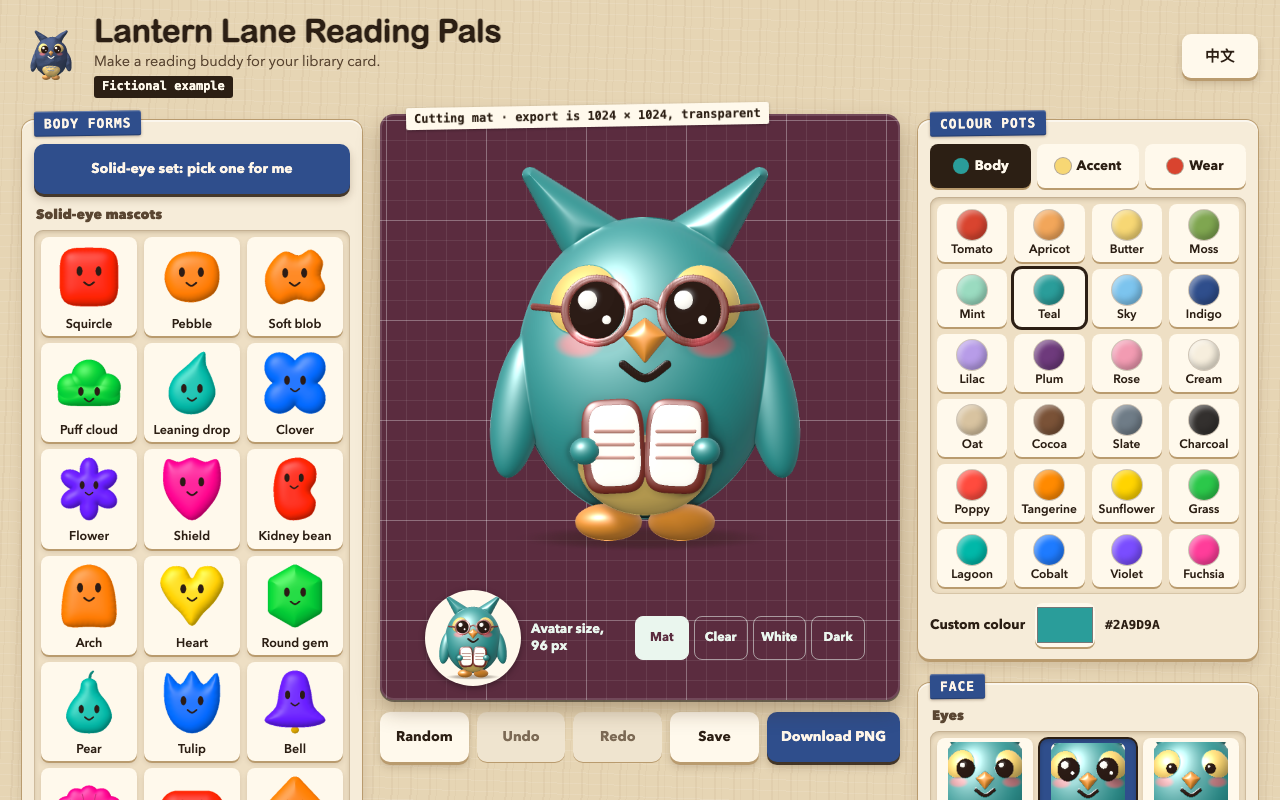
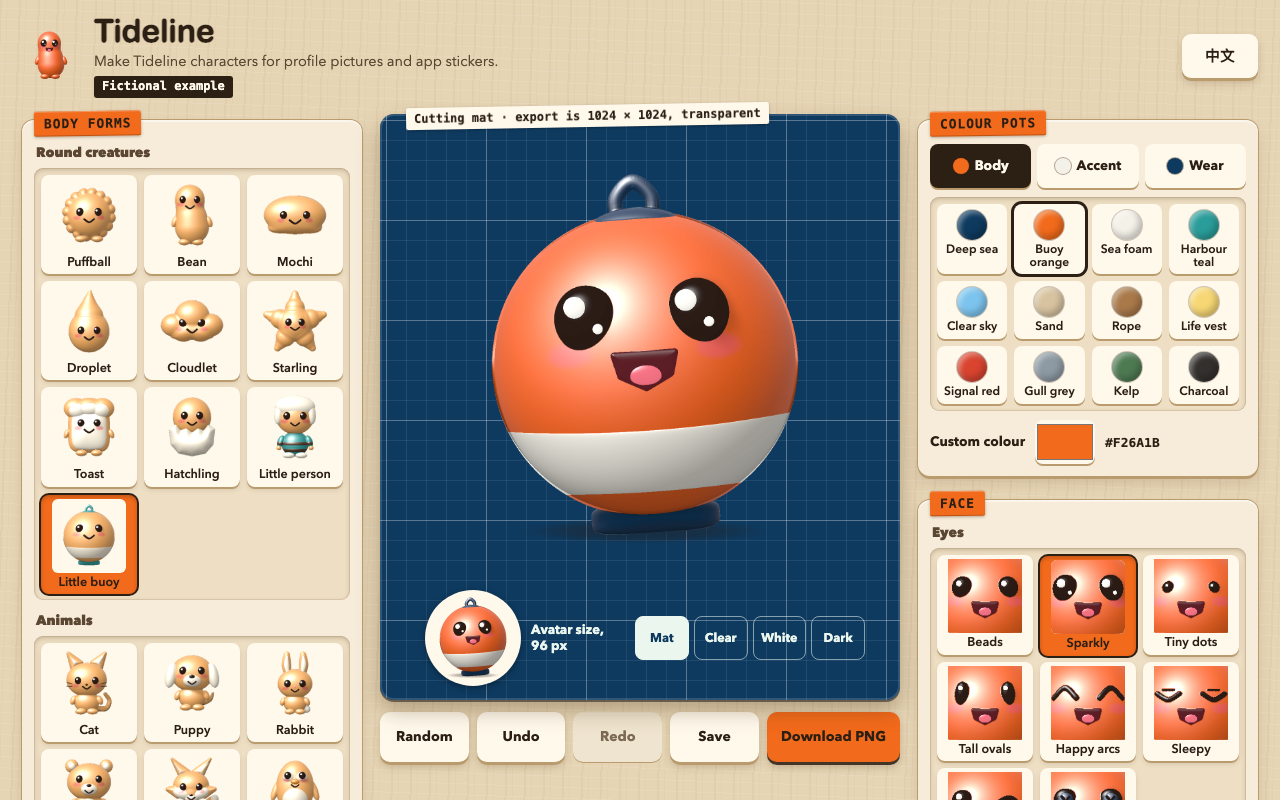
One test run on a fictional brief. Letterforms can differ on systems without the same fonts.
Delivers a working character maker as one self-contained offline HTML file. The user designs a cute character in the browser (48 body forms including a one-tap solid-eye mascot set, 11 material finishes, faces, 25 accessories, colours, random, undo, a local save shelf, English and Chinese) and downloads a 1024x1024 transparent PNG. Needs no image model, no credits, no 3D library. Use when someone wants a mascot or avatar maker for a product, class, club or community; wants to rebrand the studio or set its defaults; wants new forms or colours; wants a flat, simple mascot with solid oval eyes; or wants a batch of original character PNGs without an image model.
What it must pass before delivery
node scripts/check.mjs out.html --brand "Name" --realexits 0, or without--realfor a labelled fictional demo- I opened every contact sheet page at full size and looked at every row
- Looking myself, I found nothing that resembles a known character, and nothing unpleasant, on the sheets or on any delivered PNG at 1024 and 96 px
node scripts/drive.mjs out.html shots/exits 0- I viewed the screenshots at 1280 and 390, in both languages
- I pressed Download once myself or read the drive result, and the PNG shows through a dark background
- No sample name from the example remains
- English shows no Chinese except the switch's own name, and Chinese shows no English except the switch's own name
- Every assumed value is listed for the user
Read the full SKILL.md
---
name: clay-buddy
description: Delivers a working character maker as one self-contained offline HTML file. The user designs a cute character in the browser (48 body forms including a one-tap solid-eye mascot set, 11 material finishes, faces, 25 accessories, colours, random, undo, a local save shelf, English and Chinese) and downloads a 1024x1024 transparent PNG. Needs no image model, no credits, no 3D library. Use when someone wants a mascot or avatar maker for a product, class, club or community; wants to rebrand the studio or set its defaults; wants new forms or colours; wants a flat, simple mascot with solid oval eyes; or wants a batch of original character PNGs without an image model.
version: 1.0.0
---

# Clay Buddy

`assets/studio.html` is the whole product. Every pixel is computed in JavaScript from a height map, so each finish changes lighting and texture, and the same settings give the same pixels in any browser and in Node. Your job is to copy that file and change its config block, and sometimes add a form. You never redraw the studio.

Read `references/style.md` before changing anything visual.

## Inputs to ask for

Ask once, in one message, for anything the brief does not give. Everything has a fallback, so none of it blocks the work.

1. Who the studio is for: product or group name, in English and Chinese if both are wanted.
2. One line saying what people make here.
3. A brand colour, if they have one.
4. The character people should see first: form, finish, colours.
5. Any forms that must exist, or must be hidden.
6. Starter characters to place on the shelf, if any.

## Steps

1. Copy `assets/studio.html` to the output path. Never rebuild it from memory.
2. Edit only the JSON between `<script id="studio-config" ...>` and `</script>`. See the field table below.
3. To add forms or colours, follow "Add a form" and "Add colours" below.
4. Run `node scripts/check.mjs out.html --brand "Name" --real`. `--brand` accepts a loose match in either language: `Tideline` passes for `Tideline Crew Bench`. Drop `--real` only for a labelled fictional demo. Fix what it reports and rerun. It takes about 30 seconds.
5. Run `node scripts/contact.mjs out.html sheets/` and open every sheet with your image viewer. `forms-by-wear-N.png` shows every form with every accessory, one page per 8 forms. `forms-by-colour-N.png` shows every form in the 16 everyday colours at 96 px. `solid-set.png` and `solid-large.png` show the solid-eye set in vivid colours. `finishes.png` shows every finish at 96 px, `faces.png` the largest faces. Open every page at full size. **The checker cannot test resemblance to a known character, and it cannot tell cute from unpleasant. Only you can. Look for both, on every sheet and on every PNG you deliver, at 1024 and at 96 px.**
6. Install Playwright with `npm install playwright` (set `NODE_PATH` to a folder that holds it if needed), then run `node scripts/drive.mjs out.html shots/`. It runs 1280 and 390 wide, motion on and reduced, with touch emulated, decodes a real download and verifies its alpha. It takes about 3 minutes and closes its own browser.
7. Open the screenshots in `shots/` at both widths and both languages. View every one. Tray thumbnails redraw a moment after each change. In your own scripts, wait until `document.body.dataset.thumbs` is set again before a screenshot, or tiles show blank or show the previous character.
8. Deliver the file. It runs by double-click with no server.

For PNGs without a browser: `node scripts/render.mjs out.html pip.png '{"form":"owl","finish":"wood","body":"#7A5237"}'`. About one second per image, and the same pixels as the Download button.

## Solid-eye set

A separate mascot look: 18 rounded silhouettes with no limbs (`squircle`, `pebble`, `blob`, `puffcloud`, `teardrop`, `clover`, `flower`, `shield`, `kidney`, `arch`, `heart`, `gem`, `pear`, `tulip`, `bellshape`, `scallop`, `pill`, `kite`), simple solid oval eyes, vivid flat colour and the `vinyl` finish.

**How people ask for it.** Treat any of these as this set: "mascot look", "flat mascot", "simple blob character", "solid eyes", "dot eyes", "minimal avatar", "cute shapes with faces", "sticker-style shapes", "a set of shape characters". Asking for a named outside avatar library counts as the look only: build ours, and do not copy its art or name it in the output.

**In the studio.** One tap on "Solid-eye set: pick one for me" gives a whole character. Tapping a silhouette from outside the set brings the whole look; inside the set it changes only the silhouette. Random stays in the set while the character has a silhouette and solid eyes; choosing other eyes or a non-silhouette form leaves it. Every silhouette also takes every eye, mouth, colour, finish and accessory, and exports the same PNG.

**To open a studio in this look,** set the config:

```json
"forms": ["squircle","pebble","blob","puffcloud","teardrop","clover","flower","shield","kidney","arch","heart","gem","pear","tulip","bellshape","scallop","pill","kite"],
"defaults": {"form":"squircle","finish":"vinyl","body":"#FF8A00","accent":"#FFF6E8","wear":"#00B8A9","eyes":"solid","mouth":"smile","hat":"none","face":"none","neck":"none","extra":"none","blush":0,"seed":1}
```

Leave `forms` as `"all"` to keep the other forms too. From the command line: `node scripts/render.mjs out.html a.png '{"form":"clover","finish":"vinyl","eyes":"solid","body":"#7A4DFF","blush":0}'`.

**To add a silhouette,** give it `group:'solid'` and one body: `sil('key',function(){return ctrl([[x,y],...],4);})`. `ctrl` draws a smooth closed outline through control points, `radial(cx,cy,function(deg){return radius;},n)` draws one from a radius function, and a short plain list of points with `{r:72}` gives a rounded polygon. The key must be unique. Place the eyes high and keep the outline at least 16% different from the others: the checker fails any two silhouettes that overlap above 88% at 96 px.

**Resemblance matters most here,** because plain shapes with oval eyes are close to many famous characters. `RISKY` also covers this set: a yellow star, a red or orange flower or a white cloud with oval eyes; a pink round form; a lilac blob with small eyes; a yellow smiling round; a yellow squircle with buck teeth or a bow tie; a yellow capsule with glasses; a red, pink or white arch; a green arch; a blue drop; a yellow, red or orange scallop, which approaches a well-known logo; and brown soft mounds. These change colour with a message. **The checker cannot judge resemblance for this set either. You must look.**

## Config fields

Every text field has an `en` and a `zh` value. English text holds no Chinese and Chinese text holds no Latin letters: spell out the Chinese word for a transparent picture instead of writing PNG, and transliterate or translate a brand into Chinese. If the user gives a brand in one language only and supplies no other, ask once; if nobody answers, use the same meaning in plain Chinese or English and list it as inferred.

| Field | Meaning | Limit | If the brief is thin |
|---|---|---|---|
| `brand` | Name in the header and tab | en 28, zh 14 characters | Use the name given. No name: keep the template's own brand values, which pass the checker, and say so |
| `tagline` | One line on what people make | en 70, zh 36 | Restate the user's own words. Do not invent audiences or claims. Keep the default line when nothing is given |
| `footnote` | Small print at the foot | en 120, zh 60 | Keep the default privacy line, which is true of this file. Never add customers, numbers or awards |
| `fictional` | `true` shows the label in the header | boolean | `false` for anything real. `true` only for made-up demos |
| `fictionalLabel` | Words on that label | en 24, zh 12; must say fictional in each language when `fictional` is true; the checker looks for it | Keep the default |
| `lang` | Language at first load | `en` or `zh` | The language of the brief |
| `theme.accent` | Tray labels and the download button | `#RRGGBB`, 4.5:1 against `accent-ink` | Their brand colour. None: keep `#B5391F` |
| `theme.accent-ink` | Text on the accent | `#RRGGBB`, 4.5:1 against the accent | Pick whichever of `#FFF6E9` and `#2C1F14` reaches 4.5:1. Judge by the ratio, not by eye: bright orange such as `#F26A1B` looks strong but needs the dark one. The checker names the one that passes |
| `theme.mat` | Cutting mat behind the character | `#RRGGBB`, 4.5:1 against `#EAF6EE` | Keep `#1E5A50`, or a deep version of a second brand colour |
| `forms` | `"all"` or a list of form ids to show | ids must exist | `"all"` |
| `palette` | `[]` for the 24 defaults (16 everyday, 8 vivid), or a list of `{hex,en,zh}`; add `"vivid":1` to colours the solid-eye set may pick | 8 to 24 colours, names in both languages | `[]` |
| `defaults` | The first character shown | valid ids and `#RRGGBB`; see `references/style.md` | Keep the defaults, or the colours from the brand |
| `defaultName` | Name used until the user types one. It follows the language switch, also on the shelf and in file names; a name the user types stays as typed | en 24, zh 12 | Empty, which falls back to the built-in name |
| `brandmark` | Settings for the tiny character in the header; `null` uses `defaults` | same as `defaults` | `null` |
| `starters` | Ready-made characters on the shelf, each `{name:{en,zh},settings}` | 0 to 8; name en 24, zh 12 | `[]`. Characters the user asked for go here, named by their role, such as Deckhand, when no name is given. Never add characters nobody asked for |

A placeholder such as `{{BRAND}}`, `TODO`, `your brand`, or any sample name from the example fails the checker. If you need a neutral stand-in, use the template's own values, which pass.

## Add a form

Append one record to the `FORMS` array between `SLOT:forms` and `END SLOT:forms` in the engine.

| Field | Meaning | Rule |
|---|---|---|
| `id` | Key used in recipes | Lower-case letters and digits, unique, never containing `~` |
| `group` | Tray section | `round`, `animal` or `fantasy` |
| `en`, `zh` | Visible names | en up to 16, zh up to 6 |
| `head` | `{x,y,rx,ry}` ellipse of the skull in the 1000 x 1000 space, y down | Hats and headphones seat themselves from this alone. It must match the visible head, excluding ears |
| `eyes` | `{y,gap,r}`, optional `x` | Eye line, half the distance between eyes, radius about 30 to 40. Both eyes must land on the body, also at 140% size |
| `mouth` | `{y,w}`, optional `x` | Mouth line and width, 0.5 to 1.5 |
| `neck` | `{y}` | Scarves and collars read the real body width on this line, so choose a line through the body |
| `parts()` | Returns the shapes, drawn in order | Helpers below. `tag:'top'` hides a part under hats |
| `deco(c)` | Optional marks on the surface, drawn after the parts | `ink` and `line`, placed with `c.surf(x,y)` |

### Drawing helpers

Coordinates are in the 1000 x 1000 space with y down. `z` is towards the viewer, and a body's front surface sits around `z` 150 to 220. Options go in the last argument: `m` material, `z` depth, `rz` thickness, `rot` degrees, `k` blend radius with neighbouring body parts (`k:0` means a hard edge), `tag`.

| Helper | Draws | Use it for |
|---|---|---|
| `E(x,y,rx,ry,o)` | Ellipsoid | Heads, bodies, ears, feet |
| `S(x,y,rx,ry,o)` | Rounded box | Blocky bodies, panels |
| `curve([[x,y,r,z],...],o,steps)` | Smooth tapered tube, radius `r` at each point; `z` optional | Tails, horns, trunks, a head and body in one piece |
| `T([[x,y,r,z],...],o)` | The same tube, without the smoothing | Short straight spikes |
| `P([[x,y],...],o)` | Soft polygon; `r` corner radius, `w` how far the dome rises from the edge, `rz` height | Pointed ears, wings, leaves |
| `band(y,h,o)` | **Clean stripe painted on what is already drawn.** `y` centre line, `h` full height, `sag` drop in the middle (default 18), `m` colour (default `stripe`, which picks a colour that contrasts), `on` material it paints over (default `body`), `lift` raised amount (default 5), `x0` and `x1` to shorten it | Stripes, belts, shirts, life rings. List it after the parts it paints. It stops exactly at the silhouette, so never build a stripe from stacked `line` tubes: that leaves ribs and a toothed edge at 1024 |
| `both(fn)` with `sx(s,dx)` | Calls `fn(1)` and `fn(-1)`; `sx` mirrors a distance from the centre line | Pairs of ears, arms, feet |
| `chibi(o)`, `feetOnly(y,gap,m)` | Ready-made small body with arms and feet, or just feet | Animals with big heads |
| `line([[x,y,r],...],c,r,m,lift)` | In `deco` only: a thin tube that follows the surface; per-point radius optional; `m` can be `ink`, `shade` or any material | Whiskers, feather marks. Not for wide areas |
| `ink(x,y,rx,ry,c,lift,rot,m)` | In `deco` only: a small flat mark on the surface; `ink` turns pale on a dark body by itself | Noses, nostrils, buttons |

Materials: `body`, `accent`, `wear`, `stripe`, `gold`, `beak`, `ink2`, `wing`.

Worked example, a turtle with a banded shell. The shipped `bee` and `person` records show `band` too.

```js
{id:'turtle',group:'animal',en:'Turtle',zh:'...',head:{x:500,y:340,rx:170,ry:150},eyes:{y:340,gap:76,r:32},mouth:{y:415,w:.8},neck:{y:490},
 parts:function(){return [
   E(500,350,175,160,{rz:150}),                         // head
   E(500,650,250,190,{z:10,rz:170,m:'accent',k:6}),     // shell, overlapping the head so nothing floats
   band(620,44,{on:'accent',m:'wear',sag:20}),          // a clean stripe on the shell only
   band(720,44,{on:'accent',m:'wear',sag:20})
  ].concat(both(function(s){return [E(sx(s,232),800,74,44,{z:40,rz:50})];}));}},  // feet
```

Faces scale themselves to read at 96 px, up to the room the surface allows, so eye and mouth values are positions and starting sizes.

Every part of the body must touch the rest, or the checker reports a floating piece. Then run the checker and open the contact sheets: the new form has to read as what it is at 96 px, in orange and in charcoal.

**When to stop:** two attempts to make a form recognisable, then the fallback below. Once it is recognisable, take at most two more passes on roughness, using `band` and `curve` instead of stacked tubes, then stop and name whatever remains in your delivery note.

### Resemblance

Keep every form original and generic. Do not copy any known character, mascot or brand, and do not build one by combining presets. If a user asks for a named character, decline that part and offer a generic form.

Plain presets can drift into a famous character by accident. A sky-blue round form with a white stripe and a red bell collar did exactly that in a test, and passed every automatic check. So the bell collar was removed for good, and the `RISKY` list in the engine blocks the mixes found so far, by colour family and feature: a blue round form with a white accent and red at the neck, a white cat with a red bow, a yellow pointed-ear animal with cheeks, a pink round form with tall eyes, a blue spiky hedgehog, a green frog with a collar, a yellow star with tall eyes, a dark brown droplet, and others. A blocked mix changes one colour and shows the user a message, in the studio, in Random and in `render.mjs`.

**The checker only tests that those listed rules hold. It cannot test resemblance. You must look.** When you see a familiar character or something unpleasant on a sheet or a PNG, change that character, then add a rule to `RISKY` with a test and a smallest-change fix, plus a case in `RISK_CASES` in `check.mjs`. If `defaults` or a starter hits a rule, the checker fails, because it would otherwise be recoloured without anyone noticing.

### Roles and jobs

When the brief names a job or a mood rather than a creature, start here and list your choice as inferred.

| Role or mood | Form | Wear | Note |
|---|---|---|---|
| Crew, sailor, harbour | `person`, `dog`, `penguin` | `sailor` hat, `kerchief` | Striped `person` shirt suits this |
| Staff, team member, front desk | `person`, `bean`, `bear` | `lanyard`, `bowtie` | The badge says staff without a uniform |
| Builder, site, repair | `person`, `bear`, `robot` | `hardhat`, `lanyard` | |
| Cook, bakery, canteen | `person`, `pig`, `loaf` | `chef` hat, `kerchief` | |
| Librarian, teacher, student | `owl`, `person`, `rabbit` | `round` glasses, `book`, `backpack` | |
| Traveller, explorer | `fox`, `dog`, `person` | `cap`, `scarf`, `backpack` | |
| Music, podcast, gaming | `cat`, `robot`, `imp` | `phones`, `shades` | |
| Magic, wonder, children's story | `dragon`, `unicorn`, `fairy`, `star` | `wizard`, `wand`, `cape` | |
| Celebration, reward | `chick`, `bee`, `star` | `party`, `crown`, `bowtie` | |
| Friendly, cuddly, no job | `bear`, `puff`, `bean` | none, or `scarf` | Use `sparkle` eyes, `smile`, `rubber` or `felt` |
| Tech, product, automation | `robot`, `bean` | `phones`, `lanyard` | |

There is no real uniform for any job. Say so if the user expects one, and offer `wear` colours from their brand.

**When a requested form does not exist:** add it if it is a generic creature you can build from the shapes above. If you cannot make it recognisable within two attempts, or it is a named character, use `puff`, the neutral form, tell the user which form you used and why, and list it among your assumptions.

## Add colours

Set `config.palette` to the full list you want. Each entry is `{"hex":"#RRGGBB","en":"Name","zh":"..."}`. The checker renders every finish with every colour and fails any face that goes below contrast. Faces, hats and accents guard themselves: a colour too close to the body is shifted automatically, so tell the user if their exact accessory colour matches the body. Light and finish shift colour too: clay turns earthier and rubber deepens on large bodies, so a brand colour on a character will not match its swatch exactly. Say so when the exact colour matters.

## Add or change a finish

Add a record to `FINISHES` and a `case` in both switches in `renderRaw`: the height-map switch and the lighting switch. A finish must change the surface or the lighting, not only the colour. The checker fails any pair that looks alike at 96 px. Use only `+ - * / Math.sqrt Math.floor`: the checker refuses `Math.sin`, `pow`, `exp`, `log`, `atan` and `random` because they break determinism between browsers.

## When nobody can answer

Proceed. Use the fallback in the table, then list every value you inferred, in one short list, when you deliver. Restate the user's facts and never invent customers, numbers, testimonials or credentials.

- **Different length of copy:** cut to the limits above. Never shrink the type.
- **No real link:** this studio needs none. Do not add one. If a link is demanded, it goes in `footnote` as plain text, because the checker refuses any `http` address in the file.
- **More or fewer forms:** use `forms` to hide some, or add records. The check still tests every form in the file, hidden or not.

## Known limits

- A name the user types stays in the language they typed it in. Translating it would invent a name.
- At 390 wide the mat and tools stay on screen and take about 40% of the height, so the character stays in view while choosing. Short phones turn this off.
- There is no human likeness and no real uniform: `person` is a generic toy figure.
- `check.mjs` covers listed risky mixes only, as above.

## Deliverables

- One HTML file, working offline by double-click.
- If asked, PNG files exported from it, each 1024 x 1024 with real transparency and its recipe stored inside the file.
- A short list of inferred values.

## Before delivering

- [ ] `node scripts/check.mjs out.html --brand "Name" --real` exits 0, or without `--real` for a labelled fictional demo
- [ ] I opened every contact sheet page at full size and looked at every row
- [ ] Looking myself, I found nothing that resembles a known character, and nothing unpleasant, on the sheets or on any delivered PNG at 1024 and 96 px
- [ ] `node scripts/drive.mjs out.html shots/` exits 0
- [ ] I viewed the screenshots at 1280 and 390, in both languages
- [ ] I pressed Download once myself or read the drive result, and the PNG shows through a dark background
- [ ] No sample name from the example remains
- [ ] English shows no Chinese except the switch's own name, and Chinese shows no English except the switch's own name
- [ ] Every assumed value is listed for the user

## When not to use it

- Photorealistic portraits or a likeness of a real person: this draws stylised toys only.
- Reproducing a named character or a licensed mascot.
- Animation or video: it outputs still images.
- A character that needs a custom art direction beyond these shapes: hire an illustrator.

## Requirements

Any current browser for the studio. Node 18 or later for the scripts, which use no packages. Playwright only for `drive.mjs`. One 1024 export takes under a second on a laptop; `check.mjs` takes about 10 seconds. No network, no image model, no account.

