

Free
Colour Stage
A 16 to 20 second launch film of your real screen on a bright theatre stage: painted flats, a hard spotlight, huge poster type, one real click.
Install
Install the "Colour Stage" skill into ~/.claude/skills/colour-stage.
Download each file and save it under that folder:
https://skilllift.pages.dev/packs/colour-stage/SKILL.md → SKILL.md
https://skilllift.pages.dev/packs/colour-stage/references/style.md → references/style.md
https://skilllift.pages.dev/packs/colour-stage/assets/engine.html → assets/engine.html
https://skilllift.pages.dev/packs/colour-stage/assets/timeline.template.json → assets/timeline.template.json
https://skilllift.pages.dev/packs/colour-stage/scripts/check.mjs → scripts/check.mjs
https://skilllift.pages.dev/packs/colour-stage/scripts/render.mjs → scripts/render.mjs
https://skilllift.pages.dev/packs/colour-stage/scripts/capture.mjs → scripts/capture.mjs
Then read SKILL.md, tell me what it does, and remind me to start a new session.
Unpack it into ~/.claude/skills
Same skill, different brief
The left is the preview. The right was made by a separate agent from a different brief, using only the installed skill and without seeing the preview.
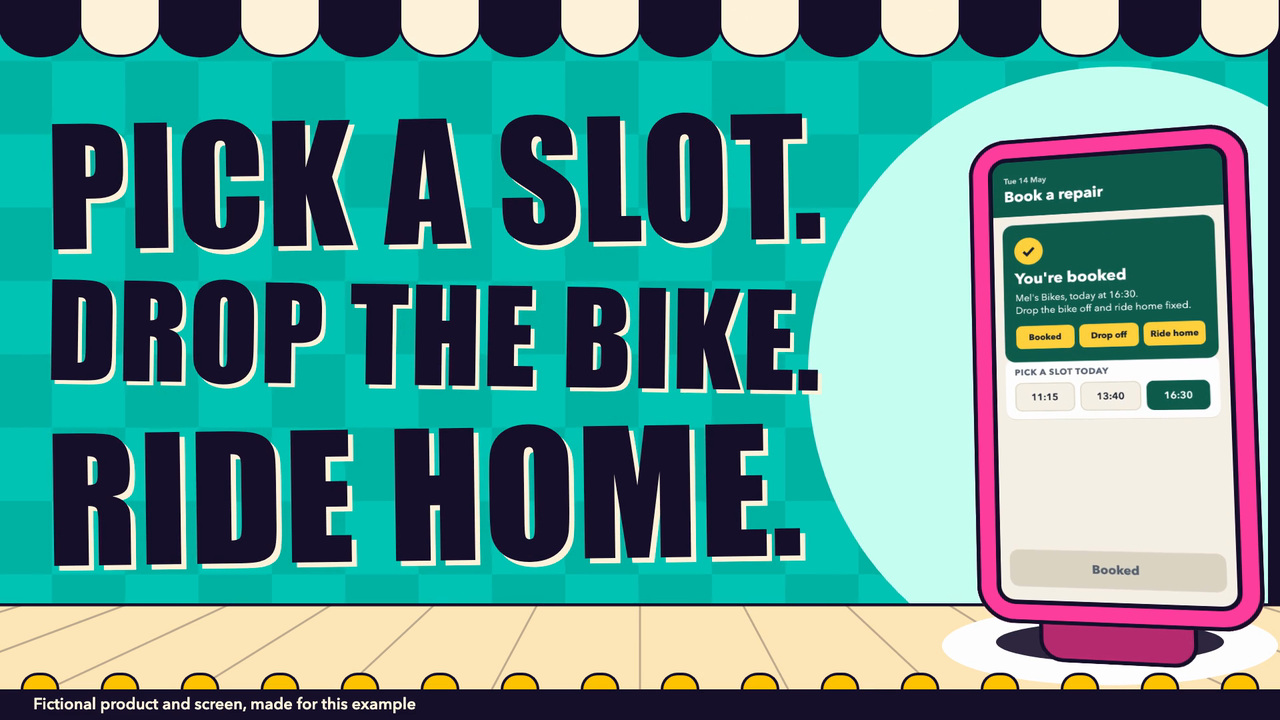
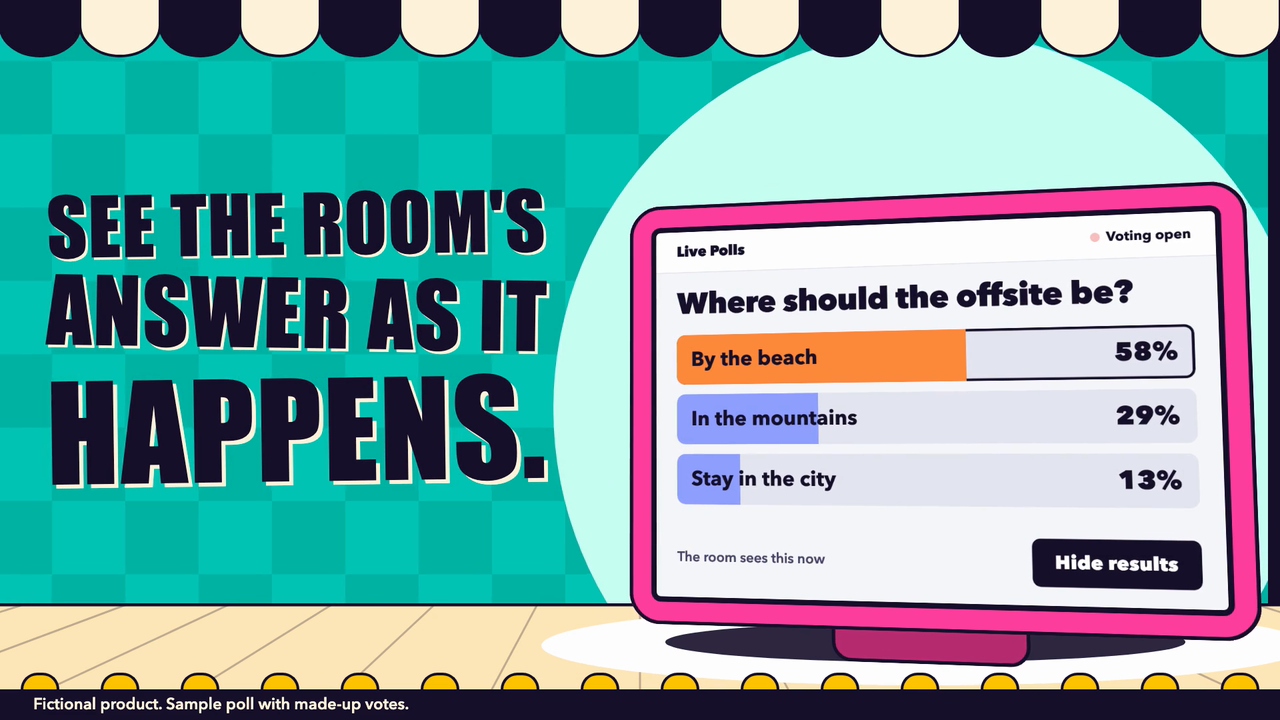
One test run on a fictional brief. Letterforms can differ on systems without the same fonts.
Makes a 16 to 20 second silent product launch film that stages a real product screen on a chunky coloured device on a bright theatre stage, with painted flats swinging in, a hard spotlight, huge poster type and one real cursor action that sets the real screen playing, ending on the name and call to action. Deterministic engine, CSS perspective only, 1920x1080 30 fps H.264, optional 1:1 and 9:16. Use when someone wants a launch film, feature teaser or product announcement video that shows their actual screen, or asks for this style by name.
What it must pass before delivery
node scripts/check.mjs film.mp4exits 0 for every format you ship, without--short.- You viewed
film.mp4.sheet.jpgfor every format and saw every scene. - You viewed
target-crop.png, and the box sits on the control. - The cursor presses a control that exists, and the after-state is what the product really does.
- The screen plays after the click, or your note says why it is a still swap.
- You looked at each item under "What check.mjs cannot see" and viewed
--frame press+30. - Every line of copy is either in
evidenceor listed as inferred. There are no invented numbers, customers or features. - One language in the film. A fictional screen says so in
copy.notice. - Nothing is still running: no browser, no ffmpeg.
Read the full SKILL.md
---
name: colour-stage
description: Makes a 16 to 20 second silent product launch film that stages a real product screen on a chunky coloured device on a bright theatre stage, with painted flats swinging in, a hard spotlight, huge poster type and one real cursor action that sets the real screen playing, ending on the name and call to action. Deterministic engine, CSS perspective only, 1920x1080 30 fps H.264, optional 1:1 and 9:16. Use when someone wants a launch film, feature teaser or product announcement video that shows their actual screen, or asks for this style by name.
version: 1.0.0
---

# Colour Stage

The look lives in `assets/engine.html`. You never edit it. You capture the product, write a few poster lines into a JSON timeline, and render. `scripts/check.mjs` checks the real film.

Read `references/style.md` for tokens, timings and palettes. Every path below is relative to this skill's folder unless it is your own working file.

## Inputs to ask for

Ask once, in one message, for anything the brief does not already give.

Required:
1. Product name.
2. The screen: a URL you can open, an HTML file, or a screenshot.
3. The one action to show: a control that really exists and visibly does something. Prefer one whose result moves: numbers counting, a list filling, a chart growing.
4. The one claim, in the user's words or from the product itself.

Optional: the moment or problem for the opening, the real link, language (English or Chinese, one per film), extra formats (1:1, 9:16), brand colour for the bumper, length from 16 to 20 seconds.

## Requirements

- Node 18 or newer, and ffmpeg with ffprobe on the PATH (or set `FFMPEG` and `FFPROBE`).
- Playwright for capture and render: `npm install playwright`, then `npx playwright install chromium`. If it lives elsewhere, set `NODE_PATH=/path/to/node_modules`. check.mjs needs no packages.
- Render time, measured on a 16 GB Apple silicon Mac: about 25 seconds for a full 1920x1080 film of 18 seconds, about 10 seconds for a half-size short test, about 2 seconds for a preflight, and about 10 seconds for a capture with 90 play frames. Allow several times that on a slow machine.
- Run one render at a time, prefixed with `nice -n 10`. Rendering is heavy, so iterate with preflight and `--short --scale 0.5`.
- The film is silent. This pack makes no audio.

## Steps

1. **Restate the facts.** Write down what the user told you and what you can see in the product. Pick one action with a visible result.
2. **Capture the screen.** Use the first of these that applies:
   - URL or HTML: `nice -n 10 node scripts/capture.mjs --url http://localhost:3000 --selector "button.save" --size 1440x900 --out screens` (or `--html file.html`). It measures the control, proves it can be clicked at its centre, clicks it, and saves `before.png`, `after.png` and `capture.json`.
   - Screenshot: open the image and read the control's box in image pixels, then `nice -n 10 node scripts/capture.mjs --image shot.png --after shot2.png --rect 1040,620,220,64 --out screens`. Add `--pixel-ratio 2` for a retina screenshot.
   - Then view `screens/target-crop.png`. The magenta box must sit on the control.
   - Add `--kind fictional` for a made-up product. Replace the whole `screen` block of the timeline with the block it prints.
   - **Make the screen play** (see below). A film whose screen is two stills announces a feature instead of showing it. check.mjs warns about this.
3. **Fill the timeline.** Copy `assets/timeline.template.json` to `timeline.json` beside your `screens` folder. Paste the `screen` block capture.mjs printed. Fill the fields in the table below. Replace every `REPLACE`.
4. **Check the copy:** `node scripts/check.mjs timeline.json`.
5. **Preflight each format you will ship:** `nice -n 10 node scripts/render.mjs --timeline timeline.json --format 16:9 --preflight`. It renders no video and runs the layout rules in about 2 seconds. Do what each failure says. If it says the screen is unreadable, paste the crop it prints.
6. **Short test:** `nice -n 10 node scripts/render.mjs --timeline timeline.json --out test.mp4 --short --scale 0.5`, then `node scripts/check.mjs test.mp4 --short`. A short test squeezes all five scenes into about 6 seconds. It is never a deliverable. To look at one moment: `nice -n 10 node scripts/render.mjs --timeline timeline.json --frame press+30 --png frame.png`.
7. **Render the film:** `nice -n 10 node scripts/render.mjs --timeline timeline.json --out film.mp4`. Add `--format 1:1 --out film-square.mp4` or `--format 9:16 --out film-vertical.mp4` for the other cuts, one after another.
8. **Check and look:** `node scripts/check.mjs film.mp4`. Keep `film.mp4.layout.json` beside the film: without it only the technical and motion rules run. View the contact sheet it writes, `film.mp4.sheet.jpg`, which holds real frames from the film, covering every scene. Rewrite copy if a line reads badly.

## Make the screen play

The film's payoff is the real screen moving after the click. Captured states are shown on the film's own clock, with `n` counting film frames from the press (negative before it). Use the first that applies, and add the flags to the capture.mjs command in step 2:

| You have | Flags | What happens |
|---|---|---|
| An HTML page you may edit, or a page that has the hook | `--play-before 150 --play-after 150` | The page defines `window.setScreenFrame(n)`, a pure function of `n` with no clock or random. It is called for each step and screenshotted; the real click happens at `n = 0`. |
| A page with its own animation after the click | `--play-ms 3000` | The real click, then the page's timers and CSS animations are advanced on a controlled clock and screenshotted. |
| Only screenshots | `--sequence s2.png,s3.png --hold 12` | Real captures shown as quick cuts after the press. Say in your note that they are cuts. |

Rules: show only states the real product has. The hook must end on the state a real user would see. Values in between may only interpolate towards real or stated values, so they must not imply a figure the product never showed. Do not add features to the page for the film. Bars and counters should settle about 60 to 90 frames after the press, while the claim is on screen. Play frames can be large and are working files: delete `screens/play/` after the final render and regenerate with capture.mjs when you need them. Thin brief: if the product has no moving result and you have one screenshot, leave `screen.play` as `null`, accept the warning, and say in your note that the film shows a still swap.

## Beats and frames

Preflight prints the beat table for your film. At 18 seconds: hook 0-89, reveal 90-164, action 165-284, press 276, claim 285-434, end 435-539. To view a moment use a name instead of adding up frames: `--frame hook`, `reveal`, `action`, `press`, `press+30`, `claim`, `end`, each with an optional offset. For a poster, render `--frame claim` or take that frame from the film: it has type, device and result together. Frame 0 is the bare first flat and spot, so it is a fair thumbnail but not a poster.

## Writing the hook

The hook is the first thing anyone reads. Write it as a poster, in up to 3 lines. In order of preference:
1. The moment or problem in the user's own words: `FLAT TYRE. / NO TIME.`
2. If the brief gives none, a question or heading already on the product's screen, word for word: `WHERE SHOULD / THE OFFSITE BE?` List it as inferred.
3. If there is neither, `HERE IT IS` or `就是它`.

Never make up a pain point. Balance the lines: a short word left alone on the last line is an orphan, and check.mjs refuses it. Move a word down or reword. Limits are 16 Latin or 9 CJK characters a line.

## Timeline fields

Latin and CJK limits count characters. Type is sized automatically; shorter lines are bigger.

| Field | Meaning | Limit | If the brief is thin |
|---|---|---|---|
| `lang` | Language of every line of type. | `en` or `zh` | Use the user's language. Translate nothing silently; make a second timeline for a second language. |
| `duration_s` | Film length. | Whole number, 16 to 20 | 18. |
| `palette` | Colour set. | `carnival`, `seaside`, `orchard` | `carnival`. |
| `bumper` | Device colour, usually the brand colour. | `#RRGGBB` or `null` | `null`. |
| `product.name` | The name on the end card, in its own case. | 40 Latin or 20 CJK | Use the name on the product itself. If there is none, stop and ask; never invent one. |
| `product.name_lines` | Where to break a long name, as an array. It must spell the name exactly. | 3 lines | `null` for Latin. For a Chinese name over 8 characters, break it at a word. |
| `copy.hook` | Opening poster: see "Writing the hook". No orphan last line. | 1 to 3 lines; 16 Latin or 9 CJK each | Screen's own question or heading if there is one, else `["HERE IT IS"]` or `["就是它"]`. Never make up a pain point. |
| `copy.intro` | Beside the device: what the product is. | 1 to 2 lines; 16 Latin or 9 CJK each | `["THIS IS", "<NAME>"]` if the name fits, or the page's own heading. |
| `copy.action_label` | Names the one action. With two lines, the second always lands exactly on the press. Beside a tall or readable screen they stack; above a dense wide screen they may share a row, still as two beats. One line appears before the press, so prefer two. | 1 to 2 lines; 12 Latin or 7 CJK each | The label on the control, split: `["ONE", "TAP."]`, `["点一下", "就好"]`. |
| `copy.claim` | The one claim. Only what the screen shows or the user stated. Line 1 lands one beat (15 frames) after the press, as the next flat swings in and the screen plays. | 1 to 3 lines; 16 Latin or 9 CJK each | `["SEE IT WORK"]` or `["亲眼看它运行"]`. |
| `copy.cta` | What to do next. | 22 Latin or 12 CJK | `"See it for yourself"` or `"亲自看看"`. |
| `copy.link` | A real address the user gave you. | 34 characters or `null` | `null`. Never guess a domain. |
| `copy.notice` | Small line printed on the front apron throughout, always clear of the device. Required for a fictional screen, and it must say so. | 60 Latin or 30 CJK, or `null` | `null` for a real product. |
| `screen.kind` | `real`, or `fictional` for a made-up product. | | `real` only if it is the user's actual product. |
| `screen.before`, `after`, `capture` | Files from capture.mjs, relative to the timeline. Local files only. | png, jpg or webp | `after: null` if only one state exists. The film then shows a press with no result, so say so in your notes. |
| `screen.play` | Path to `play.json` from capture.mjs: the screen's real moving states. See "Make the screen play". | | `null` only if nothing can move, and say so. |
| `screen.width`, `height` | The screen's size in logical pixels. | | Paste from capture.mjs. |
| `screen.crop` | Part of the screen to show, in logical pixels. | Must contain the target | `null`, until the checker asks for one. |
| `screen.crop_by_format` | A crop for one format only: `{"9:16": {x, y, w, h}}`. | Must contain the target | `null`. |
| `screen.target` | The control's box; `source` is `selector` or `manual`. | Inside the screen | Paste from capture.mjs and do not edit it. |
| `screen.target.skip_pixel_check_reason` | Why a manual target has no visible edge, such as a plain text link. | Text | Leave it out, unless you viewed `target-crop.png` and the box is right. |
| `allow_latin` | Latin product terms allowed in a Chinese film, as an array. | | Leave it out. |
| `evidence.screen`, `action`, `claim` | Where you saw it: file, page or the user's exact words. Any number in the copy must appear here. | 10 characters or more | Quote the brief, or name the file you read. |

## When something is missing

- **Thin brief:** restate the user's facts, never invent, and list every line you inferred in your delivery message. Use the thin-brief column above. Those fallback lines pass the checker.
- **Nobody can answer:** proceed with the fallbacks and list your assumptions at the top of your message.
- **A different length:** the engine does 16 to 20 seconds and no other. For a shorter clip, trim the finished film yourself and tell the user that it no longer passes check.mjs. Do not stretch it.
- **No real link:** `copy.link: null` and the fallback CTA. Do not invent a domain.
- **No screen you can reach, such as behind a login:** ask for a screenshot. If there is none, do not fake one. A mock is only for an explicitly fictional example: `screen.kind: "fictional"`, with a notice.
- **A control that does nothing on screen:** choose another. capture.mjs warns when a click changes nothing.
- **A dense dashboard:** the checker will ask for a crop. Paste it. That is showing the real screen closer, which is honest.
- **A feature that is not built yet:** it cannot be in the film. Say so and show one that exists.
- **Choosing the first frame or a thumbnail:** use `--frame claim`, not frame 0.
- **Testing determinism:** render one frame twice with `--frame n --png` and compare with `shasum`. They match byte for byte. A frame decoded from the MP4 will not, because of encoding, and that is expected.
- **Report files:** only `film.mp4.layout.json` beside the final film matters. Preflight writes to the system temp folder, and short-test reports can be deleted with the test film.

## What check.mjs cannot see, so you must look

It reads the engine's layout data and the decoded film. It does not understand pictures. On the contact sheet and at `--frame press+30`, look for:
- Whether the film excites or merely lists a feature. Does the click visibly set something moving?
- Whether the moving states are honest: what the product truly does, with no number it never shows.
- Letters touching inside a line (a `?` tight against the letter before it).
- Screen content hidden by the cursor at the press, or a result the viewer cannot find on the screen.
- A close-up that crops away the part of the screen that matters.
- Whether the copy is true, and whether it sounds like a person.

## Deliverables

- `film.mp4`, 1920x1080, 30 fps, H.264, yuv420p, silent, 16 to 20 seconds.
- `film.mp4.layout.json` beside it, plus `film-square.mp4` and `film-vertical.mp4` if asked for.
- A short note: facts used, lines inferred, assumptions, the checker's result, the render time.

## Before delivering

- [ ] `node scripts/check.mjs film.mp4` exits 0 for every format you ship, without `--short`.
- [ ] You viewed `film.mp4.sheet.jpg` for every format and saw every scene.
- [ ] You viewed `target-crop.png`, and the box sits on the control.
- [ ] The cursor presses a control that exists, and the after-state is what the product really does.
- [ ] The screen plays after the click, or your note says why it is a still swap.
- [ ] You looked at each item under "What check.mjs cannot see" and viewed `--frame press+30`.
- [ ] Every line of copy is either in `evidence` or listed as inferred. There are no invented numbers, customers or features.
- [ ] One language in the film. A fictional screen says so in `copy.notice`.
- [ ] Nothing is still running: no browser, no ffmpeg.

## When not to use it

- A long demo or tutorial: this film shows one action.
- A sombre, luxury or medical subject that this loud circus palette would undercut.
- A product with no screen.
- Something with a narrator or music: this film is silent.
Used in these workflows
- Launch a product step 3
- Make a launch video step 3

