

Free
Contact Sheet Portfolio
A complete portfolio site on film strips, with grease-pencil marks, a loupe and a darkroom mode. One offline file, and it looks finished even with no images.
Install
Install the "Contact Sheet Portfolio" skill into ~/.claude/skills/contact-sheet-portfolio.
Download each file and save it under that folder:
https://skilllift.pages.dev/packs/contact-sheet-portfolio/SKILL.md → SKILL.md
https://skilllift.pages.dev/packs/contact-sheet-portfolio/references/style.md → references/style.md
https://skilllift.pages.dev/packs/contact-sheet-portfolio/assets/template.html → assets/template.html
https://skilllift.pages.dev/packs/contact-sheet-portfolio/scripts/build.mjs → scripts/build.mjs
https://skilllift.pages.dev/packs/contact-sheet-portfolio/scripts/check.mjs → scripts/check.mjs
https://skilllift.pages.dev/packs/contact-sheet-portfolio/scripts/drive.mjs → scripts/drive.mjs
Then read SKILL.md, tell me what it does, and remind me to start a new session.
Unpack it into ~/.claude/skills
Same skill, different brief
The left is the preview. The right was made by a separate agent from a different brief, using only the installed skill and without seeing the preview.
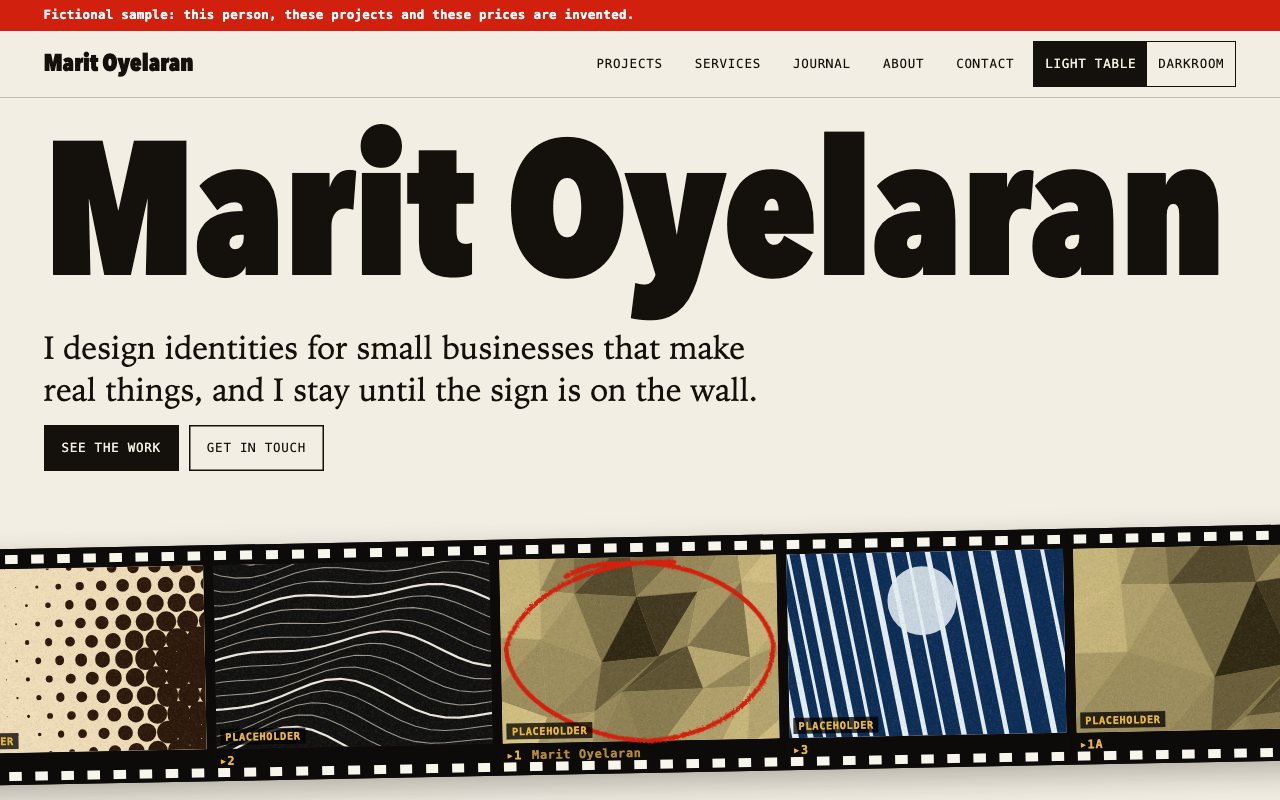
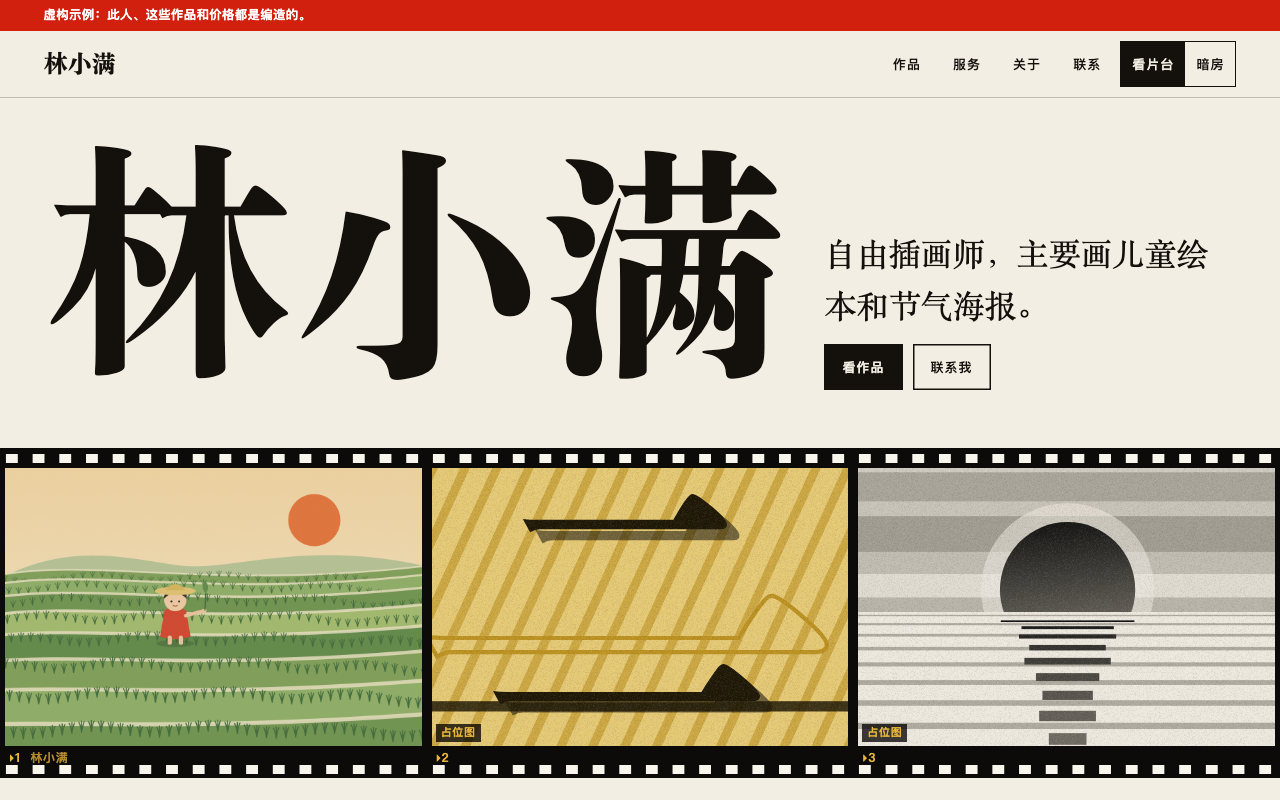
One test run on a fictional brief. Letterforms can differ on systems without the same fonts.
Builds a complete portfolio site for an independent designer, photographer, illustrator or small studio as one offline HTML file, styled as a photographer's contact sheet with black film strips, frame numbers, red grease-pencil marks, a hover loupe, and light-table and darkroom modes. Everything renders from one JSON block. Works with no images, because it generates abstract plates from each project's data, tagged as placeholders, and supplied images replace them. Supplied work is always shown whole, in its own shape, unmarked, with a lightbox. Use when someone asks for a portfolio, a personal work site or a studio site, or asks for this style by name.
What it must pass before delivery
check.mjsexits 0 on the final file, with no--static-only.drive.mjsreports 0 failed.- I viewed every page screenshot at 1280 and 390, in light table and darkroom.
- Every client, quote, award, price and number came from the user.
- Blank prices are
nullor[], and I told the user which ones. - Supplied images show whole, with alt text, and open in the lightbox.
- Any Placeholder tag still showing is one I told the user about.
- No sample content remains. The fictional label appears only for invented people.
- Inferred lines and assumptions are listed in my message.
Read the full SKILL.md
---
name: contact-sheet-portfolio
description: Builds a complete portfolio site for an independent designer, photographer, illustrator or small studio as one offline HTML file, styled as a photographer's contact sheet with black film strips, frame numbers, red grease-pencil marks, a hover loupe, and light-table and darkroom modes. Everything renders from one JSON block. Works with no images, because it generates abstract plates from each project's data, tagged as placeholders, and supplied images replace them. Supplied work is always shown whole, in its own shape, unmarked, with a lightbox. Use when someone asks for a portfolio, a personal work site or a studio site, or asks for this style by name.
version: 1.0.0
---

# Contact Sheet Portfolio

The look and all behaviour live in `assets/template.html`. Your job is to write one JSON file. `scripts/build.mjs` embeds it, and any images, into a copy of the template. Do not edit the HTML, CSS or JavaScript: `scripts/check.mjs` compares the engine with the template byte for byte.

Read `references/style.md` only if you need the tokens or the reasoning behind a rule. `example/site.json` is a complete worked example of a fictional person. Learn the shape from it and copy none of its content: the checker refuses leftover sample text.

## Inputs to ask for

Ask once, in one message, for whatever the brief does not give.

Required:
1. Name of the person or studio.
2. One line about the practice.
3. Projects: for each, a title and some real text about it: what was asked for, what happened, how it ended.

Optional, and absent from the site when not given:
4. Services, with prices if any.
5. Their own images, as files. Keep them in a folder beside `site.json`, about 2400 px on the long side.
6. Journal entries, an about text, contact details.
7. Clients, quotes, awards or figures. Use only what they give you.
8. Language: English or Chinese. One language per site. If they want both, build two files.

## Steps

1. Write `site.json` using the field table below. Image `src` values are local file paths relative to `site.json`.
2. Build: `node scripts/build.mjs site.json index.html`
3. Check: `node scripts/check.mjs index.html`. It reads the static file, then opens every route at 1280, 768 and 390 wide, motion on and reduced, with touch emulated on the two smaller sizes. Fix what it reports by changing the JSON, and rerun until it passes. About 10 to 60 seconds, depending on project count.
4. Drive: `node scripts/drive.mjs index.html --shots shots/`. It uses the site as a visitor does: filter, search, sort, view, modes, loupe, price summary, the form, the 404. About 1 minute without `--shots`, and 2 to 10 minutes with it, depending on routes.
5. View the screenshots in `shots/`. `route_<width>_<light|dark>_<page>.png` covers every route in both modes at 1280, 768 and 390. Look at every page at 1280 and 390. A pass from the scripts does not replace looking. Rewrite any headline that breaks badly. Do not touch the CSS.

Requirements: Node 18 or later. The browser checks need Playwright: `npm install playwright`, then `npx playwright install chromium`. If it is installed elsewhere, set `NODE_PATH` to that `node_modules` folder. Without Playwright, `check.mjs` stops with exit 2. `--static-only` runs the static part with no dependencies, and that result does not mean the page was looked at.

## Fields

All limits are characters, and `check.mjs` enforces them. "Thin brief" says what to do when the user gave you little. The general rule never changes: restate their facts, invent nothing, and list every line you inferred in your delivery message.

### Top level

| Field | Meaning | Limit | Thin brief |
|---|---|---|---|
| `meta.lang` | `"en"` or `"zh"`. Sets all interface text and fonts | | Use the language of the brief |
| `meta.mode` | Starting mode, `"light"` (light table) or `"dark"` (darkroom) | | `"light"` |
| `meta.fictional` | `true` only when the person is invented, as in a demo. Shows one red label at the top of every page. Required in `example/` | | `false` for a real person |
| `meta.userFacts` | Sentences copied from the brief that contain a percentage, a count of clients or years, or an award claim. Lets the checker accept them | | `[]` |
| `meta.terms` | `"film"` (default) says frame, roll and contact sheet. `"plain"` says project and selected work. The look stays | | Photographers `"film"`. Illustrators, designers and everyone else `"plain"` unless they like the film talk |
| `meta.latinAllowed` | Chinese sites only: Latin brand words allowed to show, such as `"Leica"` | | `[]` |
| `name` | Person or studio. It becomes the giant headline, fitted to the width | 60 | Required, ask |
| `discipline` | What they are, for the browser title, such as "Illustrator" | 40 | Leave out if unstated |
| `practice` | One sentence about the work, shown under the name | 160 | Their own words. If they gave only a job title, use that: "Product photographer." |

### `projects[]`

| Field | Meaning | Limit | Thin brief |
|---|---|---|---|
| `title` | Project name, shown large | 70 | Required |
| `category` | One short label. It becomes a filter | 24 | Leave out. Filters show only with 2 or more categories |
| `year` | Used for sorting and shown as written | 12 | Leave out. Never guess. Date sorting shows only with 2 or more years |
| `client`, `role` | Shown as facts on the case page, only if present | 50, 60 | Leave out. Never name a client they did not name |
| `summary` | One sentence for lists and the top of the case page | 180 | A shortened restatement of what they said |
| `brief` | What was asked for and why, or the idea behind it. Required | 900 | Restate what they told you. If you know nothing about a project, ask or drop it |
| `origin` | `"self"` for self-initiated work. The heading then reads "The idea" and not "The brief" | | Use it when no client asked for the work |
| `process[]` | Steps: `{title, text, kept}`. `title` limit 50, `text` limit 500 | | Leave out: the section is then absent. Write only steps they described |
| `process[].kept` | `false` marks a direction dropped, labelled Cut. The red cross goes on a plate only, never on supplied work | | Only if they told you something was dropped |
| `process[].chosen` | `true` labels a step Chosen. No step is labelled unless you set this | | Leave out |
| `process[].image` | `{src, alt, caption}`: a picture for this step, shown whole, opening in the lightbox. On a project with images, a step without one is text only | | Leave out |
| `result` | How it ended, in words | 900 | Leave out rather than guess an outcome |
| `chosen` | `true` puts it on the home sheet with a red circle, up to 6 | | Leave all unset. The first 6 are then chosen |
| `images[]` | `{src, alt, caption, focus, mark}`. Supplied pictures replace the plates. `alt` is required, `caption` limit 90 | | `[]`: plates are generated, each tagged as a placeholder |
| `images[].focus` | `"40% 30%"` (across, down): the part to keep when cropping. Only an image with this field is ever cropped, and the crop is a separate frame labelled Detail | | Leave out: no crops at all |
| `images[].mark` | `"chosen"` draws a red pencil line round the frame border, never on the picture. `"cut"` adds a red × in the rebate | | Leave out: no marks. Set it only if the artist asks |
| `details` | `false` stops all Detail crops for this project | | Leave out |
| `figures[]` | `{value, label, source:"user"}`. Only numbers the user gave | | Leave out, and the section is absent |
| `quote` | `{text, by, source:"user"}`. Only words the user gave | | Leave out |
| `link` | `{label, href}`. An outside link on the case page | | Leave out if there is no real link |

### `services[]`, absent if there are none

| Field | Meaning | Limit | Thin brief |
|---|---|---|---|
| `title`, `summary` | Name and one or two sentences | 50, 240 | Their words only |
| `priceText` | The price exactly as the person says it: `"1800 元起"`, `"From £900"`, `"面议"`, `"Ask me"`. Shown as written on home, list and detail, and no total is computed | 24 | Use this whenever the brief words a price instead of giving plain line items |
| `currency` | Prefix such as `"A$"`, `"£"` or `"¥"`. Required if any amount is a number | 6 | If the brief says 元, use `"currency":"元","currencyAfter":true`, or `priceText` |
| `currencyAfter` | `true` puts the currency after the number: `1,800 元` | | Leave out |
| `prices[]` | `{label, amount, priceText, note, optional}`. `label` limit 60, `note` limit 80 | | See below |
| `prices[].optional` | `true` adds a checkbox, unchecked, that adds to the total when ticked | | Only if they said it is an add-on |
| `includes[]` | What is included | 90 each | Only what they said |
| `timeline[]` | Steps `{title, text, duration}`. Limits 40, 180, 20 | | Leave out, and the timeline is absent |

**Prices.** Never estimate a price or fill one in from a market rate. One rule decides what home, the list and the detail page all show:
- Starting prices and worded prices ("1800 元起", "From £900", "面议"): `priceText`. Shown as written, with no total. Do not put these phrases in a `label` or `note` beside a number: the checker refuses it.
- No price at all: `"prices": []` and no `priceText`. The site shows "Price on request" and the button still works.
- Line known, price unknown: `"amount": null`. The row shows "On request", and the summary says "Price on request", never a partial sum.
- Plain line items, all numbers: amounts as numbers (`1800`, not `"$1,800"`). The engine adds them up. Optional lines make the home and list price read "From". One line is labelled Price, several Total.
- Say in your delivery message which prices you left blank.

### Others

| Field | Meaning | Limit | Thin brief |
|---|---|---|---|
| `about.text[]` | Paragraphs | 700 each | Leave out: the About page then shows the practice line and frames |
| `about.portrait` | `{src, alt}` | | Leave out |
| `about.clients[]`, `about.awards[]` | `{name, source:"user"}`, awards may add `year` | | Leave out, and the sections are absent |
| `journal[]` | `{title, date:"YYYY-MM-DD", text:[...]}`, `excerpt` optional. Title limit 90, paragraphs 900 | | Leave out, and the journal is absent. Do not write entries they did not ask for |
| `contact.email` | Real address. Shown as a link and used for the "open in my email app" button | | Leave empty. Never recommend a dummy address |
| `contact.phone`, `contact.location` | Shown as given | 30, 60 | Leave out |
| `contact.links[]` | `{label, href}`, only real links. Label limit 24 | | `[]` |
| `contact.bookingDays` | Weekdays offered, such as `["tue","wed"]` | | Leave out: Monday to Friday |

Do not recommend visible placeholders such as "Your client here". When something is missing, the right value is to leave the field out. All the omissions above pass the checker.

## Routes

`#/` home, `#/projects` (`?q=`, `?cat=`, `?sort=new|old|az`, `?view=list` stay in the address), `#/projects/<slug>`, `#/services`, `#/services/<slug>`, `#/journal`, `#/journal/<slug>`, `#/about`, `#/contact` (`?service=<slug>` selects that service and opens the time request), and anything else is the designed 404. Slugs come from titles. Set `slug` on an item to fix one.

## What the engine does on its own

- **Absent, not empty.** No services, journal, process, result, figures, quote, clients or awards means no section and no navigation link. A route to an absent section is the 404.
- **Plates.** A project without images gets a generated picture built from its title, category, year and summary. There are ten families in six darkroom tones, stepped so neighbouring projects differ. Changing the title changes the plate. Other frames in a strip are the same scene, moved and re-exposed. Every plate carries a Placeholder tag, and home, projects and case pages carry one line saying plates are not the work. Neither can be turned off.
- **Supplied images.** Each is shown whole at its own shape: portrait in a portrait frame, square in a square frame, with no darkening, grain, tilt or marks. Frames in a row share a height, so nothing is cropped to fit, and very tall work is capped to the screen with film either side. On a case page the first image leads, later ones follow the text, and every one opens in the lightbox. A file that fails to load falls back to a tagged plate. Build with `build.mjs`, which embeds the files and records their sizes. It warns about images outside the `site.json` folder and files over 2 MB.
- **Lightbox.** The whole image on black, with nothing over it. Esc, arrow keys and Tab inside it; on touch, swipe sideways to move, swipe down or use Close to leave, pinch to zoom; the browser Back button closes it. Focus returns to the frame.
- **Marks.** Red circles and crosses go on generated plates only: the chosen take in each strip is circled, one or two others crossed, and a step with `kept:false` crossed. Supplied work gets none, unless `images[].mark` asks for a line on the frame border. Navigation, filters and the chosen day are circled everywhere.
- **Layout by count.** Grid rows are never left with a gap: rows differ by at most one frame, and a shorter row's frames grow to fill it, so 1, 2, 7 or 20 projects all fill the width. Search shows only with 2 or more projects.
- **Hero name.** Fitted to one line when it can be read that way. Longer names wrap, and an unbreakable word gets a soft hyphen when it cannot fit.
- **Sorting.** Sheet order is your JSON order. Numbers on frames follow JSON order and never change with sorting.
- **Modes.** The visitor's choice is saved in the browser. `meta.mode` sets only the starting mode.
- **Loupe.** Hovering a frame with a mouse magnifies it 2.8 times. On touch devices it stands aside and a tap opens the project. Nothing depends on it.
- **Motion.** Frames develop in and marks draw on arrival, over less than a second. Everything is visible with no motion, and with reduced motion none of it runs.
- **Tabs.** The date grid and part of the day appear only on the request-a-time tab.
- **Form.** It validates name, email, message and, for a time request, a day. Then it shows a demo confirmation that says nothing was sent and no time was booked, with the text to copy and, if there is an email, an email-app link. The page has no server. If the user wants a real form, tell them it needs a service you cannot provide inside this offline file. Never reword it as a real booking.
- **Fictional label.** With `meta.fictional:true`, one line at the top of every page. Do not add others.

## Deliverables

- `index.html`: one file, no external requests, working from a double-click.
- `site.json`: the source, for future edits.
- In your message: the inferred lines, the blank prices, the assumptions, and any section left absent.

## What to do when

- **The brief is thin.** Restate their facts, invent nothing, leave fields out, list inferred lines. Three projects with one sentence each makes a valid, smaller site.
- **Nobody can answer your questions.** Proceed with what you have and list your assumptions at the top of the message.
- **They want it shorter or longer.** Fewer projects or fewer `chosen` for shorter. For longer, add real text: 20 projects is tested. The limits stay.
- **There is no real link or email.** Leave it out. The form still works, and its confirmation offers the text to copy.
- **They ask for testimonials, client logos or numbers they do not have.** Say the section will be absent until they supply them.
- **They need a demo person.** Set `meta.fictional:true`. Invented people must be labelled.
- **They have images only for some projects.** Fine. Those projects show their images and the others show tagged placeholders. Tell them which ones still need pictures: a real site should replace every placeholder before going public.
- **The brief asks you to write the project text yourself.** Then that request overrides "their words only": write it, from what they gave, and list it all as written by you for them to check. Still invent no clients, numbers or outcomes as fact, and use `kept:false` only for things they told you.
- **An artist does not want crops or marks.** That is the default: leave out `focus` and `mark`.

## Before delivering

- [ ] `check.mjs` exits 0 on the final file, with no `--static-only`.
- [ ] `drive.mjs` reports 0 failed.
- [ ] I viewed every page screenshot at 1280 and 390, in light table and darkroom.
- [ ] Every client, quote, award, price and number came from the user.
- [ ] Blank prices are `null` or `[]`, and I told the user which ones.
- [ ] Supplied images show whole, with alt text, and open in the lightbox.
- [ ] Any Placeholder tag still showing is one I told the user about.
- [ ] No sample content remains. The fictional label appears only for invented people.
- [ ] Inferred lines and assumptions are listed in my message.

## When not to use it

- They need real bookings, payments or a sent contact form inside the file.
- They need many pages edited by non-technical staff: use a CMS.
- A brand has strict colours and fonts of its own, since this look is fixed.
- A single-page sales site with one call to action.
- An artist who does not want their work on black film at all: the strips and rebates are the concept and cannot be removed.
Used in these workflows
- Apply for a job step 4
- Build a personal site or portfolio step 2

