

Free
Cut-Out Report
A quarterly content review with oversized blue headlines, tilted pills and paper-cut figures, charted from your real numbers.
Install
Install the "Cut-Out Report" skill into ~/.claude/skills/cut-out-report.
Download each file and save it under that folder:
https://skilllift.pages.dev/packs/cut-out-report/SKILL.md → SKILL.md
https://skilllift.pages.dev/packs/cut-out-report/references/style.md → references/style.md
https://skilllift.pages.dev/packs/cut-out-report/assets/template.html → assets/template.html
https://skilllift.pages.dev/packs/cut-out-report/assets/engine.js → assets/engine.js
https://skilllift.pages.dev/packs/cut-out-report/assets/figures.js → assets/figures.js
https://skilllift.pages.dev/packs/cut-out-report/assets/datacore.js → assets/datacore.js
https://skilllift.pages.dev/packs/cut-out-report/assets/pptx-browser.js → assets/pptx-browser.js
https://skilllift.pages.dev/packs/cut-out-report/assets/starter.json → assets/starter.json
https://skilllift.pages.dev/packs/cut-out-report/scripts/build.mjs → scripts/build.mjs
https://skilllift.pages.dev/packs/cut-out-report/scripts/check.mjs → scripts/check.mjs
https://skilllift.pages.dev/packs/cut-out-report/scripts/cdp.mjs → scripts/cdp.mjs
https://skilllift.pages.dev/packs/cut-out-report/scripts/png.mjs → scripts/png.mjs
https://skilllift.pages.dev/packs/cut-out-report/scripts/export.mjs → scripts/export.mjs
https://skilllift.pages.dev/packs/cut-out-report/scripts/pptx.mjs → scripts/pptx.mjs
https://skilllift.pages.dev/packs/cut-out-report/scripts/verify-pptx.mjs → scripts/verify-pptx.mjs
https://skilllift.pages.dev/packs/cut-out-report/scripts/pdf-pages.mjs → scripts/pdf-pages.mjs
https://skilllift.pages.dev/packs/cut-out-report/scripts/drive.mjs → scripts/drive.mjs
https://skilllift.pages.dev/packs/cut-out-report/scripts/cutout.mjs → scripts/cutout.mjs
https://skilllift.pages.dev/packs/cut-out-report/scripts/cutout.swift → scripts/cutout.swift
Then read SKILL.md, tell me what it does, and remind me to start a new session.
Unpack it into ~/.claude/skills
Same skill, different brief
The left is the preview. The right was made by a separate agent from a different brief, using only the installed skill and without seeing the preview.
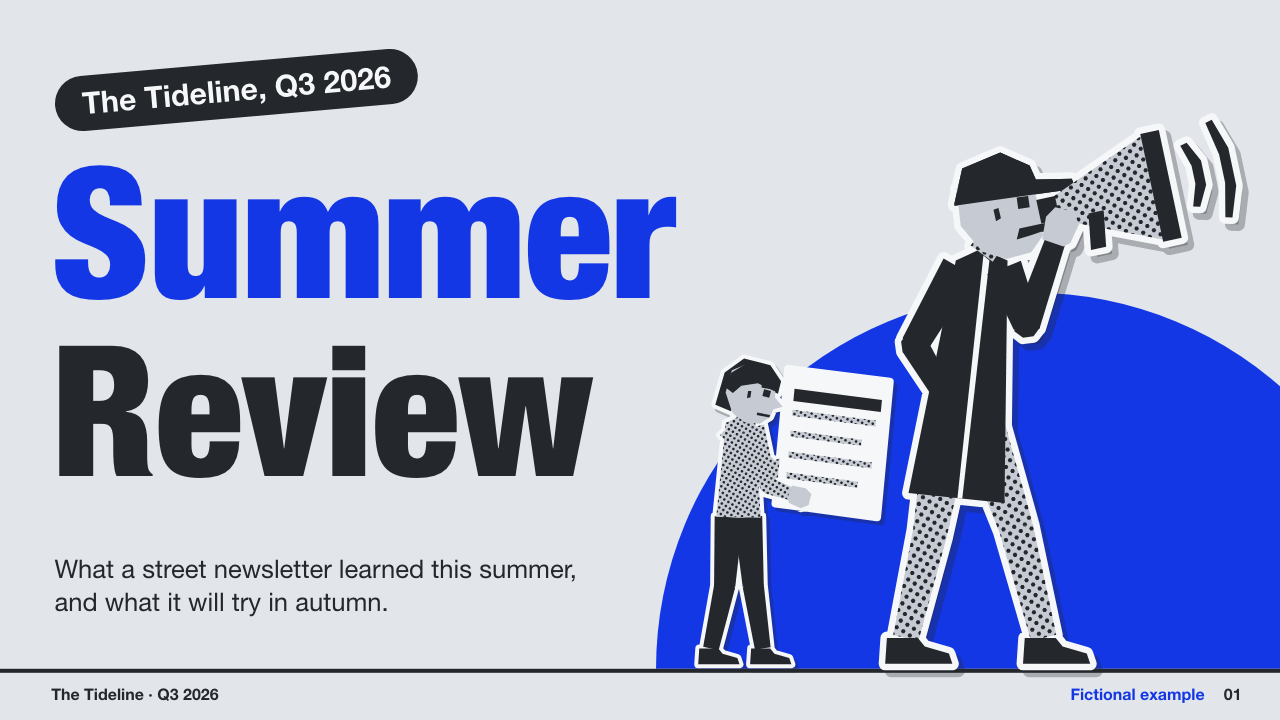

One test run on a fictional brief. Letterforms can differ on systems without the same fonts.
Builds an editable browser report deck for quarterly content reviews, audience insights and social-channel reports, from the user's real numbers. Oversized one-colour headlines with a second word in charcoal, cool grey pages, tilted pill labels and monochrome cut-out figures, with charts drawn from the data, sources on every number, a browser editing studio, and export to editable PowerPoint and PDF. Use when a marketer or small team asks for a quarterly report, content review, channel report or audience deck, or asks for this style by name.
What it must pass before delivery
check.mjs --all-presetsexits 0, and I passed on every "For review" line.- Every number traces to the user's data, and every chart and number shows its source.
- Inferred sentences are in
meta.inferredand listed in my reply. - Every number says what it measures and its unit, or the slide says that is unknown.
- Calculated numbers are in
data.derived. Claims the data disagrees with are indata.claimsand raised with the user. - Patterns with no real content were dropped or replaced by a named substitute. If the requested length could not be filled, I said so.
- I viewed every page at full size, as well as the PPTX and PDF images.
- I told the user what in the PPTX is editable and what is a picture.
- Any group photo has the user's confirmation that those people agreed.
- Text is in one language per version. A fictional example is labelled on each page.
Read the full SKILL.md
---
name: cut-out-report
description: Builds an editable browser report deck for quarterly content reviews, audience insights and social-channel reports, from the user's real numbers. Oversized one-colour headlines with a second word in charcoal, cool grey pages, tilted pill labels and monochrome cut-out figures, with charts drawn from the data, sources on every number, a browser editing studio, and export to editable PowerPoint and PDF. Use when a marketer or small team asks for a quarterly report, content review, channel report or audience deck, or asks for this style by name.
version: 1.0.0
---

# Cut-Out Report

The look lives in `assets/`. You write one JSON file; `scripts/build.mjs` makes one self-contained HTML deck. Do not edit the CSS, the engine or the figures. `scripts/check.mjs` compares them with the originals and fails if they changed.

Exact tokens and layouts are in `references/style.md`.

## Inputs to ask for

Ask once, in one message, for whatever the brief does not give.

1. The real numbers, as CSV or JSON, and where each came from (the source name is printed on the page).
2. The organisation and the period.
3. What happened: what worked, what did not, and why, in the user's words.
4. What they will do next: each step with an owner and a date.
5. Optional: team names and roles. Team photos, only if the user supplies them.
6. Optional: colour preset, language (one per version), page count.

## Steps

1. Copy `assets/starter.json` to a working folder as `content.json`. Put any CSV files beside it.
2. Fill it, using the field tables below. Fill `meta.lang` and write every word in that one language.
3. Build: `node scripts/build.mjs content.json -o deck.html`
4. Check: `node scripts/check.mjs deck.html --all-presets`. Fix everything it reports by changing the words or the page choice, then rerun. Exit 0 is required. Read the "For review" lines and pass them on to the user. A nine-page deck takes about a minute, and the browser is headless.
5. Look at every page. For each page: `deck.html?bare=1&nodraft=1#N` at 1600 by 900. Rewrite what reads badly. Passing the checker is not the end; if a page is dull, change the figure, the page order or the words.
6. If interactions were changed in any way, or on request, drive it: `npm install playwright`, `npx playwright install chromium`, then `NODE_PATH=$(npm root) node scripts/drive.mjs deck.html`. It takes about four minutes. Playwright is needed only for this step.
7. Export: `node scripts/export.mjs deck.html --pptx deck.pptx --pdf deck.pdf`, about 10 seconds.
8. Verify the exports and view every image:
   - `node scripts/verify-pptx.mjs deck.pptx --deck deck.html --expect N --render ppt-pages/` (validates parts and counts; on a Mac draws each slide with `qlmanage`)
   - `node scripts/pdf-pages.mjs deck.pdf pdf-pages/ --expect N` (on a Mac draws each page with `sips`, and fails on a repeated text layer)
   - Do not open Keynote or PowerPoint. Elsewhere, use `pdftoppm -png deck.pdf pdf-pages/p`.

## Top-level keys of content.json

| Key | Meaning |
|---|---|
| `meta` | What the deck is: language, title, organisation, period, colour, fictional label, inferred sentences. |
| `data` | The only place numbers come from: sources, metrics, tables, trends, audience groups, labels. |
| `figures` | `{ "photos": {} }`: the user's own cut-outs. Leave it empty to use the drawn figures. |
| `pages` | The pages, in order. Each has a `pattern`. |

### meta

| Field | Meaning | Limit | Thin-brief rule |
|---|---|---|---|
| `lang` | `en` or `zh-Hans` | one per version | Use the brief's language. |
| `title` | Browser tab and file title | 80 | Build it from organisation and period. |
| `org` | Name in the foot of each page | 30 | Never invent one. Write `To be confirmed`. |
| `period` | For example `Q3 2026` | 24 | Never invent one. Write `To be confirmed`. |
| `preset` | `cobalt`, `ultramarine`, `signal`, `bottle`, `violet`, `night` | one | `cobalt`. |
| `fictional` | `true` only for made-up demonstration data | boolean | Real data: `false`. |
| `fictionalLabel` | The words shown on every page if fictional | 24 | `Fictional example`. |
| `inferred` | Every sentence you inferred rather than were told | list | List them all. The checker and the Studio show them for review. |
| `words` | Names that must never break across lines, such as a brand or product. Common platform names and every table row are already protected. | list | Add any name in the brief. |

### data

Every number on every page must be here. A blank is `null` (or an empty CSV cell), shown as "No data", never as zero and never filled in.

Every number also says what it is. `label` is the metric name and `unitName` is its unit in words (`readers`, `visits`); `%` and currency in `unit` need no `unitName`. Both are printed on the page. If the brief does not say, write exactly `To be confirmed`: the slide prints "unit to be confirmed", and the checker lists it for review. A missing field fails.

| Field | Meaning | Rule |
|---|---|---|
| `sources` | `{ "key": { "name": "..." } }`, printed as "Source: ..." | Use the user's words. No source, no number: ask. |
| `metrics` | `[{ id, label, value, unit, unitName, prior, priorLabel, source, derived }]`. `prior` is optional. `unit` is `%`, or a currency prefix such as `$`. | A change is shown only when `prior` is a real, non-zero number. Or use `metricsCsv`: a CSV with those column names. |
| `channels` | `[{ id, source, label, unitName, columns: [{ key, label, unit, unitName, derivedFrom }], rows: [{ name, key: number or null }], total, time }]`, or `csv`: a file path relative to content.json, with a header row. The first column is the name, others are matched to `columns` by key. Prefer `csv`, so there is one copy of the numbers. Columns stay in the data's order. Set `time: true` if columns are periods not named as months. | Up to 10 rows, 4 columns, name 28 characters. `total` is optional; if stated it must equal the sum. |
| `trends` | `[{ id, source, label, unit, unitName, entity, points: [{ label, value }] }]`, or `csv` (`entity`: the channel it describes) | Up to 16 points. No negative values. Keep missing months as `null`. |
| `audience` | `[{ id, source, label, unit, unitName, segments: [{ label, value }], total, derivedFrom }]`, or `csv` (`derivedFrom`: `tableId:column`, when the parts come from a table) | Up to 6 segments, label 24 characters. |
| `derived` | `[{ value, label, op, from }]`: anything you worked out. `op` is `sum`, `diff`, `share` or `change`. `from` lists refs: `table:id:col` (its sum), `table:id:col:Row`, `trend:id`, `trend:id:Label`, `audience:id`, `audience:id:Label`, `metric:id`. | The checker recomputes each one and fails if wrong. The page marks it as calculated. Each is listed for review. |
| `claims` | `[{ text, series }]`: a statement from the user that the data disagrees with. | See "A claim the data contradicts". |
| `labels` | Exact strings with digits that are names or dates, not measurements, such as `by 15 Jan` | Each is listed for review. Never put a measurement here. |

A sentence may quote a value given in the data, or one declared in `data.derived`. Nothing else: the checker fails with the page and the number. The chart's own totals, shares and change pills are computed for you and labelled as such; to quote one in a sentence, declare it. A whole column worked out from others is `derivedFrom: ["jul", "aug"]`; its header says calculated. A metric worked out from data has `derived: { op, from }`.

### pages

Every page takes `pattern`, `name` (optional: the label in the overview and page list, when the pattern's name would claim more than the user said, such as `What happened` on a `worked` page), `title` (`["blue word", "charcoal word"]`, 16 Latin or 8 Chinese characters each; the second is optional) and `notes` (speaker notes, in spoken sentences, restating only the user's facts). Limits are Latin / Chinese. A page whose sentences quote numbers also needs `source`, a key or a list of keys in `data.sources`.

| `pattern` | Fields | Thin-brief rule |
|---|---|---|
| `cover` | `subtitle` 90/40, `pill` 28/14, `figures` up to 2 | Restate the brief in the subtitle. |
| `one` (the one number) | `metric` (an id), `say` 150/70, `figure` | Needs one real metric, or leave the page out. |
| `channels` (channel table) | `table`, `barColumn` (which column gets bars; it stays in its place), `barFirst` (only if asked: move it first), `say` 120/56, `figure` | Needs a real table, or leave the page out. |
| `trend` | `trend`, `highlight` (`last` or `peak`), `say` 130/60, `figure` | Describe only the shape you see. A trend needs at least two real points to be called one. |
| `worked` (what worked) | `items`: 1 to 3 of `{ pill 28/14, head 44/20, say 130/62 }`, `figure` | Use only what the user said. Fewer items is better than padding. |
| `missed` (what did not) | `items`: 1 to 3 of `{ head 44/20, say 130/62 }`, `figure` | Never invent a failure or a cause. |
| `audience` | `audience`, `say` 130/60, `figure` | Needs real groups of people, or leave the page out. |
| `share` (share of a total) | Same as `audience` | The stated substitute: parts of a total that are not audience groups, such as channels. Say so in `meta.inferred`. |
| `team` | `people`: 1 to 6 of `{ name 22/8, role 34/14, figure }`, `pill` | Only names the user gave. Otherwise leave the page out. |
| `next` (next steps) | `steps`: 1 to 4 of `{ head 60/28, who 40/20 }`, `figure` | Only commitments the user made. Never invent an owner or a target. No owner or date: `who` is exactly `To be confirmed`. |

`figure` is optional and is chosen for you, without repeating on neighbouring pages. To name one, or `photo:id`:

| Figure | Action | Suits |
|---|---|---|
| `announcer` | Shouts through a megaphone | cover, audience |
| `pointer` | Points up and across with a long arm | one |
| `carrier` | Carries a long plank on one shoulder | channels (wide: it needs room) |
| `leaper` | Star jump, arms flung up | worked only; tall and wide |
| `tumbler` | Trips, sheets flying | missed only; wide |
| `shrugger` | Palms up | missed, or an honest zero; wide, so it can cover text beside it |
| `spotter` | Looks through a telescope | audience, share |
| `reader` | Studies a large sheet | cover, channels, share |
| `flagger` | Plants a flag | next, on the top step |
| `strider` | Walks with an envelope | worked, next |
| `waver` | Waves, holds a mug | team, one |
| `folded` | Arms folded, narrow | trend, team, a bad number; the safest in tight space |
| `writer` | Sits on a crate, writing | trend, team |

## When

- **The brief is thin:** restate the user's facts, never invent, and list every inferred sentence in `meta.inferred`. Where a word is needed and unknown, write exactly `To be confirmed` (Chinese: `待确认`). It passes the checker and is listed for review. Numbers have no placeholder: leave out the page that needs them.
- **Nobody can answer:** proceed with the pages the facts support and list your assumptions in `meta.inferred` and in your reply.
- **A pattern has no real content:** drop it. Never fill a pattern with something it does not mean. The deck gets shorter, or you use a stated substitute: `share` for `audience` when parts of a total are real, or a second `one`, `channels` or `trend` over a different real number. Name each substitute in `meta.inferred`.
- **A different length:** one page is usually `one`. Five: `cover, one, channels, worked, next`. Nine is the full set when all nine have content; it is not a target. Longer: repeat patterns over different data; repeats mirror automatically, and the checker fails if two neighbours look the same. Split so each page says one thing.
- **A requested length cannot be honestly filled:** say so plainly, give the length the facts support, and name what would fill the rest. Do not pad.
- **A claim the data contradicts:** the user says "email did not grow" and the data shows 1,800 to 1,900. Do not repeat it silently and do not change it. Keep the user's words, show the numbers beside them, add `{ "text": "email did not grow", "series": "table:channels:Email" }` to `data.claims`, and raise it in your reply. The checker fails on an undeclared contradiction it can detect, and lists declared ones for review. It reads only clauses that name a table row or a trend's `entity` with a growth word, over time-based columns. Read every other claim yourself.
- **Open space:** a "For review" open-space line on a page with little content (one item, one step, a zero) is expected. Do not pad to remove it; check that it looks deliberate.
- **There is no real link:** this deck has no links. Do not add any.
- **Awkward data:** one huge value stays in true proportion and small bars stay small, with the number beside them. Do not truncate an axis, drop a row, or round to hide it. A zero is a zero, a blank is "No data".

## Figures and photos

With no photos, the drawn figures are used. They are stylised and clearly drawn, and the deck never generates realistic people.

Photos are used only if the user supplies them:

1. On macOS 14 or later: `node scripts/cutout.mjs photo.jpg person.png`. It runs Apple's Vision framework through `scripts/cutout.swift`, on the device. First run compiles for a few seconds.
2. If it finds several subjects it writes nothing. Ask the user to confirm that everyone shown has agreed to appear. Only then rerun with `--group-agreed`.
3. Anywhere else, the script explains and stops. The route that works everywhere is a transparent PNG from a tool the user trusts: `node scripts/cutout.mjs --check-png their.png`.
4. Add it: `"figures": { "photos": { "ada": { "file": "person.png", "people": 1, "alt": "Ada, the editor" } } }` and use `"figure": "photo:ada"`. A group is `"people": 3, "consent": true`; the build refuses a group without it. The deck turns it monochrome and adds the paper edge.

## Deliverables

- `deck.html`: one file with no external requests. On a phone, the reader below the slide shows the page's words at a readable size and its chart as a real table. Arrow keys, Space, Home and End, swipe; O overview, N notes, F present, E edit, P print.
- The Studio (Edit): text on the page or in the panel, drawn figures or a transparent PNG, page order, colour presets, speaker notes. It warns about any number not in the data. It keeps a draft in the browser, and **Save** writes a new HTML file that reopens with all edits.
- `deck.pptx`: text, notes, blocks and bars are editable. Figures and decorations (the disc, the diagonal slab) are pictures. Tilted pills sit upright, because the exporter cannot rotate live text. Cards sit straight too. Tell the user this plainly. Headlines use Impact in PowerPoint, so they display on Mac and Windows. Line breaks depend on the viewer's fonts and may differ from the HTML, and a Chinese word can break there, because PowerPoint and Quick Look do their own wrapping. `qlmanage` is a preview, not PowerPoint.
- `deck.pdf`: one vector page per slide.

## Before delivering

- [ ] `check.mjs --all-presets` exits 0, and I passed on every "For review" line.
- [ ] Every number traces to the user's data, and every chart and number shows its source.
- [ ] Inferred sentences are in `meta.inferred` and listed in my reply.
- [ ] Every number says what it measures and its unit, or the slide says that is unknown.
- [ ] Calculated numbers are in `data.derived`. Claims the data disagrees with are in `data.claims` and raised with the user.
- [ ] Patterns with no real content were dropped or replaced by a named substitute. If the requested length could not be filled, I said so.
- [ ] I viewed every page at full size, as well as the PPTX and PDF images.
- [ ] I told the user what in the PPTX is editable and what is a picture.
- [ ] Any group photo has the user's confirmation that those people agreed.
- [ ] Text is in one language per version. A fictional example is labelled on each page.

## When not to use it

- A sober board or finance report: this look is loud.
- No numbers and no story to tell: ask first; do not make a deck of placeholders.
- A brand with a strict template: the look is fixed here.
- Negative values (profit and loss): bars from zero here cannot show them.

## Requirements

Node 18 or later. Any local Chrome, Chromium or Edge for `check.mjs` and `export.mjs` (it runs headless; set `CHROME_PATH` if it is not found). `drive.mjs` needs Playwright: `npm install playwright`, with `NODE_PATH` set if needed. macOS 14+ and the Swift command line tools for `cutout.mjs`; `qlmanage` and `sips` on a Mac for viewing exports. System fonts only, nothing embedded: Helvetica Neue Condensed Black with Impact as fallback, and PingFang SC with Noto Sans CJK and Microsoft YaHei as fallbacks.
Used in these workflows
- Make a report deck step 3

