

Free
Exploded Plate
A patent-office exploded-view poster of any object, drawn by script from an approved parts list, with labels, a parts table and blank rails for verified specs
Install
Install the "Exploded Plate" skill into ~/.claude/skills/exploded-plate.
Download each file and save it under that folder:
https://skilllift.pages.dev/packs/exploded-plate/SKILL.md → SKILL.md
https://skilllift.pages.dev/packs/exploded-plate/references/style.md → references/style.md
https://skilllift.pages.dev/packs/exploded-plate/assets/engine.mjs → assets/engine.mjs
https://skilllift.pages.dev/packs/exploded-plate/assets/spec.template.json → assets/spec.template.json
https://skilllift.pages.dev/packs/exploded-plate/scripts/render.mjs → scripts/render.mjs
https://skilllift.pages.dev/packs/exploded-plate/scripts/check.mjs → scripts/check.mjs
https://skilllift.pages.dev/packs/exploded-plate/scripts/parts-from-text.mjs → scripts/parts-from-text.mjs
https://skilllift.pages.dev/packs/exploded-plate/scripts/record.mjs → scripts/record.mjs
Then read SKILL.md, tell me what it does, and remind me to start a new session.
Unpack it into ~/.claude/skills
Same skill, different brief
The left is the preview. The right was made by a separate agent from a different brief, using only the installed skill and without seeing the preview.
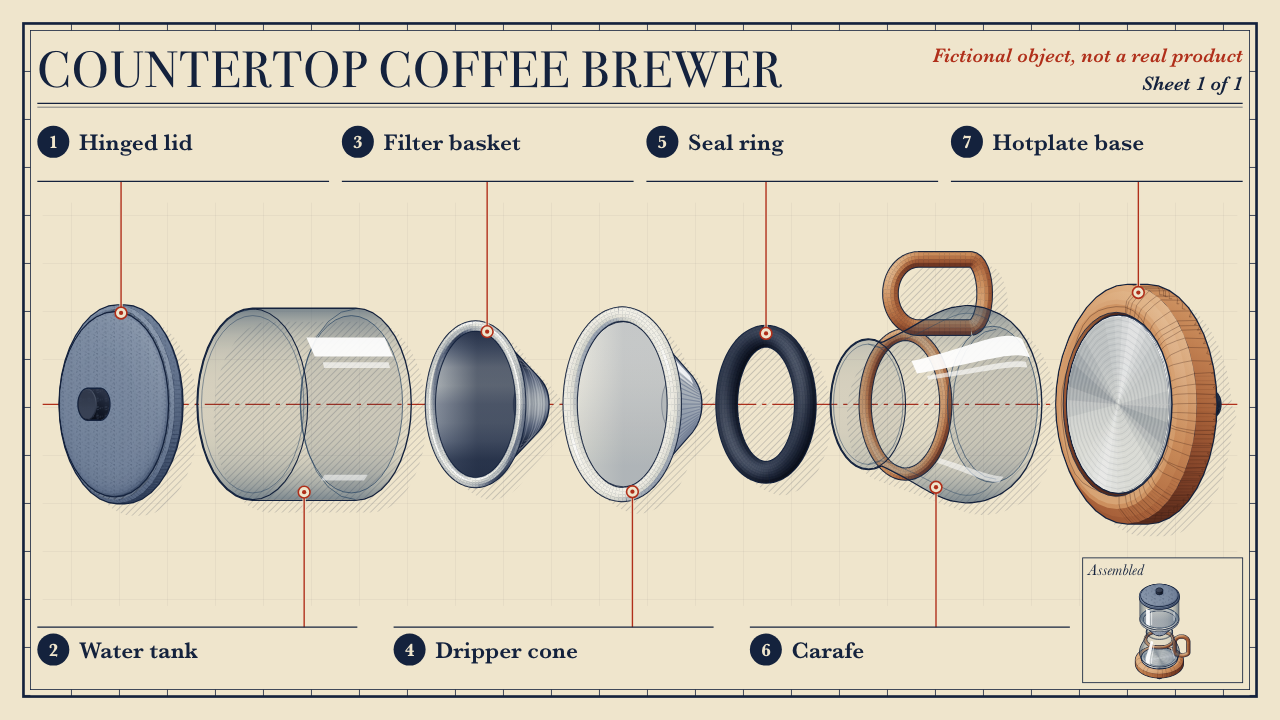
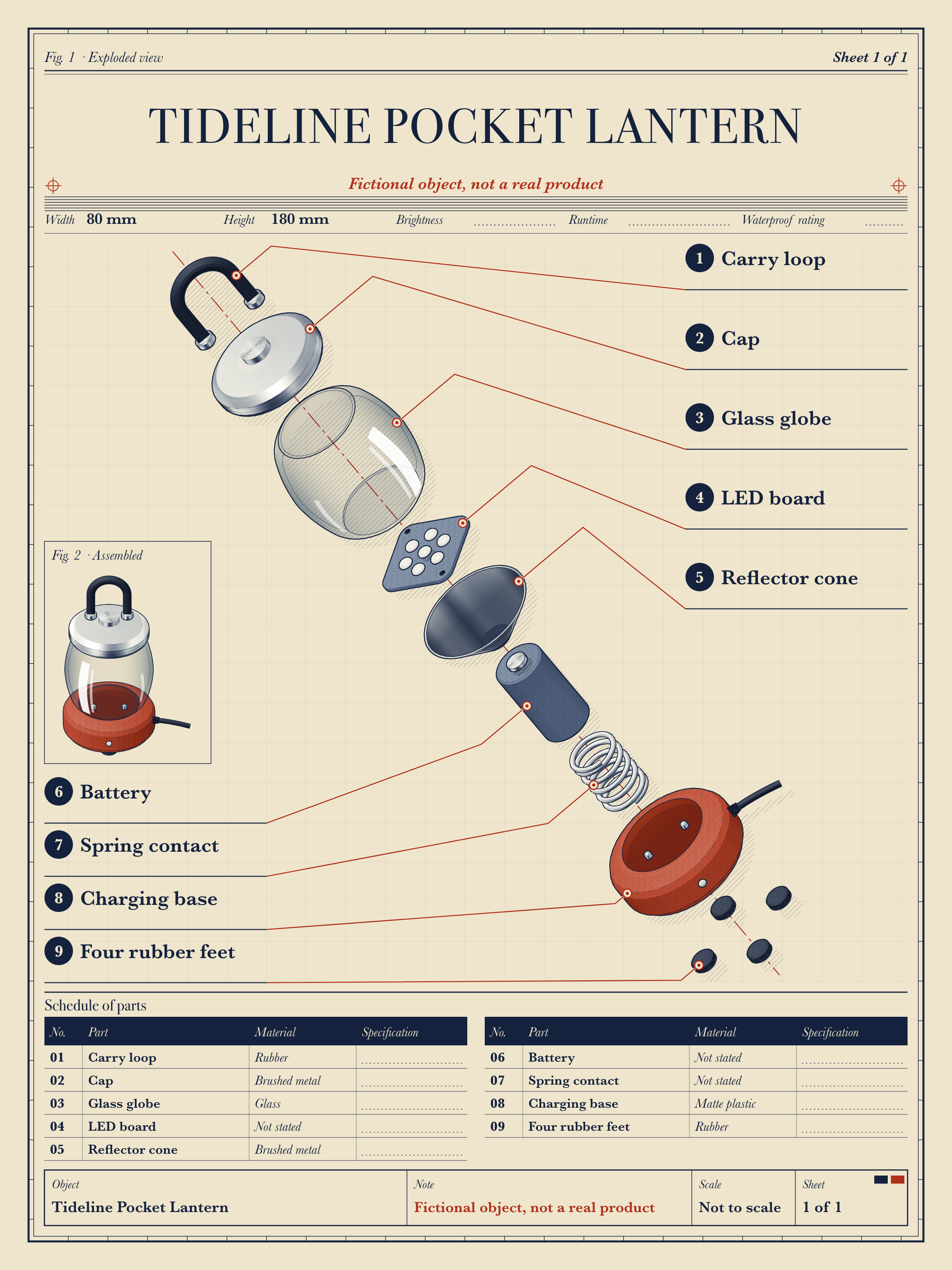
One test run on a fictional brief. Letterforms can differ on systems without the same fonts.
Draws a technical exploded-view poster of a product or object by script, with no image model, from an approved parts list. Parts separate along one diagonal axis in true isometric and fill the sheet, beside a small assembled figure, with leader lines, part numbers, a parts table, overall dimensions and named blank rails for specifications not yet verified, in the style of a Victorian patent plate crossed with a two-colour printer's chart. Outputs a 2400x3200 PNG, 1600x1600 and 2400x1350 versions of the same art, and editable SVGs. Use when someone asks for an exploded view, a parts diagram, a teardown poster or a "how it fits together" plate. Refuses third-party logos and recognisable trade dress.
What it must pass before delivery
check.mjsexits 0 on the final output, not a draft, run from its installed location--approvedand--factswere given the user's own lists- I judged the object for real brands and recognisable trade dress myself; a pass from the scripts does not settle that
- The dimensions and named rails appear at all three sizes, and the assembled figure looks like the object
- I viewed poster, square and wide at full size and at 25 percent
- Each part looks like what it is, or is a neutral block
- Rails with no verified figure are blank; every printed spec has a source
- Fictional objects are labelled at every size
- No third-party name, logo or trade dress
- I listed my inferred lines and assumptions for the user
Read the full SKILL.md
---
name: exploded-plate
description: Draws a technical exploded-view poster of a product or object by script, with no image model, from an approved parts list. Parts separate along one diagonal axis in true isometric and fill the sheet, beside a small assembled figure, with leader lines, part numbers, a parts table, overall dimensions and named blank rails for specifications not yet verified, in the style of a Victorian patent plate crossed with a two-colour printer's chart. Outputs a 2400x3200 PNG, 1600x1600 and 2400x1350 versions of the same art, and editable SVGs. Use when someone asks for an exploded view, a parts diagram, a teardown poster or a "how it fits together" plate. Refuses third-party logos and recognisable trade dress.
version: 1.1.0
---

# Exploded Plate

The look lives in `assets/engine.mjs`. You describe the object as data and never edit the engine. Copy `assets/spec.template.json`, fill it in, render, check, and look at the result.

Read `references/style.md` for exact tokens and layout.

## Refuse first

This skill does not draw third-party logos, brand names, or a shape that would be recognised as someone else's product. If asked, say so plainly: "I can't draw that brand's product or trade dress. I can draw an unbranded fictional object, or your own product if you own the rights."

**You must make this judgement yourself, every time.** `render.mjs` and `check.mjs` both refuse names on a short hashed list and trademark signs, but that list is only a backstop. No name list can be complete, and no list can recognise a distinctive shape. A pass from the scripts never clears a brand. Refuse any real brand or recognisable product you know of, on the list or not. If the list flags a word that plainly means something else here, such as a fruit in an apple corer, add that word to `notBrands`.

## Inputs to ask for

Ask once, in one message.

1. The parts list, in order from one end of the object to the other. Each part needs a label, shape, proportions and material.
2. Title.
3. Whether the object is fictional, the user's own, or licensed.
4. The approved figures and claims, word for word, if any: dimensions, ratings, capacities.
5. Which specifications should show as named blank rails, such as brightness or runtime.
6. Optional: language (`en` or `zh`), paper (`cream` or `blue`), sheet number.

## Fields

Every limit counts a Chinese character as two Latin characters. The engine rejects anything over the limit and says why.

| Field | Meaning | Limit | Thin brief |
|---|---|---|---|
| `title` | Object name on the sheet | 44 Latin or 22 Chinese | The name the user gave. If none, `Exploded view` |
| `subtitle` | One line under the title. Poster only, and no figures: the renderer refuses a digit here | 70 Latin or 34 Chinese | Leave it out |
| `approvedFacts` | Every figure and claim the user approved, word for word. `check.mjs` fails any figure or claim on the plate that is not here | a list | Leave it empty. Never add a fact the user did not give |
| `dimensions` | Overall size of the whole object, `[{"label":"Width","value":"80 mm"}]`. Prints at all three sizes | label 22 Latin or 11 Chinese, value 16 Latin or 8 Chinese | Leave it out unless supplied. Each value must be in `approvedFacts` |
| `rails` | Named blank rails for whole-object specs, `[{"label":"Brightness"}]`. Prints at all three sizes with a blank rule. Add `value` only when it is in `approvedFacts` | same limits; 8 entries together with `dimensions` | Name a rail for each spec the user mentioned without a figure. Do not invent others |
| `originality` | `fictional`, `own` or `licensed` | one of three | `fictional` if invented. Otherwise ask; if nobody answers, draw it as fictional and say so |
| `notice` | Label beside the title | 60 Latin or 30 Chinese | Leave it out. Fictional plates print a default at every size |
| `sheet` | Sheet number | 16 characters | Leave it out and `1 of 1` prints |
| `approved` | The user's list, label for label | 2 to 20 parts | Copy the list exactly as approved, lower case and bracketed hints included. Matching ignores case and a final bracket, and the sheet capitalises the first letter |
| `parts[].label` | Part name, same as in `approved` | 60 Latin or 30 Chinese | The user's word, unimproved. A bracket such as `carry loop (rubber)` is a hint: use it for material or shape, and it does not print |
| `parts[].short` | Shorter callout text | 36 Latin or 18 Chinese; needed when the label is longer | Cut words from the label, add none |
| `parts[].material` | What the user says it is | 30 Latin or 15 Chinese | Leave it out and `Not stated` prints. The drawn finish is not a claim |
| `parts[].qty` | Quantity. Must be named in the label or in `approvedFacts` | a number | Only if supplied. If the label already says it, as in `Four rubber feet`, leave it out and draw the four with `array` |
| `parts[].spec` | One verified specification of this part alone. Must be in `approvedFacts` | 40 Latin or 20 Chinese | Leave it out and a blank rail prints |
| `parts[].specSource` | Where the figure came from; never printed | required with `spec` | No source, no spec |
| `parts[].scale` | Enlarges a part on the sheet, keeping its own proportions | 0.25 to 4 | Leave it out. Parts far below the median grow by themselves, up to 2.5x |
| `parts[].shapes` | The primitives | at least one | One primitive matching the part's word, or a block |
| `parts[].internal` | `true` if the part is hidden inside the assembled object. It stays out of the assembled figure and adds no height | true or false | Set it for what is plainly inside, such as a battery. List it as an assumption |
| `parts[].assembled` | `{"at":[x,y,z]}`: where the part sits in the assembled figure, when simple stacking would be wrong, as with a lamp arm | coordinates | Leave it out: parts stack in list order |
| `notBrands` | Words the name list flagged that here plainly mean something else | a list | Leave it out |

## Primitives

Shapes go in `parts[].shapes`, listed from far or bottom to near or top. Part-local z runs along the explode axis, with z 0 at the part's base. Units are your own, used consistently.

Every shape takes `finish` (`metal`, `glass`, `plastic`, `rubber`, `ceramic`, `wood`), `at` `[x,y,z]`, `axis` `[x,y,z]` to tilt it, and `array` `{"n","radius","start"}` to repeat it around the axis. Matte plastic also takes `"tint":"spot"`. `cylinder` also takes `"ribs": n`.

| Type | Parameters |
|---|---|
| `cylinder` | `r`, `h`, `bevel` |
| `disc` | `r`, `h`, `bevel` |
| `cone` | `r`, `h`, `rTop` |
| `dome` | `r`, `h` |
| `tube` | `r`, `h`, `wall` (open top) |
| `shell` | `r` or `rBottom` and `rTop`, or `profile` `[[r,z],...]`; `h`, `wall`, `smooth` (open vessel) |
| `lathe` | `profile` `[[r,z],...]` bottom to top, `smooth` to curve through the points (any turned form) |
| `torus` | `R` ring radius, `r` tube radius. A seal or O-ring. For something to carry an object by, use `loop` |
| `loop` | `w`, `h`, `r` tube radius, `closed`, `feetFinish`: a carry loop or handle standing upright and facing the viewer. It cannot turn edge-on. Open by default, with two ferrules; `closed` for a handle ring |
| `base` | `r`, `h`, `well` seat radius, `depth`, `pins`, `indicator`, `cable`, `cableLength`: a dock or stand with foot groove, shoulder and recessed seat. Pins, lens and cable are off by default; add one only if the part has it |
| `spring` | `r`, `wire`, `h`, `turns`. Keep `wire` near a tenth of `r` and under `h / turns / 3`. Ends are closed and flat |
| `screw` | `r`, `h`, `headR`, `headH`, `pitch`, `head` (`pan`, `flat`, `hex`), `drive` (`cross`, `slot`) |
| `box` | `w`, `d`, `h`, `bevel`, `taper` |
| `roundedBox` | `w`, `d`, `h`, `corner`, `bevel`, `taper` |
| `plate` | `w`, `d`, `h`, `corner`, `holes` `[{"x","y","r"}]` |
| `block` | `w`, `d`, `h`: the labelled neutral block |

Compose them. A lid is a `disc`, a `dome` at `[0,0,h]`, and a small `cylinder` knob. See `example/brewer/spec.json` and `example/lamp/spec.json`.

**Axis.** Part-local z runs along the explode axis. The viewer looks from the `[1,1,1]` direction, so a flat ring with `axis` `[1,1,1]` faces the viewer and one with `axis` `[1,-1,0]` is edge-on, a dark slab. `check.mjs` fails rings that are close to edge-on.

**Detail versus added part.** You may add unlabelled detail to a named part when it helps the part read and claims nothing, such as mounting holes or a seam. Anything that has its own identity or function, a separate screw or a switch, is a part, and it needs the user's approval. List the detail you added in your handover.

**Finish versus material.** `material` is what the user said and prints in the table. `finish` is only how the part is drawn. When material is unstated, choose the finish the part most likely looks like, leave `material` out so the table says `Not stated`, and list your choice.

**Glass with a ring.** List a ring or handle before the glass shape it sits on, so it is seen through the glass.

**If a part cannot be made from primitives, use one `block` with the part's label and the true overall proportions.** The table marks it as a schematic block. Do not draw a near miss. Never use a block to skip work a primitive can do.

## Steps

1. Get the approved list. If it arrives as messy plain text, run `node scripts/parts-from-text.mjs parts.txt spec.json --title "..."`. It marks every guess with `_guess`. Read them all, correct them, and delete `_read_me` and every `_guess`; the renderer refuses an unreviewed draft. Ask the user to confirm order and shapes if you can.
2. Copy `assets/spec.template.json` to `spec.json` and delete `$slots`, or start from the draft. Fill in `approved` and `parts`.
3. Draft first: `node scripts/render.mjs spec.json out --draft`. Usually a few seconds for all three sizes.
4. Check the draft: `node scripts/check.mjs out --draft`. Fix what it reports, in the spec.
5. View `out/poster.png`, `out/square.png` and `out/wide.png` with your image viewer. Does each part look like what it is? If not, change its primitives or use a block.
6. Full render: `node scripts/render.mjs spec.json out`. Usually under 30 seconds. Render one at a time; do not run several at once.
7. Run `node scripts/check.mjs out --approved approved.txt --facts facts.txt`. `approved.txt` holds the user's labels and `facts.txt` the user's figures and claims, one per line. Target the folder render wrote, which holds the full-size files. It must exit 0. If you made a resized copy with the same name, add `--poster-png full-size.png`; a `poster-full.png` is found by itself.
8. View all three at full size and again at 25 percent. Zoom into the art on the poster. The checker cannot judge whether a part reads as what it is: only looking can. Cover the labels and ask.
9. Look at the assembled figure. Does it look like the object? If not, set `internal` or `assembled`.

Optional motion: `node scripts/record.mjs spec.json hover.mp4 --poster poster.png`, about two minutes.

After a hand edit to an SVG, run `node scripts/render.mjs spec.json out --raster-only`, then check again. Labels moved by hand fail the check, so change the spec instead.

## Deliverables

- `poster.png` 2400x3200 and `poster.svg`, editable: live text and named layers, with each part in its own group
- Every plate carries Fig. 2, a small assembled view drawn from the same primitives at true relative scale
- `square.png` 1600x1600 and `square.svg`
- `wide.png` 2400x1350 and `wide.svg`
- `spec.json`, the source

Square and wide are not hard crops, because a hard crop would cut parts in half. They reframe the same parts and finishes. Poster and square run the axis diagonally; wide runs it horizontally. `dimensions` and `rails` print at all three sizes. `subtitle` and the parts table print on the poster only, which is why neither may be the only place for a figure. If the user wants a literal crop, cut it from `poster.png` and tell them which parts it loses.

## When things are missing

- **Thin brief.** Restate the user's facts. Do not invent parts, materials or figures. Give the user a list of every line you inferred, including any shape or proportion you chose.
- **Nobody can answer.** Proceed, draw guessed parts plainly, leave `material` and `spec` out, and list your assumptions in the handover.
- **A figure with no approval.** Leave it off the plate and name a blank rail for it. Do not put it in `approvedFacts` to get past the check.
- **No proportions.** Pick plain ones from the part's word and list them as assumptions. The sheet says not to scale.
- **Different length.** The engine takes 2 to 20 parts. Over 20, split the object across sheets with `sheet` numbers.
- **A real link.** Plates carry no links. Put any link in your message.
- **Crowded plate.** If the checker reports a tiny part, set that part's `scale`. If it reports crowding, use `short` labels.
- **Mixed language.** Keep each plate in one language. Make a second spec for a second language.

## Before delivering

- [ ] `check.mjs` exits 0 on the final output, not a draft, run from its installed location
- [ ] `--approved` and `--facts` were given the user's own lists
- [ ] I judged the object for real brands and recognisable trade dress myself; a pass from the scripts does not settle that
- [ ] The dimensions and named rails appear at all three sizes, and the assembled figure looks like the object
- [ ] I viewed poster, square and wide at full size and at 25 percent
- [ ] Each part looks like what it is, or is a neutral block
- [ ] Rails with no verified figure are blank; every printed spec has a source
- [ ] Fictional objects are labelled at every size
- [ ] No third-party name, logo or trade dress
- [ ] I listed my inferred lines and assumptions for the user

## When not to use it

- Photographic or rendered product shots
- Exact engineering drawings with tolerances, sections or dimensions: this is an illustrative plate, marked not to scale
- Organic subjects that primitives cannot describe, such as animals or the human body
- Anything about another company's product

## Requirements

- Node.js 22 or later. `check.mjs` and `parts-from-text.mjs` need nothing else.
- Playwright for `render.mjs` and `record.mjs`: `npm install playwright`, then `npx playwright install chromium`. If it is installed elsewhere, set `NODE_PATH` to that `node_modules` folder.
- ffmpeg for `record.mjs` only. Set `FFMPEG=/path/to/ffmpeg` if it is not on your PATH.
- No image model and no network. Rendering runs one browser and closes it. Iterate with `--draft`, render one plate at a time, and stop only processes you started, by process ID.
Used in these workflows
- Open an online shop step 4
- Explain a concept step 3

