

Free
High Cirrus
A calm explainer deck on luminous, code-painted skies, with glass cards, an editing studio and an editable PowerPoint export.
Install
Install the "High Cirrus" skill into ~/.claude/skills/high-cirrus-deck.
Download each file and save it under that folder:
https://skilllift.pages.dev/packs/high-cirrus-deck/SKILL.md → SKILL.md
https://skilllift.pages.dev/packs/high-cirrus-deck/references/style.md → references/style.md
https://skilllift.pages.dev/packs/high-cirrus-deck/assets/template.html → assets/template.html
https://skilllift.pages.dev/packs/high-cirrus-deck/assets/engine.js → assets/engine.js
https://skilllift.pages.dev/packs/high-cirrus-deck/assets/pptx-browser.js → assets/pptx-browser.js
https://skilllift.pages.dev/packs/high-cirrus-deck/scripts/build.mjs → scripts/build.mjs
https://skilllift.pages.dev/packs/high-cirrus-deck/scripts/check.mjs → scripts/check.mjs
https://skilllift.pages.dev/packs/high-cirrus-deck/scripts/cdp.mjs → scripts/cdp.mjs
https://skilllift.pages.dev/packs/high-cirrus-deck/scripts/drive.mjs → scripts/drive.mjs
https://skilllift.pages.dev/packs/high-cirrus-deck/scripts/export.mjs → scripts/export.mjs
https://skilllift.pages.dev/packs/high-cirrus-deck/scripts/jpeg.mjs → scripts/jpeg.mjs
https://skilllift.pages.dev/packs/high-cirrus-deck/scripts/layouts.mjs → scripts/layouts.mjs
https://skilllift.pages.dev/packs/high-cirrus-deck/scripts/pdf-pages.mjs → scripts/pdf-pages.mjs
https://skilllift.pages.dev/packs/high-cirrus-deck/scripts/pptx.mjs → scripts/pptx.mjs
https://skilllift.pages.dev/packs/high-cirrus-deck/scripts/sky.mjs → scripts/sky.mjs
https://skilllift.pages.dev/packs/high-cirrus-deck/scripts/verify-pptx.mjs → scripts/verify-pptx.mjs
Then read SKILL.md, tell me what it does, and remind me to start a new session.
Unpack it into ~/.claude/skills
Same skill, different brief
The left is the preview. The right was made by a separate agent from a different brief, using only the installed skill and without seeing the preview.
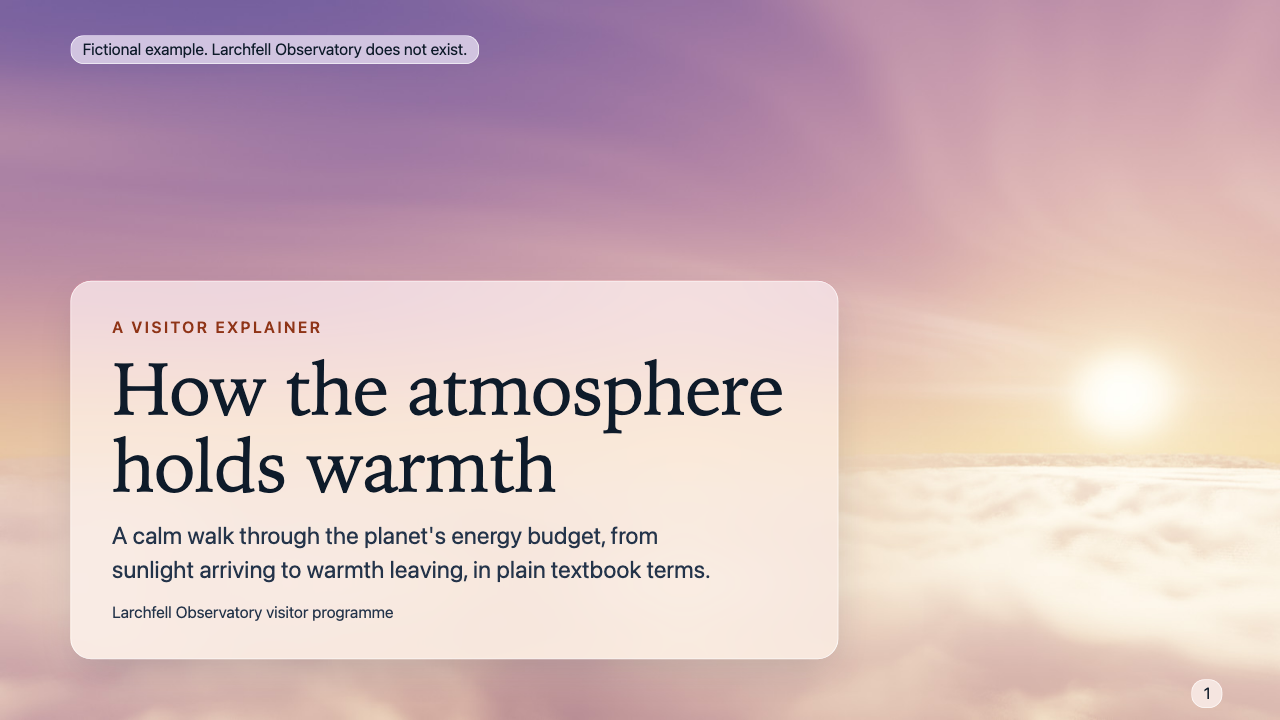
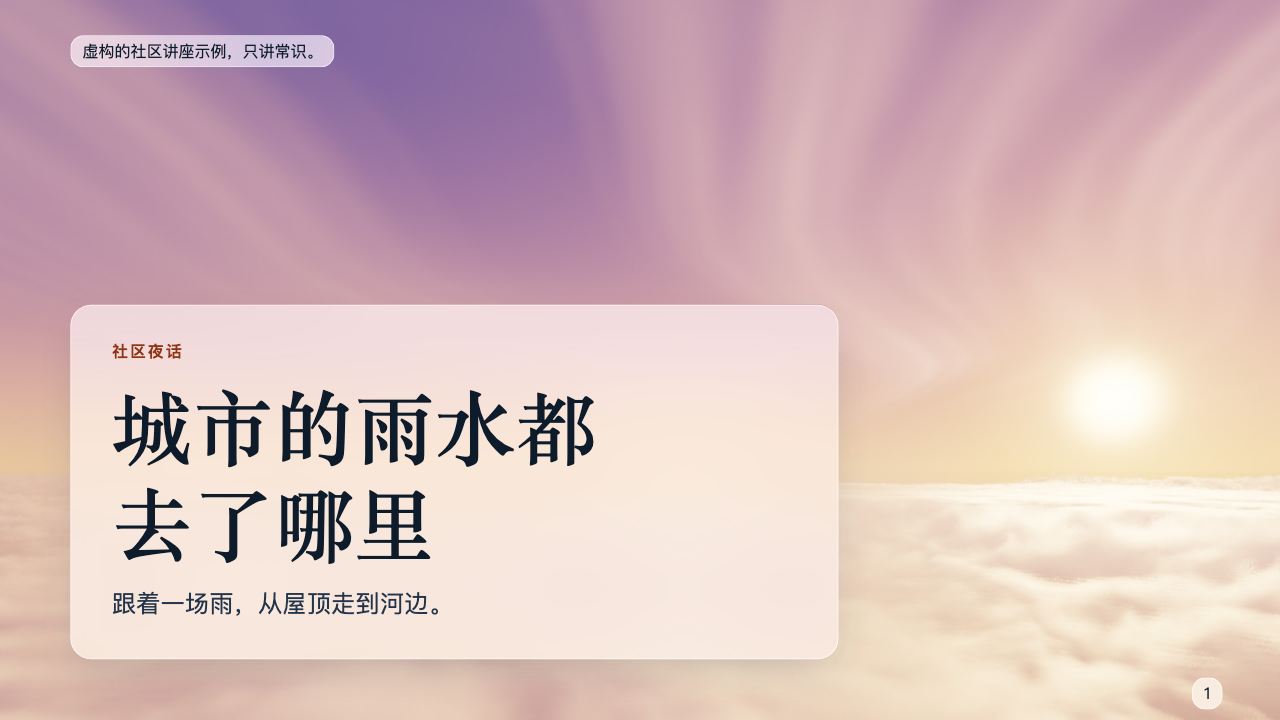
One test run on a fictional brief. Letterforms can differ on systems without the same fonts.
Builds a browser presentation of any length for explaining a complex subject calmly, on luminous code-painted skies with translucent glass cards. It has page navigation, overview, speaker notes, print, a built-in editing studio, and exports to an editable PowerPoint file and a PDF. Use when someone needs an explainer deck, teaching slides, a public talk or a briefing, and wants it to feel serene and atmospheric, or asks for this style by name.
What it must pass before delivery
node scripts/check.mjs deck.htmlprints PASS, including the render part (not--static).- I viewed every slide at 1280 and at 390 wide, in real screenshots, and every PDF page through
pdf-pages.mjsif a PDF is delivered. - If the brief had no facts, I said all text is inferred and flagged the factual sentences for review.
- No fact, number, name or result is invented; inferred lines are listed for the user.
- A fictional deck says so in
fictionalLabel, and nowhere else on the slides. - Every slide has speaker notes.
- If exported:
verify-pptx.mjspasses, I viewed its thumbnails, and I told the user what is editable and what is a picture. - If I could not open the PowerPoint file in PowerPoint itself, I said so.
Read the full SKILL.md
---
name: high-cirrus-deck
description: Builds a browser presentation of any length for explaining a complex subject calmly, on luminous code-painted skies with translucent glass cards. It has page navigation, overview, speaker notes, print, a built-in editing studio, and exports to an editable PowerPoint file and a PDF. Use when someone needs an explainer deck, teaching slides, a public talk or a briefing, and wants it to feel serene and atmospheric, or asks for this style by name.
version: 1.0.0
---

# High Cirrus

The look lives in the files. You write `content.json`; `scripts/build.mjs` paints a sky for each slide and produces one self-contained `deck.html`. Never edit its CSS or engine code. `scripts/check.mjs` judges the result the way a viewer would, and you are not finished until it passes.

Read `references/style.md` if you need exact tokens or the reasoning behind a rule.

## Inputs to ask for

Ask once, in one message, for whatever the brief does not already give.

Required:
1. The subject, and who the audience is.
2. The slide count they want. If none is given, use 12.
3. The facts to use, and where any numbers come from.
4. Whether the deck is real or a fictional example.

Optional:
5. Language: English or Chinese. One deck uses one language.
6. Photographs to use in place of skies.
7. Presenter name, and a theme: `arc` (default), `dawn`, `noon`, `storm` or `night`.

## What to do when

- **The brief is thin.** Restate the user's facts in calm sentences and invent nothing: no numbers, customers, quotes, results or credentials. Use fewer slides rather than padding. List every line you inferred in your delivery message.
- **The brief has no facts at all, only a subject.** General knowledge is allowed, but then every sentence is inferred by you. Keep to what a textbook would say, with no numbers or named sources. All layouts are open to you, and the rules below that say "only what the brief gives" apply to invented specifics, not to common knowledge. In the delivery message, say plainly that all of the text is inferred, list the sentences that carry a factual claim, and flag them for the user's review before anyone presents them.
- **Nobody can answer your questions.** Proceed with the most modest reading and list your assumptions in the delivery message.
- **The user wants a different length.** Any count works, including 1 and 40. To shorten, merge and keep the arc. To lengthen, add `section` slides and split ideas; never repeat a sentence on several slides. Do not put the same layout more than three times in a row.
- **There is no presenter or date.** Leave `byline` out. Do not write a placeholder.
- **A number has no source.** Remove it, or spell out a small count as a word. If the number came from the user's brief, set the slide's `source` to `From the brief`, which passes the checker.
- **Something does not fit.** The checker names the slide. Shorten the text or split the slide. Do not touch the CSS.

## Steps

1. Requirements: Node 18 or later and any Chrome, Chromium or Edge. If there is no browser: `npm install playwright && npx playwright install chromium`. `scripts/check.mjs` and `scripts/export.mjs` find the browser on their own. `scripts/drive.mjs` needs the Playwright package; set `NODE_PATH` to its `node_modules` if it is elsewhere.
2. Write `content.json` using the tables below. The file `example/content.json`, if present, shows the format; do not reuse its words.
3. Build: `node scripts/build.mjs content.json --out deck.html`. Time: about 3 s per dawn, noon or night slide and about 13 s per storm slide. A 12-slide deck takes about a minute and a 40-slide deck about four. Skies are cached, so a rebuild after text changes is immediate.
4. Check: `node scripts/check.mjs deck.html`. It takes seconds. Fix the content and rebuild until it prints PASS.
5. Look. Screenshot every slide at 1280 and at 390 wide and view each one yourself. The checker cannot judge meaning or taste. Then page through with motion on: each slide should fade in and its cards should rise and settle, with no text missing at the end. In a screenshot-only run you cannot judge motion by eye; `drive.mjs` confirms content appears with motion on and off, and you should say that you did not watch it.
6. Drive the features if you changed anything beyond text: `node scripts/drive.mjs deck.html --out drive-output/`.
7. Export: `node scripts/export.mjs deck.html --pptx deck.pptx --pdf deck.pdf`, then `node scripts/verify-pptx.mjs deck.pptx --expect-slides N --render thumbs/` and view the thumbnails. On a Mac, view every PDF page as Apple draws it: `node scripts/pdf-pages.mjs deck.pdf pages/`. On its own `sips` draws only page 1, so this script gives each page its own file first.

## Fields

**The file's shape.** `content.json` has exactly two top-level keys: `meta` (an object) and `slides` (an array, one entry per slide, in order).

```json
{
  "meta": { "title": "...", "lang": "en", "kind": "real" },
  "slides": [
    { "layout": "cover", "title": "...", "notes": "..." },
    { "layout": "figure", "title": "...", "diagram": { "type": "flow", "nodes": [ { "label": "...", "note": "..." } ] }, "notes": "..." }
  ]
}
```

Lengths are in units: a Chinese character counts 2.5, anything else counts 1. Every limit is enforced.

**meta**

| Field | Meaning | Limit | If the brief is thin |
|---|---|---|---|
| title | The deck's name; shown in the tab and file | 90 | Use the subject in plain words |
| lang | `en` or `zh` | | Match the brief's language |
| kind | `real`, or `fictional` for an invented example | | Ask. If nobody can answer, use `fictional` when you invented the subject matter |
| fictionalLabel | Required when fictional. Must contain "fictional" or "虚构". Shown only on the first and last slide; do not repeat it elsewhere | 110 | `Fictional example.` |
| presenter | Goes in file properties | 70 | Leave out |
| theme | `arc`, `dawn`, `noon`, `storm`, `night` | | `arc` |
| seed | Number that varies all the skies | | Leave out |

**Every slide**

| Field | Meaning | Limit | If the brief is thin |
|---|---|---|---|
| layout | One of the layouts below | | Pick by the job the slide does |
| notes | Speaker notes. Required. What the speaker says, in a spoken sentence. Numbers here need `source` too. The fictional-label rule does not limit notes; the speaker may say it | 900 | Say the slide's point aloud, using only the brief's facts |
| source | Small footnote. Required when the slide or its notes contain a numeral or percentage | 140 | `From the brief` for the user's own numbers. Otherwise remove the number |
| photo | Path to a JPEG or PNG, relative to content.json, replacing the sky | | Leave out |
| mood | `dawn`, `noon`, `storm` or `night`, overriding the theme | | Leave out |
| seed | Number for a different sky on this slide | | Leave out |

**Layouts and their fields** (brackets show how many items are allowed)

| Layout | Use it for | Fields and limits | If the brief is thin |
|---|---|---|---|
| cover | Opening | title 90 (required), eyebrow 44, subtitle 170, byline 70 | Title only is fine |
| section | Chapter turn | title 56 (required), lead 130 | Title only is fine |
| statement | One sentence to sit with | text 160 (required), aside 120 | The brief's main point, in its words |
| explain | One idea in parts | title 70, lead 170 (both required), points [2-4] {term 30, text 100} | Restate the facts as two points |
| figure | A diagram | title 80 (required), caption 170, diagram (below) | Use `flow` with what the user described; otherwise choose another layout |
| compare | Two things side by side | title 80, a and b {label 30, points [2-5] of 66} (all required), verdict 130 | Only compare what the brief compares. Leave out verdict |
| matrix | Two or three options on several aspects | title 80, columns [2-3] of 26, rows [2-5] {aspect 24, cells of 56, one per column}, note 110 | Avoid it unless the brief has the facts |
| sequence | A clear order of steps | title 80 (required), lead 120, steps [2-6] {label 28, text 76} | Use the user's own steps; do not invent extra |
| pillars | Two to four parallel ideas | title 80 (required), lead 130, items [2-4] {term 30, text 120} | As few items as the facts allow |
| myth | A common mistake and the correction | title 60, myth 110, fact 130 (all required), why 120 | Only when the brief gives the correction |
| image | A photograph with one caption | title 70 (required), caption 150 | Needs a photo, otherwise the sky fills the slide |
| closing | Take-aways | title 60 (required), points [1-3] of 80, next 100 | One point is enough. Leave out next |

**Diagrams.** Do not write SVG. Choose a primitive and give it text; the engine draws it for slide, phone, print and PowerPoint.

`"diagram": { "type": "flow", "nodes": [ { "label": "...", "note": "..." } ] }`

| Type | Shows | Nodes | label | note |
|---|---|---|---|---|
| flow | A chain with arrows | 2-6 | 24 | 40 |
| cycle | A closed loop | 3-6 | 26 | 44 |
| layers | Stacked bands, listed top first | 2-6 | 30 | 80 |
| spectrum | Positions along a line, in order, with no numbers | 2-6 | 24 | 40 |
| branch | One cause, several results. Also needs `"root": { "label", "note" }` | 2-5 | 30 | 64 |

`note` is optional. Thin brief: use labels only.

## Skies and photographs

Skies are computed from a seed with no image model and no image files. The default `arc` follows slide position: the first 20% of the deck is dawn, up to 58% noon, up to 84% storm edge, the rest night. Plan your order with this in mind, and set `mood` on any slide whose subject asks for it, for example `storm` on a slide about heavy rain. Each layout tells the renderer where its cards will sit, and the clouds flatten into soft haze there, so cards never land on a muddled region. Sun and moon are placed by position, wholly in frame, or left out if a card would cover them. The checker fails a sky that has lost its clouds, or a disc cut off by the frame; change that slide's `seed`.

A slide with `photo` uses that picture in place of its sky, and the glass adapts: light glass over bright pictures, dark glass over dim ones. Resize photographs to about 1920 px wide first. Only use pictures the user owns or supplied. If the checker reports a muddled background or low contrast, use a calmer picture or another layout.

### Optional: a sky from the user's own image model

The skill never needs this. Do it only if the user asks and their agent already has an image model; it uses their model and their quota. Generate a 16:9 picture with this prompt, save it as a JPEG, and set it as the slide's `photo`:

> Photograph from a high-altitude aircraft window: a sea of cloud below a luminous sky at [dawn / noon / the edge of a storm / night under a bright moon], thin cirrus high above, soft even light across the [left / right] two-thirds where text will sit, no aircraft, no people, no text, no logos.

Tell the user in the delivery message which slides use generated pictures. Then run the checker as usual.

## Deliverables

- `deck.html`: one file, no external requests, opens by double-click.
- `deck.pptx` and `deck.pdf`, if asked for.
- A delivery message listing assumptions and inferred lines.

**What the PowerPoint file is.** Text and speaker notes stay editable. Backgrounds, glass cards, rules and diagram lines are pictures, so they cannot be restyled in PowerPoint. Say this plainly to the user, along with these points:

- In the file's control: titles, and all text in a Chinese deck, carry the line breaks measured in the browser, so words stay whole and wrapping matches across viewers. The price is that those lines hold manual line breaks: remove them when rewriting a title. Other English text wraps freely inside a slightly wider box. Step and part numbers use Arial, whose figures are all one height.
- Up to the viewer: fonts and metrics. Latin text names Georgia and Arial; Chinese names Songti SC and PingFang SC by default (`--fonts win` names SimSun and Microsoft YaHei). A machine without them substitutes its own, and lines may then run longer. Numerals inside Georgia text are old-style, so their heights vary. QuickLook, Keynote and PowerPoint also differ slightly in line spacing.

## What the deck does

Arrow keys, space, Page Up and Down, Home and End; swipe on touch; `O` overview; `N` speaker notes with next slide and timer; `P` print; `F` full screen; `E` studio. On a phone each slide becomes a scrolling reading page, and the toolbar shows previous, next, overview, notes and edit: there is no full-screen button there, and printing is under Edit, File. Chinese lines break only between words, using the browser's word segmenter, and the checker fails a word split across lines.

The studio edits text in place, changes layout, adds and removes list items, changes speaker notes and source, replaces the sky with a photograph, repaints clouds or time of day, reorders by dragging or with arrows, duplicates, deletes and adds slides, changes the theme (skies repaint on the device, about 1 to 5 s each), undoes and redoes, saves a new self-contained HTML file named after the deck title (`<title>.html`, in the browser's download folder; your original is not changed), and exports PowerPoint and PDF. Edits autosave in the browser; Save writes the file that travels.

PDF: print from the deck and choose Save as PDF, or run `export.mjs`, which uses the same print styles without a dialog. Glass is baked into a picture for print, because live blur often breaks in Apple's PDF renderer. Each text appears once in the PDF's text layer.

## Before delivering

- [ ] `node scripts/check.mjs deck.html` prints PASS, including the render part (not `--static`).
- [ ] I viewed every slide at 1280 and at 390 wide, in real screenshots, and every PDF page through `pdf-pages.mjs` if a PDF is delivered.
- [ ] If the brief had no facts, I said all text is inferred and flagged the factual sentences for review.
- [ ] No fact, number, name or result is invented; inferred lines are listed for the user.
- [ ] A fictional deck says so in `fictionalLabel`, and nowhere else on the slides.
- [ ] Every slide has speaker notes.
- [ ] If exported: `verify-pptx.mjs` passes, I viewed its thumbnails, and I told the user what is editable and what is a picture.
- [ ] If I could not open the PowerPoint file in PowerPoint itself, I said so.

## When not to use it

- Data-heavy reporting with many charts: there is no chart layout, and numbers need sources.
- Decks that must follow a company template in PowerPoint: backgrounds here are pictures.
- Loud launches or sales pitches: the mood is calm and unhurried.
- Print-first documents to be read closely.

## Requirements

Node 18 or later. Any Chrome, Chromium or Edge for checking and exporting. Playwright only for `drive.mjs`. System fonts only, nothing to install or license: Iowan Old Style or Palatino with Georgia as fallback, the system sans, and Songti SC or PingFang SC, with Noto CJK fallbacks. No network and no image model.
Used in these workflows
- Present research step 3

