

Free
Market Stall
A small shop that really works, in one offline file: painted awning, price tags on string, products drawn in code.
Install
Install the "Market Stall" skill into ~/.claude/skills/market-stall.
Download each file and save it under that folder:
https://skilllift.pages.dev/packs/market-stall/SKILL.md → SKILL.md
https://skilllift.pages.dev/packs/market-stall/references/style.md → references/style.md
https://skilllift.pages.dev/packs/market-stall/assets/template.html → assets/template.html
https://skilllift.pages.dev/packs/market-stall/assets/template.zh.html → assets/template.zh.html
https://skilllift.pages.dev/packs/market-stall/assets/fonts-license.txt → assets/fonts-license.txt
https://skilllift.pages.dev/packs/market-stall/assets/fonts-zh.json → assets/fonts-zh.json
https://skilllift.pages.dev/packs/market-stall/scripts/check.mjs → scripts/check.mjs
https://skilllift.pages.dev/packs/market-stall/scripts/fill.mjs → scripts/fill.mjs
https://skilllift.pages.dev/packs/market-stall/scripts/drive.mjs → scripts/drive.mjs
Then read SKILL.md, tell me what it does, and remind me to start a new session.
Unpack it into ~/.claude/skills
Same skill, different brief
The left is the preview. The right was made by a separate agent from a different brief, using only the installed skill and without seeing the preview.
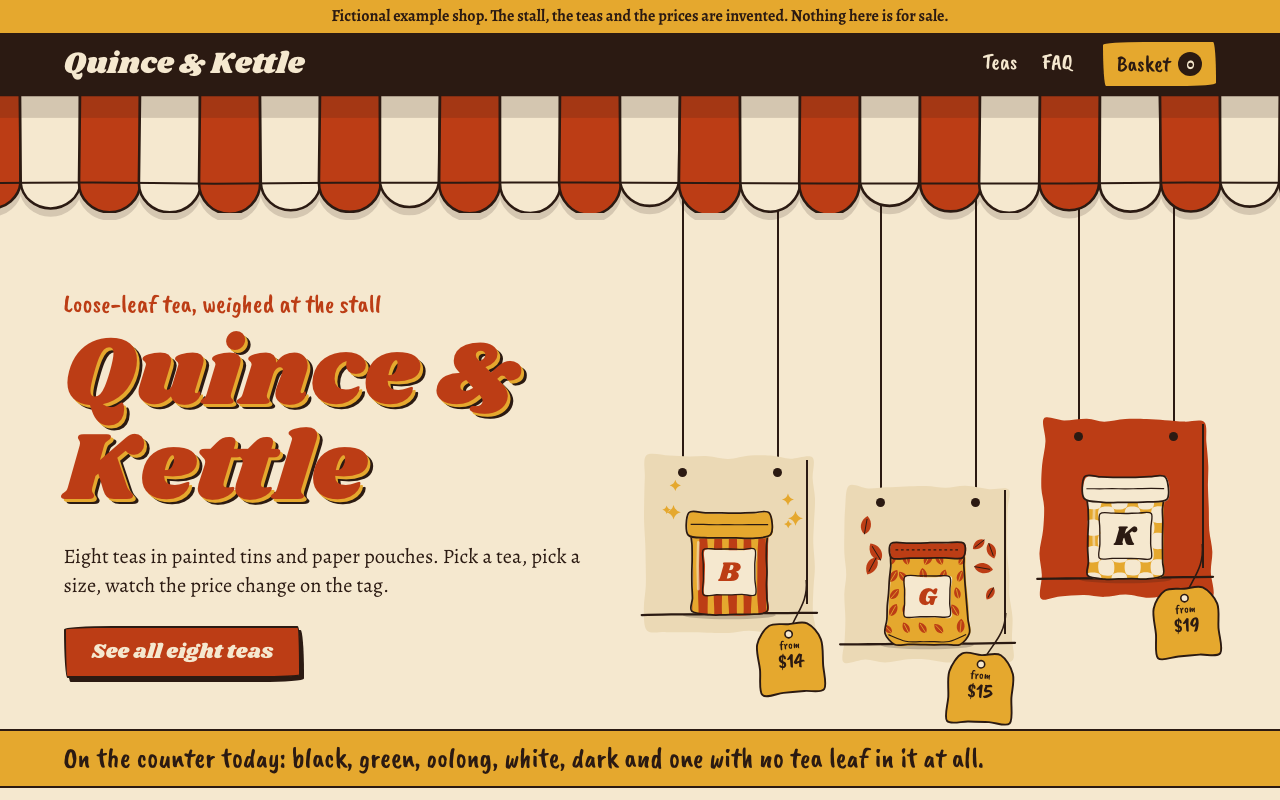
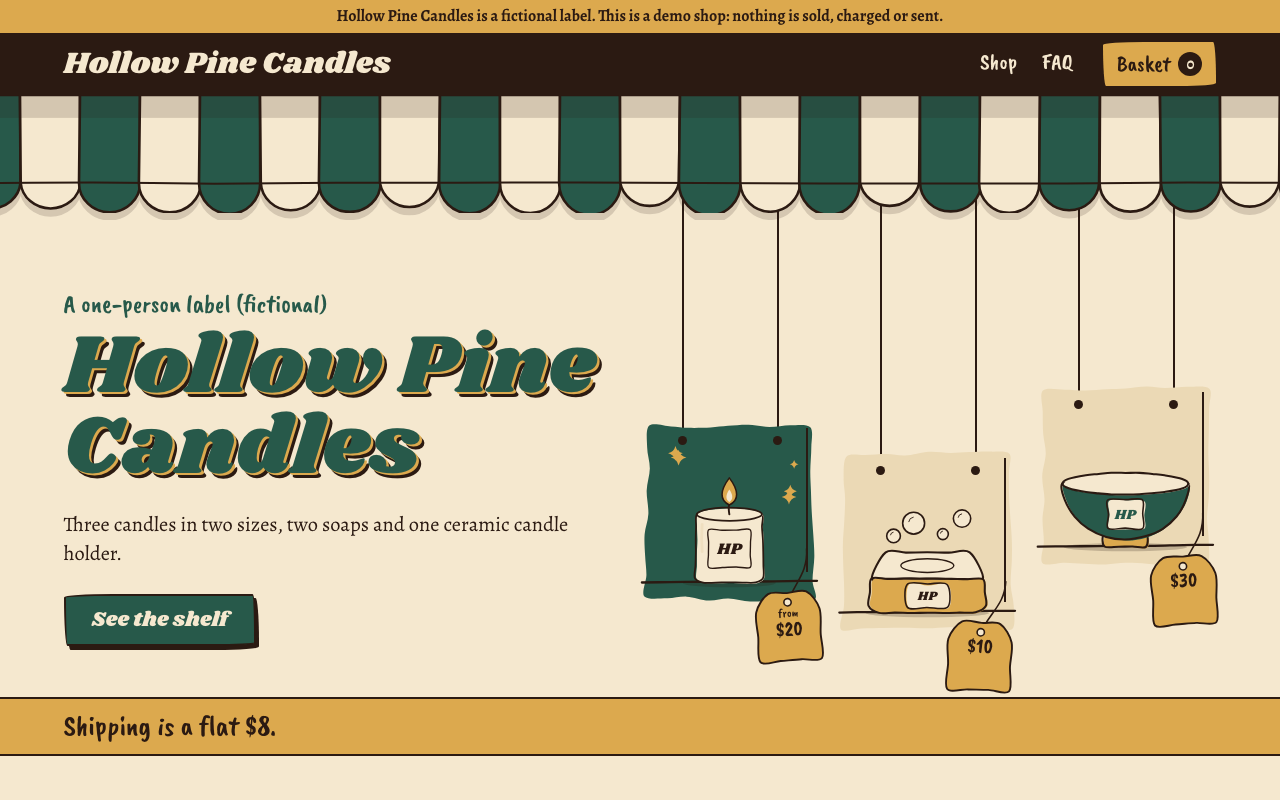
One test run on a fictional brief. Letterforms can differ on systems without the same fonts.
Builds a small working online shop for an independent label as one offline HTML file with hash routes: home, catalogue with filters, product pages with an option picker that changes the price, sold-out options, basket drawer, promo codes, FAQ, a designed 404 and a demo checkout that takes no payment. It looks like a hand-painted market stall, and products are drawn in code from their data, so no photographs are needed. Use when someone wants a shop demo, a storefront prototype or a shop for a small label, or asks for this style by name. Not for taking real payments.
What it must pass before delivery
check.mjspasses.drive.mjspasses, with motion on and reduced.- Every page viewed as a real screenshot at desktop and phone size.
- Each size or option that should change the drawing does change it.
- Nothing is claimed that the user did not supply: no reviews, no sales claims, no credentials.
- A fictional shop says so in the ribbon, the footer and the FAQ.
- One language only in the file.
- The user can see how to find a promo code, through
promoHintor the FAQ. - The inferred lines and assumptions are listed in your reply.
Read the full SKILL.md
---
name: market-stall
description: Builds a small working online shop for an independent label as one offline HTML file with hash routes: home, catalogue with filters, product pages with an option picker that changes the price, sold-out options, basket drawer, promo codes, FAQ, a designed 404 and a demo checkout that takes no payment. It looks like a hand-painted market stall, and products are drawn in code from their data, so no photographs are needed. Use when someone wants a shop demo, a storefront prototype or a shop for a small label, or asks for this style by name. Not for taking real payments.
version: 1.0.0
---

# Market Stall

The look and the working parts live in the template. Your job is to write one JSON block. Everything the shop sells and says comes from it. `scripts/check.mjs` enforces the rest.

Read `references/style.md` for the exact tokens and every drawing parameter.

## Inputs to ask for

Ask once, in one message, for whatever the brief does not give.

Required:
1. Shop name, and what it sells.
2. The products: name, one line, price and any options such as size or colour, with what each option adds to the price.
3. Which options or products are sold out, if any.
4. Whether the shop is real or fictional.

Optional:
5. Promo codes and what each does.
6. Delivery options and prices.
7. FAQ answers.
8. Season for the colours: spring, summer, autumn or winter. Default: the current season where the shop is.
9. Language: English or Chinese. One language per file.

## When the brief falls short

- **Thin brief:** restate the user's facts in the shop's voice. Never invent customers, reviews, ratings, sales numbers, awards, origins or credentials. Give the user a list of every line you inferred.
- **A required field is blank (a price, a product name):** do not silently invent it. Use a clearly flagged placeholder, such as the name "Scent 1 (TBC)" or a round price like 10.00, and list each one under "Placeholders to replace" in your reply. Do not use `[[...]]`, because the checker rightly rejects it.
- **Thin facts:** `facts` may be as few as one, or empty, and the card then disappears. Burn time, weight or materials the user did not give stay out. `story` can be one sentence: 280 is a limit, not a target.
- **Nobody can answer:** proceed, mark the shop fictional in `notice`, `footer` and an FAQ answer, and list your assumptions in your reply.
- **"Three scents in two sizes":** that is one product per scent, three products, each with a size option. Make a thing a separate product when it would have its own name and its own picture. Make it an option when the buyer is choosing a version of the same thing.
- **Different length:** any number of products works. The home row and the hero lay out to the real count, so one, two or three products leave no empty slot. The example has 8. Write fewer or more FAQ items freely. `notes` is always exactly 3.
- **No location for the season:** take the current season where the user is. If that is unknown too, choose the season the goods belong to, say so in your reply, and move on.
- **No real link or payment:** there is nothing to link. Checkout stays a demo. If they need real payments, say this template does not do that, and hand them the shop as a design to build from.

## Steps

1. Write `shop.json`. Start from the `shop-data` block in `assets/template.html` (or `assets/template.zh.html`). Each placeholder states its own length limit. Money is whole cents: `1450` is 14.50. See `example/shop.en.json` in the pack if it is present.
2. Choose each product's `draw` values from `references/style.md`. Pick the `kind` that is the real object: a candle is `candle`, not `jar`. Goods with no matching kind use `parcel`, and you say so in the handoff, rather than a near-miss drawing such as a bowl for a candle holder. Give each size a `draw.scale` (small 0.85, medium 1, large 1.12) so the picture changes with the option.
3. Build: `node scripts/fill.mjs shop.json output.html`, adding `--zh` for Chinese. Never hand-edit the HTML. For Chinese, rerun this after every change to the words, because it embeds only the sign-font pieces those words need.
4. Check: `node scripts/check.mjs output.html`, adding `--fictional` if the shop is fictional. Fix what it reports, and rerun until it passes.
5. Drive: `node scripts/drive.mjs output.html --shots shots/`. This presses every control in a real browser, with motion on, with motion reduced, and at phone size. It also tries a long shop name and shops of one, two and three products. It takes about a minute and a half. Fix anything that fails.
6. Look: open the screenshots in `shots/` with your image reader, then open each product page yourself. Every page must be viewed, at desktop and phone size. Check that names break well and that a tag does not hide a label. Rewrite words or change drawing values if something reads badly. Do not touch the CSS.

## How the shop's data behaves

Routes, all in the address after `#`: `#/` home, `#/shop` catalogue (filters are kept here, such as `#/shop?kind=green&stock=1&sort=low`), `#/p/<product id>` product, `#/faq`, `#/checkout`, `#/order/<number>` demo slip. Anything else shows the designed 404.

- **`featured: true`:** the first three hang in the hero and the first four fill the home row. If fewer than four are featured, the others fill in, in stall order.
- **`filters`:** yours go in the JSON, and may be none. Values in one group widen the result, and separate groups narrow it. An "In stock only" filter under Availability is added automatically, so never write your own. It keeps a product if any version of it can be bought.
- **Sold out:** `soldOut: true` on a choice blocks that choice. On a product, or on every choice in a group, it blocks the product.
- **`delivery`:** one option or several. `cost` is in cents and prints before the note, so the note must not repeat it (`check.mjs` catches this). `freeOver` makes it free once the basket reaches that many cents. `needsAddress: true` asks for an address when that option is chosen.
- **`promos`:** `kind` is `percent` (`value` 1 to 100), `amount` (`value` in cents) or `freedelivery` (no `value`). `min` is an optional minimum basket in cents; below it the code is refused, or pauses if the basket drops later. Codes ignore case and spaces, and one works at a time.

## Installing Playwright

`check.mjs` and `fill.mjs` need only Node 18 or later. `drive.mjs` needs Playwright: run `npm install playwright` and `npx playwright install chromium`, then run from that folder. If it is installed elsewhere, set `PLAYWRIGHT_FROM=/path/that/contains/node_modules`. Run one browser at a time.

## Deliverables

- `output.html`: the whole shop in one file, working offline from a double-click. English is about 300 KB; Chinese is about 2 MB because of its sign font.
- `shop.json`: the source, for later changes.
- In your reply: inferred lines, assumptions, the promo codes to try, and what was tested.

## Before delivering

- [ ] `check.mjs` passes.
- [ ] `drive.mjs` passes, with motion on and reduced.
- [ ] Every page viewed as a real screenshot at desktop and phone size.
- [ ] Each size or option that should change the drawing does change it.
- [ ] Nothing is claimed that the user did not supply: no reviews, no sales claims, no credentials.
- [ ] A fictional shop says so in the ribbon, the footer and the FAQ.
- [ ] One language only in the file.
- [ ] The user can see how to find a promo code, through `promoHint` or the FAQ.
- [ ] The inferred lines and assumptions are listed in your reply.

## When not to use it

- The shop has to take real money or real orders. Nothing here is sent anywhere, and stock is what the JSON says.
- The products must be shown in photographs, such as clothing fit or artwork.
- The catalogue runs above about 60 products, or has stock that changes by the hour.
- The label's own brand must set the look. This pack's look is fixed by design.

## Requirements

Node 18 or later for the scripts, Playwright for `drive.mjs`, and any current browser to view the result. The output makes no external requests. Fonts are open-licensed and listed in `assets/fonts-license.txt`; keep that licence with the pack.
Used in these workflows
- Open an online shop step 2

