

Free
Mono Portrait
Turns an authorised photo into a calm black-and-white studio half portrait, without redrawing the face.
Install
Install the "Mono Portrait" skill into ~/.claude/skills/mono-portrait.
Download each file and save it under that folder:
https://skilllift.pages.dev/packs/mono-portrait/SKILL.md → SKILL.md
https://skilllift.pages.dev/packs/mono-portrait/references/style.md → references/style.md
https://skilllift.pages.dev/packs/mono-portrait/assets/look.json → assets/look.json
https://skilllift.pages.dev/packs/mono-portrait/scripts/mono-portrait.mjs → scripts/mono-portrait.mjs
https://skilllift.pages.dev/packs/mono-portrait/scripts/vision.swift → scripts/vision.swift
https://skilllift.pages.dev/packs/mono-portrait/scripts/check.mjs → scripts/check.mjs
https://skilllift.pages.dev/packs/mono-portrait/scripts/lib/png.mjs → scripts/lib/png.mjs
https://skilllift.pages.dev/packs/mono-portrait/scripts/lib/jpeg.mjs → scripts/lib/jpeg.mjs
https://skilllift.pages.dev/packs/mono-portrait/scripts/lib/img.mjs → scripts/lib/img.mjs
https://skilllift.pages.dev/packs/mono-portrait/scripts/lib/refuse.mjs → scripts/lib/refuse.mjs
https://skilllift.pages.dev/packs/mono-portrait/scripts/lib/font.mjs → scripts/lib/font.mjs
Then read SKILL.md, tell me what it does, and remind me to start a new session.
Unpack it into ~/.claude/skills
Same skill, different brief
The left is the preview. The right was made by a separate agent from a different brief, using only the installed skill and without seeing the preview.
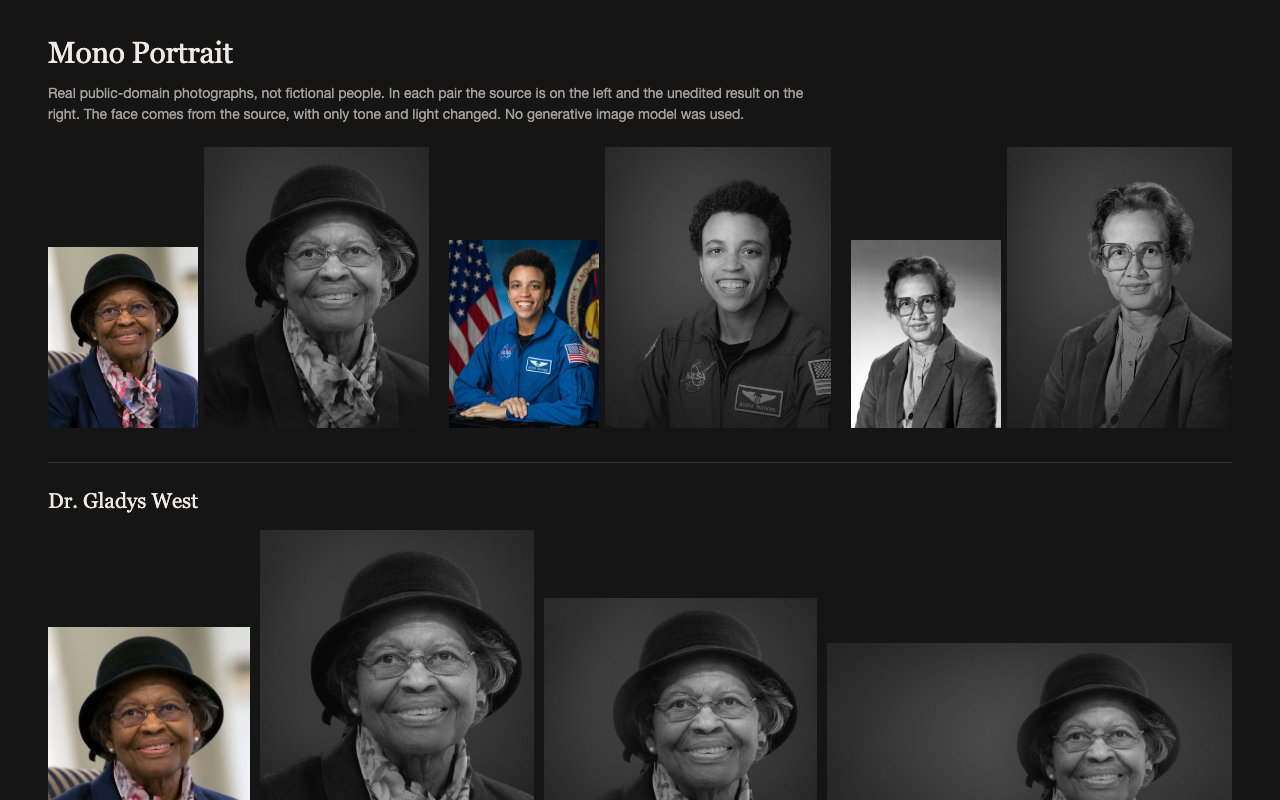
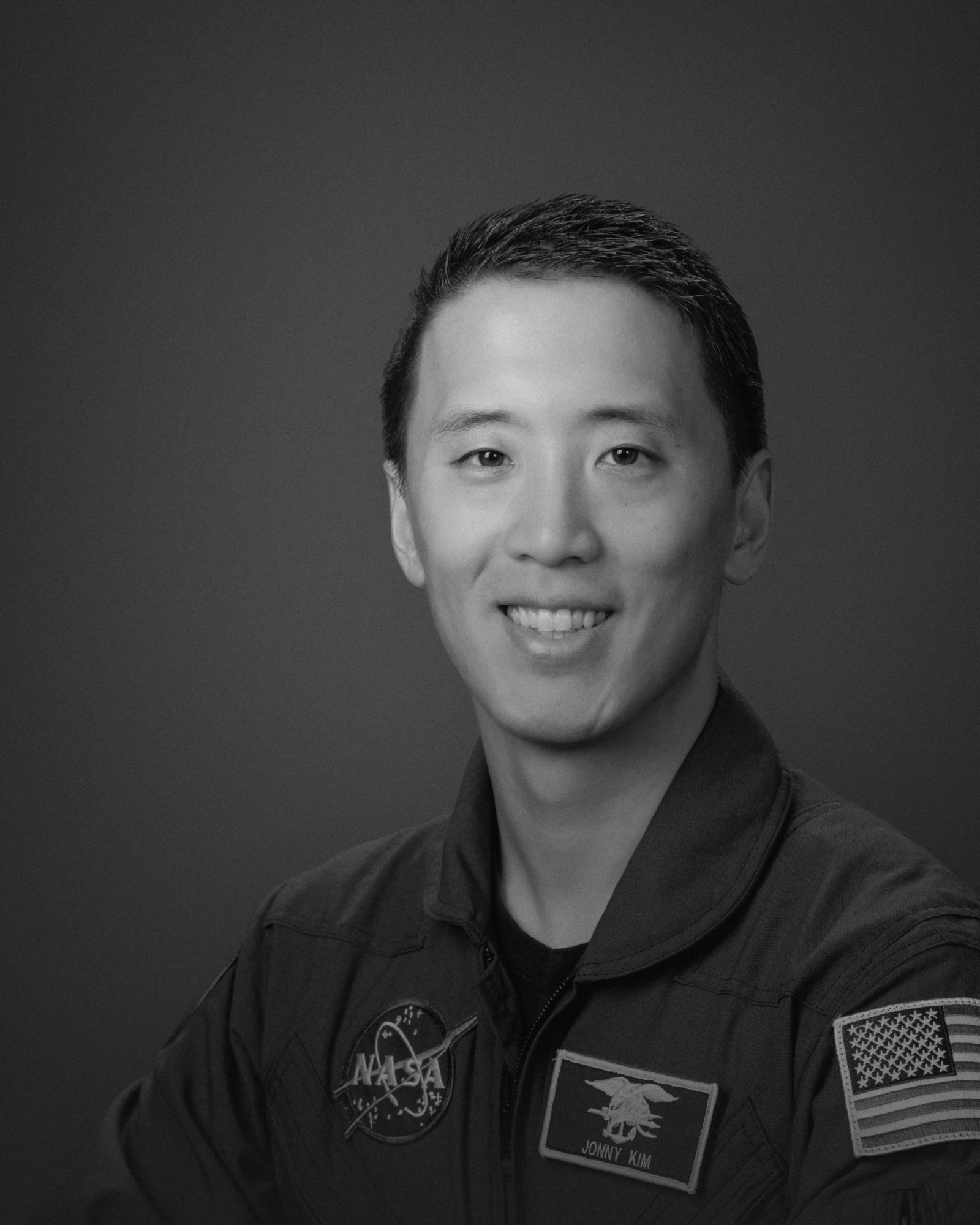
One test run on a fictional brief. Letterforms can differ on systems without the same fonts.
Turns an authorised photo of one adult into a calm black-and-white studio half portrait with soft one-direction light, natural skin texture, subtle film grain and deliberate negative space, for profiles, personal pages and social use. No generative image model is used and the face is never redrawn, so the person stays exactly who they are, glasses included. Everything runs on the user's machine. Use when someone asks for a black-and-white headshot, a studio-style portrait or a profile photo from a photo they already have. Do not use for passport, ID or proof-of-identity photos.
What it must pass before delivery
- I opened the photo: one person who appears to be an adult
- The user confirmed this is them or that the person agreed
- This is not for a passport, ID, biometric or proof-of-identity use
node scripts/check.mjsexits 0 on the output folder- I viewed every crop at full size and at 96 pixels, and judged it honestly; nothing visible overrules the passing check
- If the photo shows insignia or a name patch, I told the user they stay legible and to use their own photo
- I passed on every warning and note in plain words
- I told the user that metadata is stripped, that nothing was uploaded, and what this cannot change
- I told the user to keep the QA sheet, the JSON and
qa/private
Read the full SKILL.md
---
name: mono-portrait
description: Turns an authorised photo of one adult into a calm black-and-white studio half portrait with soft one-direction light, natural skin texture, subtle film grain and deliberate negative space, for profiles, personal pages and social use. No generative image model is used and the face is never redrawn, so the person stays exactly who they are, glasses included. Everything runs on the user's machine. Use when someone asks for a black-and-white headshot, a studio-style portrait or a profile photo from a photo they already have. Do not use for passport, ID or proof-of-identity photos.
version: 1.0.0
---

# Mono Portrait

The look lives in `assets/look.json` and `scripts/mono-portrait.mjs`. You choose the photo, confirm the rules below, run one command, run the checker and look at the result. You do not retouch anything by hand.

**The benefit.** No generative image model is used, by design. Apple Vision runs on the user's Mac only to find the person's outline and the eye and chin positions. It paints nothing. Every pixel of the face comes from the user's own photo, with only tone and light changed, so the person looks like themselves, glasses and wrinkles included.

**The limit, to say plainly to the user.** It cannot change clothes, pose or hairstyle, remove a logo or a badge, or fix a bad photo. A blurred, dark or tightly cropped photo gives a poor result or a refusal. Patches, insignia and name tags stay readable, so a person's name can show even when `--label` avoids it.

## Rules

- Use only a photo of the user, or of someone who has given permission.
- Refuse passports, visas, ID cards and any other identity document, biometric matching and any proof-of-identity use. Do not offer a workaround. The renderer also refuses labels such as `passport`, `id-photo`, `photo-id`, `proof-of-identity` and `护照`, but no list can be complete and the default label passes it. You must stop such a request yourself, whatever the label says.
- The tool cannot verify consent. `--consent self` and `--consent permission` only record what you were told, and the checker only confirms the word is there. You must ask. If you use a stand-in photo for a test, say that the value is a stand-in and that the person gave no consent.
- If the photo is official, with insignia, a name patch or an organisation's logo, tell the user plainly that those stay legible, that the organisation may restrict their use, and that they should use their own photo. The QA sheet carries the same notice.
- Never alter facial features. Do not edit the result in another tool to do it.
- If the photo shows more than one person, or a person who appears to be a minor, stop and ask. Continue with a minor only if the user makes clear the person is in fact an adult. Otherwise do not process the photo.
- Tell the user that metadata is stripped from outputs: EXIF, GPS, camera data and text notes are not carried over.
- Nothing is uploaded. The renderer makes no network request. Do not send the photo anywhere yourself.

## Inputs to ask for

Ask once, in one message, for whatever the brief does not already give you.

1. The photo, as a file path.
2. Whose photo it is, and whether that person agreed. This becomes `--consent`.

Nothing else is needed. All other fields have safe defaults.

## Fields

| Field | Meaning | Limit | If the brief is thin |
|---|---|---|---|
| `--input` | The photo: JPEG, PNG, HEIC or anything else macOS can open | One file | Ask. There is no default |
| `--out` | Output folder, created if missing | Any writable path | Use `mono-portrait-out` beside the photo |
| `--consent` | `self` means a photo of the user. `permission` means the person agreed | Only these two words | Ask. Never assume it. If nobody can answer, stop; this is the one field you may not guess |
| `--looked` | Your statement that you opened the photo and saw one person who appears to be an adult | Only `one-adult` | Open the photo with your image-viewing tool first. If you cannot view it, ask the user |
| `--label` | First part of each file name | 1 to 40 lowercase letters, digits or hyphens | Use `portrait`. It always passes the checker. Never use the person's name unless asked |
| `--seed` | The grain pattern. The same photo and seed give the same result | Whole number, 0 to 999999 | Leave it out (1) |
| `--side` | Which side holds the empty space | `auto`, `left`, `right` | Leave it on `auto`: it reads the turn of the head from nose and eye positions, and counts a clear turn from a score of 0.06. Set `left` or `right` if you can see the person faces that way and the output says otherwise |
| `--backdrop` | Backdrop tone | `auto`, `charcoal`, `ash` | Leave it on `auto`. Try `ash` if dark hair vanishes into the background |
| `--confirmed-one-person` | The user has confirmed one person, after Vision counted more than one but found a single face | Flag, with no value | Only after asking the user. It does not override a second face |

## Steps

1. Open the photo and look at it. Confirm one person who appears to be an adult, a clear face, and space above the head. Note anything touching the body, such as a table under the hands: the frame ends above it where it can. Confirm consent.
2. Render. It takes about 5 to 20 seconds, and about 3 more the first time while the Vision helper compiles:

   ```
   nice -n 10 node scripts/mono-portrait.mjs --input photo.jpg --out out --consent self --looked one-adult
   ```

3. Run the checker, from the skill folder or anywhere else. Fix what it reports, and do not deliver a failing result:

   ```
   node scripts/check.mjs out
   ```

4. Look at the result. Open each PNG at full size, and again reduced to 96 pixels wide. Ask yourself honestly whether it looks like a studio shot or a filtered snapshot. Look for scraps of the old background, hard cuts, fading body edges and a soft face. The checker cannot judge taste. **What you see overrules a passing check.** If you can see a scrap, a cut or a ragged edge at full size, treat it as a failure and do not deliver that crop.
5. Tell the user what you delivered, repeat every `WARNING` and `NOTE` line in plain words, and state the limit above.

## Other systems

Cutting out the person needs macOS Vision. On any other system the renderer refuses and changes nothing. Tell the user, and offer the second route: they supply a transparent PNG of the person. Read the eye and chin positions off that image yourself:

```
node scripts/mono-portrait.mjs --cutout person.png --eyes x1,y1,x2,y2 --chin x,y --out out --consent self --looked one-adult
```

Coordinates are pixels in the PNG: the centre of each pupil and the bottom of the chin. The one-person test cannot run on this route, so your own look at the photo is the only test.

## When it stops

| Exit | Meaning | What to do |
|---|---|---|
| 2 | A field is missing or invalid | Read the message and fix the command |
| 3 | More than one person | Ask which person and whether they agreed, then have the photo cropped to them alone. Use `--confirmed-one-person` only if there is really one person and one face |
| 4 | No clear face or no person | Ask for a clearer, more frontal photo |
| 5 | No Vision on this system, or the helper could not compile | Offer the cutout route, or run `xcode-select --install` |
| 6 | Too small or too dark. It stops when a crop needs over 3.2x enlargement, at about 125 pixels from eye to chin. Under about 200 pixels it warns that the result is soft | Ask for a better photo. Do not upscale or brighten it first to get past this |
| 7 | The label names an identity-document or biometric use. This is only a word list | Refuse |

## When the checker fails

| Failure | What to do |
|---|---|
| Top of the head cut off | The source has no space above the head. Ask for another photo |
| Scraps of the old background, or halo | Vision could not separate this background. Ask for a photo on a plainer background. Do not paint them out |
| Too little negative space | Open the photo, see which way the person faces and set `--side left` or `--side right`. If both fail, ask for a wider photo |
| Hard cut, scraps, ragged or blotchy edge on the body | Something in the source was cut away or Vision could not separate it. Ask for a photo with nothing touching the body |
| Facial edges or structure differ | Someone changed the output after rendering. Render it again and do not edit it |
| Crushed, clipped or flat tone | The source is the cause. Ask for a better-exposed photo |

## If the first photo fails, try these in order

1. Too little negative space: rerun with `--side left` or `--side right`, the way the person faces.
2. Dark hair or a dark hat lost against the background: rerun with `--backdrop ash`.
3. Exit 3 with one person and one face: ask the user, then rerun with `--confirmed-one-person`.
4. Any other failure: no option fixes it, and `--seed` only changes the grain. Ask for another photo with a plain wall behind, space above the head, nothing touching the body and at least 200 pixels from eye to chin.
5. No other photo: deliver nothing. Say what failed and what photo would pass.

If there is no better photo and nobody can answer, deliver nothing that fails. Report what failed and what photo would pass. Never invent details about the person, and do not write a caption, name or job title unless the user gives one.

## Half portrait

The frame normally ends at mid-chest and does not need the hands. The lower body eases into the backdrop. A close source gives a closer head and shoulders, which still counts as a half portrait. Say so if the user wanted more of the body.

## Deliverables

In the output folder, with `portrait` standing for `--label`:

- `portrait-1600x2000`, `portrait-1600x1600` and `portrait-2000x1125`, each as `.png` and high-quality `.jpg`.
- `portrait-qa-sheet.png`: the source beside the results, with the insignia notice along the bottom.
- `mono-portrait.json` and `qa/`: the record the checker needs, holding the source copy, the mattes and the eye and chin positions used for framing.

Only the six image files are for publishing. The QA sheet, `mono-portrait.json` and `qa/` contain the original photo and face positions, so tell the user to keep them private and delete them after approval. If the user wants another size, tell them these three are fixed and they can crop a PNG themselves, and the checker will not cover that crop.

## Before delivering

- [ ] I opened the photo: one person who appears to be an adult
- [ ] The user confirmed this is them or that the person agreed
- [ ] This is not for a passport, ID, biometric or proof-of-identity use
- [ ] `node scripts/check.mjs` exits 0 on the output folder
- [ ] I viewed every crop at full size and at 96 pixels, and judged it honestly; nothing visible overrules the passing check
- [ ] If the photo shows insignia or a name patch, I told the user they stay legible and to use their own photo
- [ ] I passed on every warning and note in plain words
- [ ] I told the user that metadata is stripped, that nothing was uploaded, and what this cannot change
- [ ] I told the user to keep the QA sheet, the JSON and `qa/` private

## When not to use it

- For a passport, visa, ID, licence or other official photo, or anything that must prove identity.
- For group photos, children, or anyone who has not agreed.
- When the user wants a different outfit, pose or hairstyle. That would need a generative image model, and this pack has none.
- When the user wants colour, a real location or a retouched face.

## Requirements

- macOS 12 or later for the automatic route. On macOS 14 and later, Vision also counts people. Before that, only faces are counted, so your own look at the photo matters more.
- Xcode Command Line Tools, for the small local Vision helper: `xcode-select --install`
- Node 18 or later, with no npm packages: `brew install node`, or the installer from nodejs.org
- Python, numpy, Pillow and Playwright are not used. No generative image model is used, and no network is needed. Apple Vision runs on the device.
- The renderer writes only to the output folder and the system temporary folder.

