

Free
Morning Edition
Today's checked news on your city and topics, set as a real printed newspaper of your own, every story cited.
Install
Install the "Morning Edition" skill into ~/.claude/skills/morning-edition.
Download each file and save it under that folder:
https://skilllift.pages.dev/packs/morning-edition/SKILL.md → SKILL.md
https://skilllift.pages.dev/packs/morning-edition/references/style.md → references/style.md
https://skilllift.pages.dev/packs/morning-edition/assets/template.html → assets/template.html
https://skilllift.pages.dev/packs/morning-edition/assets/fonts/ma-shan-zheng-common.woff2 → assets/fonts/ma-shan-zheng-common.woff2
https://skilllift.pages.dev/packs/morning-edition/assets/fonts-license.txt → assets/fonts-license.txt
https://skilllift.pages.dev/packs/morning-edition/assets/paper.example.json → assets/paper.example.json
https://skilllift.pages.dev/packs/morning-edition/assets/paper.example.zh.json → assets/paper.example.zh.json
https://skilllift.pages.dev/packs/morning-edition/scripts/build.mjs → scripts/build.mjs
https://skilllift.pages.dev/packs/morning-edition/scripts/check.mjs → scripts/check.mjs
https://skilllift.pages.dev/packs/morning-edition/scripts/render.mjs → scripts/render.mjs
Then read SKILL.md, tell me what it does, and remind me to start a new session.
Unpack it into ~/.claude/skills
Same skill, different brief
The left is the preview. The right was made by a separate agent from a different brief, using only the installed skill and without seeing the preview.
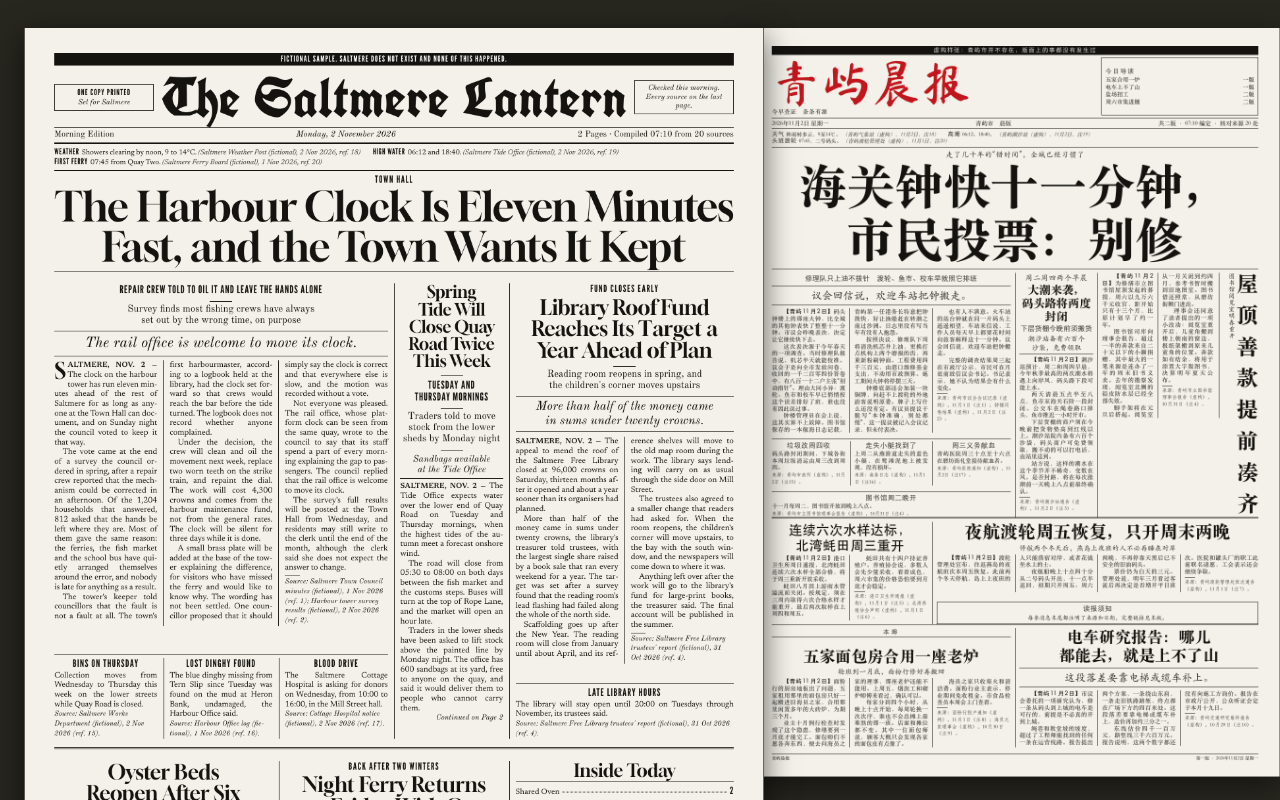
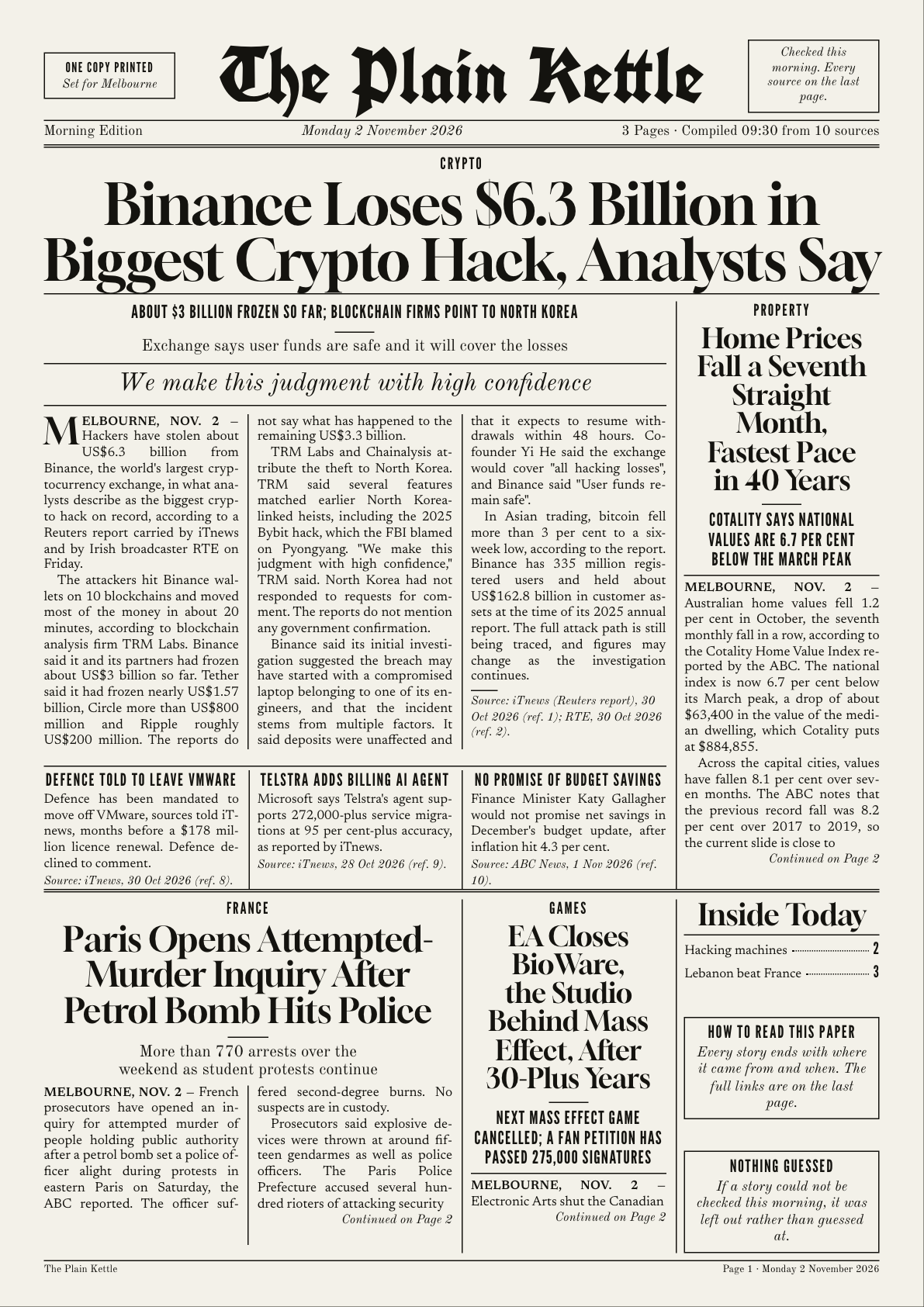
One test run on a fictional brief. Letterforms can differ on systems without the same fonts.
Looks up today's news on the topics and city someone cares about, checks and cites it, and sets it as a real printable newspaper of their own, with nameplate, edition line, multi-column pages, jumps and A3 or A4 print pages, in one HTML file plus a PDF where possible. Works in English and Chinese, including vertical Chinese headlines. Use when someone asks for a personal newspaper, a printed daily digest, a news front page for their town, "my own morning paper", or this style by name. Not for slide decks or for inventing news.
What it must pass before delivery
- The date came from the system clock and matches
paper.date. - I opened every report I cited, and every story and brief has a named source and date.
- Nothing in the paper came from memory or inference. No invented quotes, numbers or details.
- Every quote is exact as printed, or marked as a translation. Any lunar date came from a calendar I opened.
- Anything disputed or damaging is confirmed or clearly attributed, or left out and noted.
check.mjspasses andrender.mjsreports no problems.- I looked at every page image at the size being delivered.
sampleis not set on a real edition, and the paper name isn't that of a real newspaper.- I told the person what I left out and what I assumed.
Read the full SKILL.md
---
name: morning-edition
description: Looks up today's news on the topics and city someone cares about, checks and cites it, and sets it as a real printable newspaper of their own, with nameplate, edition line, multi-column pages, jumps and A3 or A4 print pages, in one HTML file plus a PDF where possible. Works in English and Chinese, including vertical Chinese headlines. Use when someone asks for a personal newspaper, a printed daily digest, a news front page for their town, "my own morning paper", or this style by name. Not for slide decks or for inventing news.
version: 1.1.0
---

# Morning Edition

You act as the editor. You find the news, check it, and write it up. The look and layout live in `assets/template.html`, and `scripts/build.mjs` pours your words into it. Your work is honest reporting and good headlines. Never touch the CSS or the engine.

**The rule that outranks everything: leave a story out rather than guess.** A short paper that is true beats a full one that isn't.

## For someone who just wants the paper

Most people asking for this are not technical. Ask plain questions, do all the setup yourself, and hand over the finished file. Never mention JSON, scripts, Node or Playwright to them. Tell them where the file is and how to print it: "Open it, press Print, choose actual size and both sides."

## Questions to ask

Ask once, in one message, in the person's language. Only the first is needed.

1. Which city or town is this paper for, and what topics do you care about most?
2. Which sections do you want? Offer to choose for them (for example: your city, your work, the world, sport).
3. Would you like a name for the paper? If not, make one from the city, such as "The Fitzroy Lantern". Never use the name of an existing newspaper, and tell them what you chose.
4. A3 or A4? If they don't know, use A4: it fits a home printer.

If nobody can answer, go ahead: use the city and topics you can infer, A4, and list your assumptions in your message. If you have no city or topic at all, you must ask, because there is nothing to search for.

## Steps

1. **Get today's date from the system clock**, not from memory.
2. **Check you can search.** Use your own web search or browsing tool.
   - **No search tool:** say so plainly: "I can't look up news from here, so I can't report today's news myself. If you paste the articles you want in, I'll set those as your paper." Then work only from what they paste. Mark those sources `"pasted": true`, using the publication name and date they give. If the date is unknown, ask or leave the story out. Say in `colophon` that the paper was set from material the reader supplied.
   - Never fill the paper from memory.
   - **Search may fail even when you have the tool.** News queries often return spam, stale pages or nothing. Don't give up, and don't pad. Go to the publishers: news sites' RSS feeds are a good route. Fetch the site's RSS or feed page (often `/rss`, `/feed`, `/rss.xml`, or a link on its home page or a section page; public broadcasters and trade papers usually have them). A feed gives headlines, dates and links, so you can then open each report. Section front pages work too. Say in your handover which route you used.
3. **Report each section.** Search for it with today's date, and open the reports you intend to use. Aim for 5 to 12 stories and 2 to 5 briefs; 3 stories still makes a good single sheet. For each one:
   - Read the report itself, not just a search snippet.
   - Note the publisher and the publication date, and the event date if it differs.
   - Confirm important claims in a second independent source where you can: casualties, arrests, accusations, health claims, money, anything that could hurt someone. If you can't confirm them, leave them out or attribute them clearly ("X said, according to Y").
   - No clear date, a claim that appears only on social media, or sources that disagree on the central fact: leave it out and add one sentence to `left_out` saying what and why. Do not repeat a damaging unconfirmed allegation about a named person there; describe it generally.
   - Prefer today's stories. If you use something older, the date must show in the text ("on Thursday").
4. **Write in your own words.** Summarise; don't copy paragraphs. Quote only short phrases, exactly as printed, with who said them. **A quote you translated is not exact words.** If the report is in another language from the paper, either report the point without quote marks, or set `"translated_quotes": true` on that story or brief, which prints a line saying the quotes are this paper's translation. `check.mjs` refuses a quote when every source is in another language and the mark is missing. Add `"lang"` to a source if its name doesn't show the language. Don't invent a translated name; keep the name as printed. Never invent a quote, a number, a name, a detail or a scene to make a story read better. If the facts run out, the story ends. Use only sourced facts in headlines too, and don't make a headline stronger than its report. The paper has no reporters, so no bylines, and no "our correspondent".
   Slugs print in the index and on jump lines, so a slug is a claim too: "approved" for a story that was only conditionally approved is wrong. `left_out` prints under "these could not be confirmed", so only put things there that you really left out. Say in your handover how many stories rest on one source: that is normal, but the reader should know.
5. **Weather, tides, markets, scores.** Include a `strip` only if you looked the data up today from a named source. Otherwise leave it out. An empty strip simply doesn't print.
6. **Write `paper.json`** in a temp folder, using `assets/paper.example.json` (or `paper.example.zh.json`) as the shape. Full field list and limits are in `references/style.md`. Put stories in order of importance; the first is the lead. Mark up to 5 with `"front": true`. Do **not** set `sample` on a real edition. Length limits are in `references/style.md`; `check.mjs` reports what is over. Shorten it yourself and don't ask the person.
7. **Build:** `node scripts/build.mjs paper.json morning-edition-YYYY-MM-DD.html`
8. **Check:** `node scripts/check.mjs morning-edition-YYYY-MM-DD.html`. Fix what it reports and rebuild.
9. **Render and look:** `node scripts/render.mjs morning-edition-YYYY-MM-DD.html outdir`. This takes about 10 seconds a size, makes PDFs for both sizes and one image per page, and lists any layout problems. Look at every page image. Rewrite a headline if it breaks badly or reads badly, and cut if a story won't fit. Do not edit the layout. The engine keeps Chinese words whole in headlines where it can, but a name it doesn't know can still split: reword it if so. It also moves a front-page story inside rather than start it with two lines and a jump, and sets a `vertical_body` piece across if it would leave blank paper beside it, so don't be surprised if a piece isn't vertical. Use `vertical_body` on Chinese-only pieces: Latin words go sideways.
   - Playwright missing: in a temp folder run `npm install playwright`, then set `NODE_PATH` to that folder's `node_modules`. The script uses the Chrome already on the computer if its own browser isn't installed; if not, run `npx playwright install chromium`.
   - If a PDF can't be made at all, deliver the HTML and tell the person: open it, press Print, choose Save as PDF.
10. **Hand over** the HTML and the PDF. Say in a line or two how many stories made it, what you left out and why, and anything you assumed.

## Deliverables
- One self-contained HTML file. It makes no network requests. It opens on the chosen size, has A4 and A3 buttons that reset the whole paper, and a print button.
- A PDF at A4 and A3 if the agent can make one.

## When the brief is thin or odd
- **Few stories found:** print fewer. Do not pad, and do not widen the search to unrelated news without saying so. If you can't confirm a single story, don't make a paper. Say what you tried.
- **Wants more pages:** report more stories; the page count follows. Never stretch.
- **Wants fewer pages:** cut the lowest stories, or shorten them.
- **Personal items** (a birthday, a family note): fine, in a clearly separate section, marked as supplied by the reader with `"pasted": true`.
- **A source has no link** (a print paper, say): use `"pasted": true` with the name and date.
- **A fast-moving story** such as a disaster or an election count: say the time of the report in the text and note that it may have changed. Don't state totals as final.
- **Lunar date (农历):** the paper prints none unless you looked one up. Set `paper.lunar` and `paper.lunar_source` (`name`, `url`) only if a calendar you actually opened today gives it. Otherwise leave it out.
- **Chinese:** write natural Chinese with `"lang": "zh-CN"`. Use `vertical_head` where a short headline can stand beside its text and `vertical_body` for one short piece. A3 folded in half makes a small paper; a print shop can scale the A3 file to 8K (八开), which is close to it.

## Before delivering
- [ ] The date came from the system clock and matches `paper.date`.
- [ ] I opened every report I cited, and every story and brief has a named source and date.
- [ ] Nothing in the paper came from memory or inference. No invented quotes, numbers or details.
- [ ] Every quote is exact as printed, or marked as a translation. Any lunar date came from a calendar I opened.
- [ ] Anything disputed or damaging is confirmed or clearly attributed, or left out and noted.
- [ ] `check.mjs` passes and `render.mjs` reports no problems.
- [ ] I looked at every page image at the size being delivered.
- [ ] `sample` is not set on a real edition, and the paper name isn't that of a real newspaper.
- [ ] I told the person what I left out and what I assumed.

## When not to use it
- For a slide deck, or a report argued from one set of findings.
- To produce news that isn't true: joke front pages about real people, fake headlines to share, or anything meant to look like a real newspaper. The fictional sample format is for demonstrating this skill only, always carries its band, and never names real people.
- For breaking emergencies, where someone should go to official sources now.
- For medical, legal or financial decisions: this paper summarises reports and is not advice.

## Requirements
Node 18 or later for the scripts, none of which need installing. A web search tool for live news. Playwright or Chrome for the PDF and page images. Chinese text uses the computer's own Song, Kai and Hei fonts; the PDF carries them, so print from a computer that has them. Fonts in the template are under the SIL Open Font License; see `assets/fonts-license.txt`.

