

Free
Radio Report
Turn a long report into a narrated deck anyone can listen to at their own pace, tuned on a glowing valve-radio dial.
Install
Install the "Radio Report" skill into ~/.claude/skills/radio-report.
Download each file and save it under that folder:
https://skilllift.pages.dev/packs/radio-report/SKILL.md → SKILL.md
https://skilllift.pages.dev/packs/radio-report/references/style.md → references/style.md
https://skilllift.pages.dev/packs/radio-report/assets/template.html → assets/template.html
https://skilllift.pages.dev/packs/radio-report/assets/template.zh.html → assets/template.zh.html
https://skilllift.pages.dev/packs/radio-report/scripts/check.mjs → scripts/check.mjs
https://skilllift.pages.dev/packs/radio-report/scripts/render-audio.mjs → scripts/render-audio.mjs
https://skilllift.pages.dev/packs/radio-report/scripts/export-pdf.mjs → scripts/export-pdf.mjs
Then read SKILL.md, tell me what it does, and remind me to start a new session.
Unpack it into ~/.claude/skills
Same skill, different brief
The left is the preview. The right was made by a separate agent from a different brief, using only the installed skill and without seeing the preview.
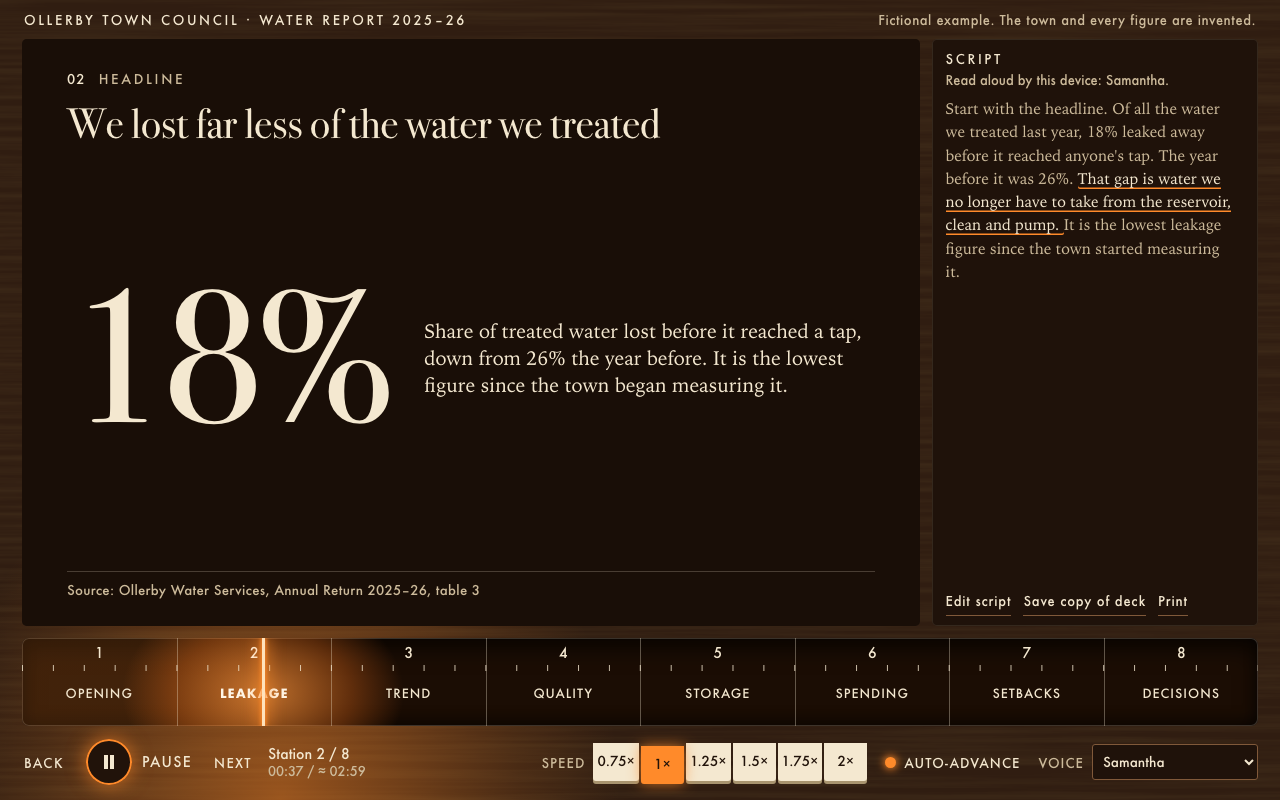
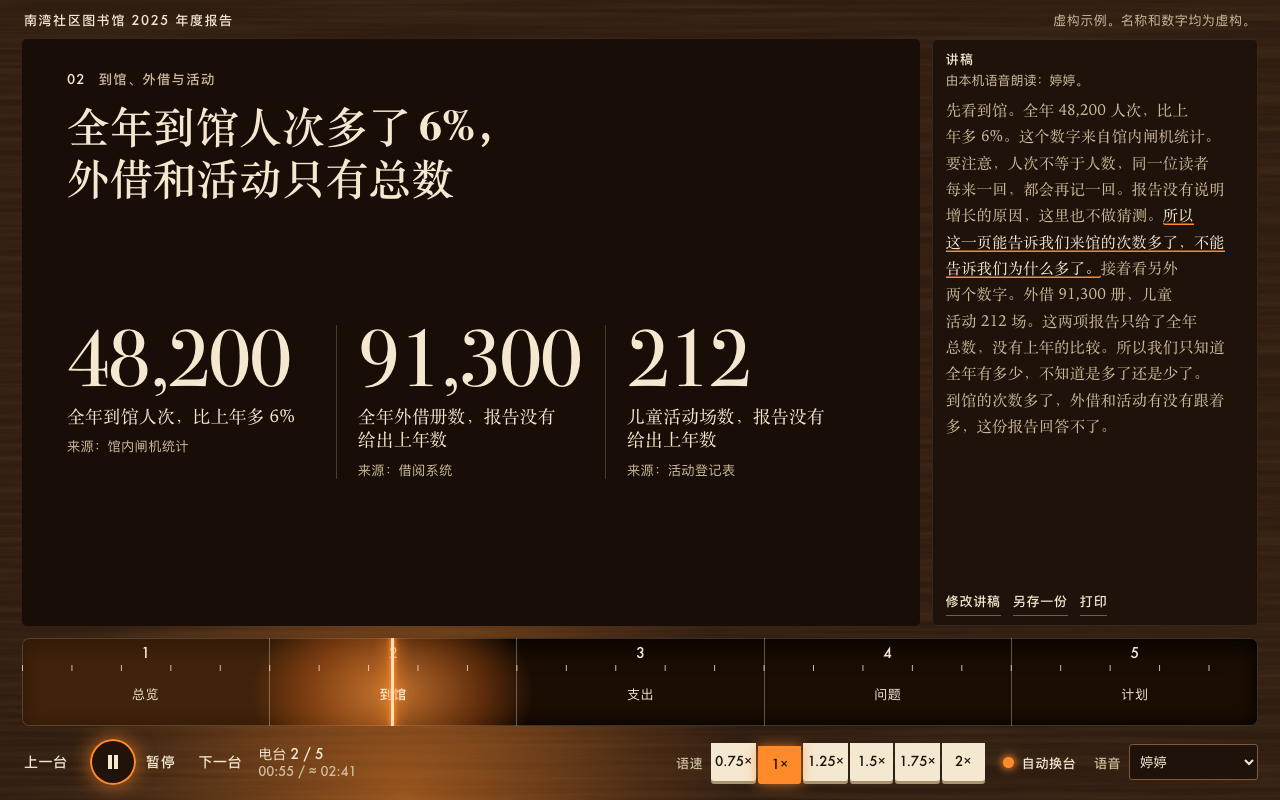
One test run on a fictional brief. Letterforms can differ on systems without the same fonts.
Turns a long report into a self-paced narrated deck in one offline HTML file, styled as a vintage valve radio. Every slide has an editable spoken script. The built-in player has play and pause, seek, speed from 0.75x to 2x and auto-advance. Narration is free and needs no API key, using the browser's voice or optional macOS recordings, with a visible transcript when no voice exists. Works in English and Chinese. Use when someone wants a report people can listen to instead of a meeting, a narrated deck or a recorded briefing without recording anything, or asks for this style by name.
What it must pass before delivery
node scripts/check.mjspasses with no flags other than--fictional, and it ran the screen checks.- I viewed every station at 1280 wide and at phone width, and read it.
- I pressed Play, dragged the needle, changed the speed and let a station advance.
- Every number on a slide is from the report and has its source showing.
- Nothing was invented or padded. Inferred lines and assumptions are listed for the user.
- If the content is invented, the notice says so once, and nothing else in any view repeats it.
- The interface and the copy are in one language.
- If I recorded audio, I reran the script after the last edit and told the user about Apple's licence.
- If I made a PDF, I viewed every page rendered by
sips.
Read the full SKILL.md
---
name: radio-report
description: Turns a long report into a self-paced narrated deck in one offline HTML file, styled as a vintage valve radio. Every slide has an editable spoken script. The built-in player has play and pause, seek, speed from 0.75x to 2x and auto-advance. Narration is free and needs no API key, using the browser's voice or optional macOS recordings, with a visible transcript when no voice exists. Works in English and Chinese. Use when someone wants a report people can listen to instead of a meeting, a narrated deck or a recorded briefing without recording anything, or asks for this style by name.
version: 1.0.0
---

# Radio Report

The look and the player live in `assets/template.html` (English) and `assets/template.zh.html` (Chinese). You write the words. You copy the template for the deck's language, fill the marked slots, and leave the CSS and the engine untouched. `scripts/check.mjs` compares them byte for byte and looks at the deck on screen.

`references/style.md` has the exact tokens and the reasoning behind each rule.

## Inputs to ask for

Ask once, in one message, for whatever the brief does not give.

Required:
1. The report: a file or the text.
2. Who will listen, and what they should do afterwards. If nobody says: assume general readers of the report, and invent no call to action.

Optional:
3. Deck language. Default: the report's language. One deck, one language.
4. Presenter and date, for the cover.
5. A length limit, if there is one. By default, length follows the report. There is no minimum and no target.
6. Whether the content is real. If it is invented, it needs a notice.
7. Whether recorded audio is wanted (Mac only; see step 7).

## When information is missing

- **Thin brief:** restate the user's facts, never invent, and list every inferred line when you deliver. Each slot below has its own rule. Never add a customer, number, quotation, source or credential. A link you draw between two items, such as "this plan answers that problem", counts as inferred if the report does not state it.
- **Nobody can answer:** proceed with the defaults, and list your assumptions when you deliver.
- **Length follows the report. Never pad.** A short report makes a short deck, even one station with one short script. If a user asks for more time than the report can fill, make the honest length and tell them why. For a shorter deck, merge stations and cut scripts. For more than 14 stations, make two decks.
- **No real link:** the deck needs none, and there is no button to fill. Name sources as text. If a source has a real URL you may write it as text. Never invent one.

## Steps

1. Read the whole report. Write down its argument in one sentence, then the claims that carry it, up to 14. Each claim becomes a station. Note what you left out; you will report that.
2. Copy the template for the language to the output path, for example `deck.html`. Never rebuild it from memory. For a language other than English or Chinese, use the English template, set `lang` on `<html>`, and translate only the values in `radio-ui`.
3. Between `STATIONS:BEGIN` and `STATIONS:END`, keep one `<section>` per station. Copy a layout for each claim and delete the sample sections you do not use. Change only the text inside `data-slot` elements and the `data-label` and `data-value` attributes. Keep the attributes and the order of the parts. The template's comments may be deleted.
4. Fill the slots using the table below. Write the script last, so that it adds to the slide instead of reading it out.
5. Run `node scripts/check.mjs deck.html`, adding `--fictional` if the content is invented. It takes about 10 to 25 seconds. Fix what it reports by changing the words, and rerun until it passes.
6. Open the deck yourself. View every station at 1280 wide and at phone width, and read each one. Press Play, drag the needle, change the speed, and listen to a station if you can.
7. Optional recording, Mac only: `node scripts/render-audio.mjs deck.html`. It takes about 2 to 5 seconds per station and adds about 0.4 MB per minute. Use `--list` to see voices and `--voice Tingting` to choose. Rerun it after any script change, then rerun the check. Without this step the browser's own voice reads the deck, which is free and also works.
8. Optional handout: if the user wants a PDF, run `node scripts/export-pdf.mjs deck.html out.pdf pages/`, then view every PNG in `pages/`. They are rendered by Apple's renderer (`sips`), which can differ from Chromium.

## Slots

A **unit** is one Latin character. One Chinese character counts as 2 units, so "28 units" means 14 Chinese characters. The checker enforces every limit.

| Slot | What it means | Limit | If the brief is thin |
|---|---|---|---|
| `title` in `<head>` | The file's name in a browser tab | 70 | Use the report's own name |
| `deck-name` | Short name on the cabinet | 56 | Use the report's name, cut down |
| `notice` | One label for the whole deck, for example that it is fictional or a draft | 80 | Empty for a real report. For invented content it is required: "Fictional example. The names and figures are invented." In Chinese: "虚构案例:名称和数字都是编出来的。" Never repeat it in a slide or a script |
| `data-label` | Station name printed on the dial | 10, no digits | One plain word for the topic, such as "Costs" |
| `kicker` | Small line above the title; says what kind of thing this slide is | 28 | A plain topic word, such as "Headline" or "Costs" |
| `title` | The claim, as a sentence that can be disagreed with. On the cover, the report's main finding | 72, cover 64 | Use the report's own wording of its conclusion. If it states none, use a neutral description and list it as inferred |
| `lede` | Cover only: what the report covers | 120 | Restate the report's scope, or leave empty |
| `byline` | Cover only: who presents it, and when | 70 | Leave empty. Never invent a name or a date |
| `figure` | Figure layout: the one number | 10 | Only a number the report states. No number means use the points layout |
| `meaning` | What the number means, with the comparison | 180 | Say only what the report says. No comparison stated means leave it out. May be empty |
| `figure`, `label`, `source` in trio | Exactly 3 numbers, what each counts, and where each came from | 8, 60, 80 | Exactly 3. Fewer than 3 numbers means use another layout. Figures shrink together to fit their columns, so all three stay the same size |
| `name`, `val`, `data-value` in bars | 2 to 6 rows: the row's name, the number shown, and the plain number that sets the bar length | 24, 12, a number | More than 6 rows: keep the largest and say where the rest are. `data-value` must equal the number in `val` |
| `head`, `text` in points | 1 to 4 points: the point and its explanation | 40, 110 | Fewer points, never padded ones |
| `source` | Where every number on the slide came from | 130 | See "Sources" |
| `script` | What the voice says, in the deck's language. Also the transcript and the editable notes | At most 1100 (about 70 seconds; 550 Chinese characters). At least 8 (4 Chinese characters): one short sentence is enough | Only what the report says. See "Writing the script" |

## Sources

Every number stays visible with its source. The checker fails a slide that has a number and no source line.

- Name the document and the place in it: "Source: Annual Return 2025, table 3". If the report names the origin but no place, write what it gives: "Source: door counter".
- If the report gives a number but cites nothing, write exactly `Source: as stated in the report; no document cited`, or in Chinese `来源:报告原文,未注明出处`. The checker accepts these, prints a note, and you must list those slides for the user.
- Leave the source empty only when the slide has no numbers.
- The cover has no source line, so it can carry only a year.

## Writing the script

- It is spoken. Use short sentences and one idea at a time. English runs at about 150 words a minute; Chinese at about 250 characters.
- Add what the slide cannot show: the reason, the caveat, what to do, when the report gives them. If it gives none, say what it does not state, or keep the script short. Do not read the slide aloud. A general fact the report does not state counts as inferred; list it.
- Write numbers in digits, "18%" rather than "eighteen percent". Voices read them correctly, and the checker can then match them. Every number spoken must also be on the slide, apart from a bare year. If the report uses a word, as in 两小时 or "two hours", you may keep it, but the same words must then be on the slide with a source.
- Avoid abbreviations a voice would stumble on. Plain text only.
- Keep to one language. Chinese decks may keep acronyms of up to 5 capitals, such as AI or KPI. Nothing else in Latin letters.
- Listeners can edit the script in the deck ("Edit script"), and "Save copy of deck" writes a new file with their edits. Edits to a recorded station switch it to the device voice.

## How narration behaves

The player chooses in this order: recorded audio if embedded; otherwise the browser's voice in the deck's language; otherwise reading mode, where the needle moves at reading pace, the transcript highlights the current sentence and a visible line explains why it is silent. It never reads Chinese with an English voice, or the reverse. Tell the user that voice quality depends on their device.

## Deliverables

- One `.html` file that works offline, with no other files.
- Optional: a PDF handout, if asked for.
- A short note listing: what you left out of the report, inferred lines, assumptions, and slides whose source is the brief itself.

## Before delivering

- [ ] `node scripts/check.mjs` passes with no flags other than `--fictional`, and it ran the screen checks.
- [ ] I viewed every station at 1280 wide and at phone width, and read it.
- [ ] I pressed Play, dragged the needle, changed the speed and let a station advance.
- [ ] Every number on a slide is from the report and has its source showing.
- [ ] Nothing was invented or padded. Inferred lines and assumptions are listed for the user.
- [ ] If the content is invented, the notice says so once, and nothing else in any view repeats it.
- [ ] The interface and the copy are in one language.
- [ ] If I recorded audio, I reran the script after the last edit and told the user about Apple's licence.
- [ ] If I made a PDF, I viewed every page rendered by `sips`.

## When not to use it

- A live talk with a presenter in the room: the voice and the auto-advance get in the way.
- A report whose value is in long tables that must be read in full: send the document.
- Sensitive content when using a browser voice: on some devices the browser sends text to an online voice service. Choose a voice on the device, record on a Mac, or use reading mode.
- A deck that must sound like a real person: these are synthetic voices.
- A number-free opinion piece: an essay is better.

## What cannot be checked

Nobody has judged the voices by ear in the automatic checks. Events and audio levels show that speech happened, not that a figure such as 48,200 was pronounced well. If a person can listen, have them listen to the numbers. Mention this when you deliver if nobody did.

## Requirements

- Node 18 or newer. The checks need Playwright: `npm install playwright` and `npx playwright install chromium`. If it is installed elsewhere, set `NODE_PATH` to that `node_modules` folder. Use `--static` only if it truly cannot be installed, and say so when you deliver.
- A modern browser for the deck. Chrome, Edge and Safari have built-in voices; Firefox depends on the system.
- `render-audio.mjs` needs macOS, which ships `say` and `afconvert`. Apple licenses its voices for personal, non-commercial use, so check its terms before publishing recorded audio commercially.
- `export-pdf.mjs` needs Playwright, and macOS for its page images.
Used in these workflows
- Report to a client step 5
- Run a lesson step 5
- Present research step 5
- Record a video lesson step 5

