

Free
Section Kit
Seventeen finished page sections to paste into a site you already have, in HTML, React or Vue, recoloured from two to four brand colours.
Install
Install the "Section Kit" skill into ~/.claude/skills/section-kit.
Download each file and save it under that folder:
https://skilllift.pages.dev/packs/section-kit/SKILL.md → SKILL.md
https://skilllift.pages.dev/packs/section-kit/references/style.md → references/style.md
https://skilllift.pages.dev/packs/section-kit/assets/tokens.css → assets/tokens.css
https://skilllift.pages.dev/packs/section-kit/assets/base.css → assets/base.css
https://skilllift.pages.dev/packs/section-kit/assets/art.js → assets/art.js
https://skilllift.pages.dev/packs/section-kit/assets/samples.json → assets/samples.json
https://skilllift.pages.dev/packs/section-kit/assets/fields.json → assets/fields.json
https://skilllift.pages.dev/packs/section-kit/assets/blocks.json → assets/blocks.json
https://skilllift.pages.dev/packs/section-kit/assets/blocks/hero-steps/hero-steps.html → assets/blocks/hero-steps/hero-steps.html
https://skilllift.pages.dev/packs/section-kit/assets/blocks/hero-steps/hero-steps.css → assets/blocks/hero-steps/hero-steps.css
https://skilllift.pages.dev/packs/section-kit/assets/blocks/hero-steps/hero-steps.js → assets/blocks/hero-steps/hero-steps.js
https://skilllift.pages.dev/packs/section-kit/assets/blocks/hero-steps/HeroSteps.jsx → assets/blocks/hero-steps/HeroSteps.jsx
https://skilllift.pages.dev/packs/section-kit/assets/blocks/hero-steps/HeroSteps.vue → assets/blocks/hero-steps/HeroSteps.vue
https://skilllift.pages.dev/packs/section-kit/assets/blocks/hero-angled/hero-angled.html → assets/blocks/hero-angled/hero-angled.html
https://skilllift.pages.dev/packs/section-kit/assets/blocks/hero-angled/hero-angled.css → assets/blocks/hero-angled/hero-angled.css
https://skilllift.pages.dev/packs/section-kit/assets/blocks/hero-angled/HeroAngled.jsx → assets/blocks/hero-angled/HeroAngled.jsx
https://skilllift.pages.dev/packs/section-kit/assets/blocks/hero-angled/HeroAngled.vue → assets/blocks/hero-angled/HeroAngled.vue
https://skilllift.pages.dev/packs/section-kit/assets/blocks/hero-stat/hero-stat.html → assets/blocks/hero-stat/hero-stat.html
https://skilllift.pages.dev/packs/section-kit/assets/blocks/hero-stat/hero-stat.css → assets/blocks/hero-stat/hero-stat.css
https://skilllift.pages.dev/packs/section-kit/assets/blocks/hero-stat/HeroStat.jsx → assets/blocks/hero-stat/HeroStat.jsx
https://skilllift.pages.dev/packs/section-kit/assets/blocks/hero-stat/HeroStat.vue → assets/blocks/hero-stat/HeroStat.vue
https://skilllift.pages.dev/packs/section-kit/assets/blocks/hero-contact/hero-contact.html → assets/blocks/hero-contact/hero-contact.html
https://skilllift.pages.dev/packs/section-kit/assets/blocks/hero-contact/hero-contact.css → assets/blocks/hero-contact/hero-contact.css
https://skilllift.pages.dev/packs/section-kit/assets/blocks/hero-contact/HeroContact.jsx → assets/blocks/hero-contact/HeroContact.jsx
https://skilllift.pages.dev/packs/section-kit/assets/blocks/hero-contact/HeroContact.vue → assets/blocks/hero-contact/HeroContact.vue
https://skilllift.pages.dev/packs/section-kit/assets/blocks/hero-poster/hero-poster.html → assets/blocks/hero-poster/hero-poster.html
https://skilllift.pages.dev/packs/section-kit/assets/blocks/hero-poster/hero-poster.css → assets/blocks/hero-poster/hero-poster.css
https://skilllift.pages.dev/packs/section-kit/assets/blocks/hero-poster/HeroPoster.jsx → assets/blocks/hero-poster/HeroPoster.jsx
https://skilllift.pages.dev/packs/section-kit/assets/blocks/hero-poster/HeroPoster.vue → assets/blocks/hero-poster/HeroPoster.vue
https://skilllift.pages.dev/packs/section-kit/assets/blocks/hero-arch/hero-arch.html → assets/blocks/hero-arch/hero-arch.html
https://skilllift.pages.dev/packs/section-kit/assets/blocks/hero-arch/hero-arch.css → assets/blocks/hero-arch/hero-arch.css
https://skilllift.pages.dev/packs/section-kit/assets/blocks/hero-arch/HeroArch.jsx → assets/blocks/hero-arch/HeroArch.jsx
https://skilllift.pages.dev/packs/section-kit/assets/blocks/hero-arch/HeroArch.vue → assets/blocks/hero-arch/HeroArch.vue
https://skilllift.pages.dev/packs/section-kit/assets/blocks/quotes-grid/quotes-grid.html → assets/blocks/quotes-grid/quotes-grid.html
https://skilllift.pages.dev/packs/section-kit/assets/blocks/quotes-grid/quotes-grid.css → assets/blocks/quotes-grid/quotes-grid.css
https://skilllift.pages.dev/packs/section-kit/assets/blocks/quotes-grid/QuotesGrid.jsx → assets/blocks/quotes-grid/QuotesGrid.jsx
https://skilllift.pages.dev/packs/section-kit/assets/blocks/quotes-grid/QuotesGrid.vue → assets/blocks/quotes-grid/QuotesGrid.vue
https://skilllift.pages.dev/packs/section-kit/assets/blocks/quotes-mosaic/quotes-mosaic.html → assets/blocks/quotes-mosaic/quotes-mosaic.html
https://skilllift.pages.dev/packs/section-kit/assets/blocks/quotes-mosaic/quotes-mosaic.css → assets/blocks/quotes-mosaic/quotes-mosaic.css
https://skilllift.pages.dev/packs/section-kit/assets/blocks/quotes-mosaic/QuotesMosaic.jsx → assets/blocks/quotes-mosaic/QuotesMosaic.jsx
https://skilllift.pages.dev/packs/section-kit/assets/blocks/quotes-mosaic/QuotesMosaic.vue → assets/blocks/quotes-mosaic/QuotesMosaic.vue
https://skilllift.pages.dev/packs/section-kit/assets/blocks/quote-single/quote-single.html → assets/blocks/quote-single/quote-single.html
https://skilllift.pages.dev/packs/section-kit/assets/blocks/quote-single/quote-single.css → assets/blocks/quote-single/quote-single.css
https://skilllift.pages.dev/packs/section-kit/assets/blocks/quote-single/QuoteSingle.jsx → assets/blocks/quote-single/QuoteSingle.jsx
https://skilllift.pages.dev/packs/section-kit/assets/blocks/quote-single/QuoteSingle.vue → assets/blocks/quote-single/QuoteSingle.vue
https://skilllift.pages.dev/packs/section-kit/assets/blocks/quote-portrait/quote-portrait.html → assets/blocks/quote-portrait/quote-portrait.html
https://skilllift.pages.dev/packs/section-kit/assets/blocks/quote-portrait/quote-portrait.css → assets/blocks/quote-portrait/quote-portrait.css
https://skilllift.pages.dev/packs/section-kit/assets/blocks/quote-portrait/QuotePortrait.jsx → assets/blocks/quote-portrait/QuotePortrait.jsx
https://skilllift.pages.dev/packs/section-kit/assets/blocks/quote-portrait/QuotePortrait.vue → assets/blocks/quote-portrait/QuotePortrait.vue
https://skilllift.pages.dev/packs/section-kit/assets/blocks/quotes-fan/quotes-fan.html → assets/blocks/quotes-fan/quotes-fan.html
https://skilllift.pages.dev/packs/section-kit/assets/blocks/quotes-fan/quotes-fan.css → assets/blocks/quotes-fan/quotes-fan.css
https://skilllift.pages.dev/packs/section-kit/assets/blocks/quotes-fan/quotes-fan.js → assets/blocks/quotes-fan/quotes-fan.js
https://skilllift.pages.dev/packs/section-kit/assets/blocks/quotes-fan/QuotesFan.jsx → assets/blocks/quotes-fan/QuotesFan.jsx
https://skilllift.pages.dev/packs/section-kit/assets/blocks/quotes-fan/QuotesFan.vue → assets/blocks/quotes-fan/QuotesFan.vue
https://skilllift.pages.dev/packs/section-kit/assets/blocks/case-note/case-note.html → assets/blocks/case-note/case-note.html
https://skilllift.pages.dev/packs/section-kit/assets/blocks/case-note/case-note.css → assets/blocks/case-note/case-note.css
https://skilllift.pages.dev/packs/section-kit/assets/blocks/case-note/CaseNote.jsx → assets/blocks/case-note/CaseNote.jsx
https://skilllift.pages.dev/packs/section-kit/assets/blocks/case-note/CaseNote.vue → assets/blocks/case-note/CaseNote.vue
https://skilllift.pages.dev/packs/section-kit/assets/blocks/site-header/site-header.html → assets/blocks/site-header/site-header.html
https://skilllift.pages.dev/packs/section-kit/assets/blocks/site-header/site-header.css → assets/blocks/site-header/site-header.css
https://skilllift.pages.dev/packs/section-kit/assets/blocks/site-header/SiteHeader.jsx → assets/blocks/site-header/SiteHeader.jsx
https://skilllift.pages.dev/packs/section-kit/assets/blocks/site-header/SiteHeader.vue → assets/blocks/site-header/SiteHeader.vue
https://skilllift.pages.dev/packs/section-kit/assets/blocks/proof-row/proof-row.html → assets/blocks/proof-row/proof-row.html
https://skilllift.pages.dev/packs/section-kit/assets/blocks/proof-row/proof-row.css → assets/blocks/proof-row/proof-row.css
https://skilllift.pages.dev/packs/section-kit/assets/blocks/proof-row/ProofRow.jsx → assets/blocks/proof-row/ProofRow.jsx
https://skilllift.pages.dev/packs/section-kit/assets/blocks/proof-row/ProofRow.vue → assets/blocks/proof-row/ProofRow.vue
https://skilllift.pages.dev/packs/section-kit/assets/blocks/pricing-table/pricing-table.html → assets/blocks/pricing-table/pricing-table.html
https://skilllift.pages.dev/packs/section-kit/assets/blocks/pricing-table/pricing-table.css → assets/blocks/pricing-table/pricing-table.css
https://skilllift.pages.dev/packs/section-kit/assets/blocks/pricing-table/pricing-table.js → assets/blocks/pricing-table/pricing-table.js
https://skilllift.pages.dev/packs/section-kit/assets/blocks/pricing-table/PricingTable.jsx → assets/blocks/pricing-table/PricingTable.jsx
https://skilllift.pages.dev/packs/section-kit/assets/blocks/pricing-table/PricingTable.vue → assets/blocks/pricing-table/PricingTable.vue
https://skilllift.pages.dev/packs/section-kit/assets/blocks/faq/faq.html → assets/blocks/faq/faq.html
https://skilllift.pages.dev/packs/section-kit/assets/blocks/faq/faq.css → assets/blocks/faq/faq.css
https://skilllift.pages.dev/packs/section-kit/assets/blocks/faq/Faq.jsx → assets/blocks/faq/Faq.jsx
https://skilllift.pages.dev/packs/section-kit/assets/blocks/faq/Faq.vue → assets/blocks/faq/Faq.vue
https://skilllift.pages.dev/packs/section-kit/assets/blocks/footer-cta/footer-cta.html → assets/blocks/footer-cta/footer-cta.html
https://skilllift.pages.dev/packs/section-kit/assets/blocks/footer-cta/footer-cta.css → assets/blocks/footer-cta/footer-cta.css
https://skilllift.pages.dev/packs/section-kit/assets/blocks/footer-cta/FooterCta.jsx → assets/blocks/footer-cta/FooterCta.jsx
https://skilllift.pages.dev/packs/section-kit/assets/blocks/footer-cta/FooterCta.vue → assets/blocks/footer-cta/FooterCta.vue
https://skilllift.pages.dev/packs/section-kit/scripts/check.mjs → scripts/check.mjs
https://skilllift.pages.dev/packs/section-kit/scripts/palette.mjs → scripts/palette.mjs
https://skilllift.pages.dev/packs/section-kit/scripts/recolour.mjs → scripts/recolour.mjs
https://skilllift.pages.dev/packs/section-kit/scripts/scaffold.mjs → scripts/scaffold.mjs
https://skilllift.pages.dev/packs/section-kit/scripts/drive.mjs → scripts/drive.mjs
Then read SKILL.md, tell me what it does, and remind me to start a new session.
Unpack it into ~/.claude/skills
Same skill, different brief
The left is the preview. The right was made by a separate agent from a different brief, using only the installed skill and without seeing the preview.
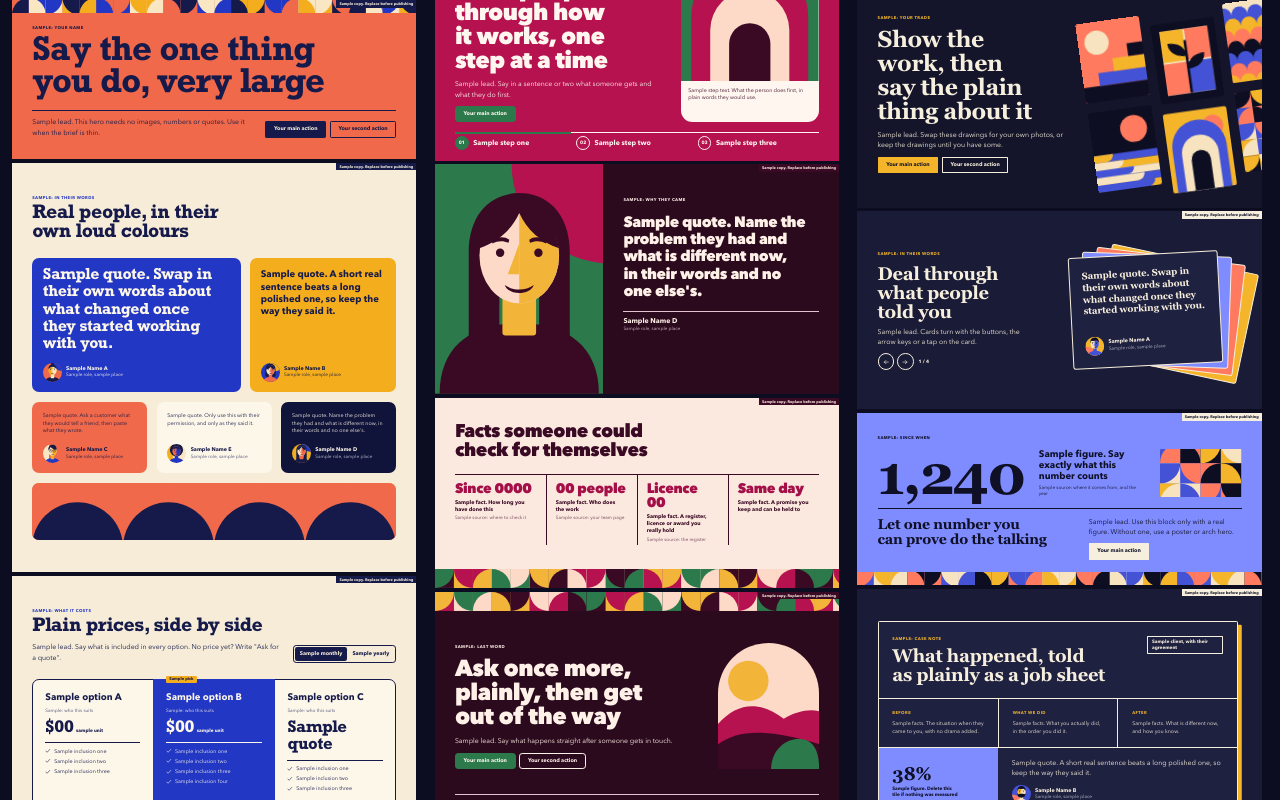
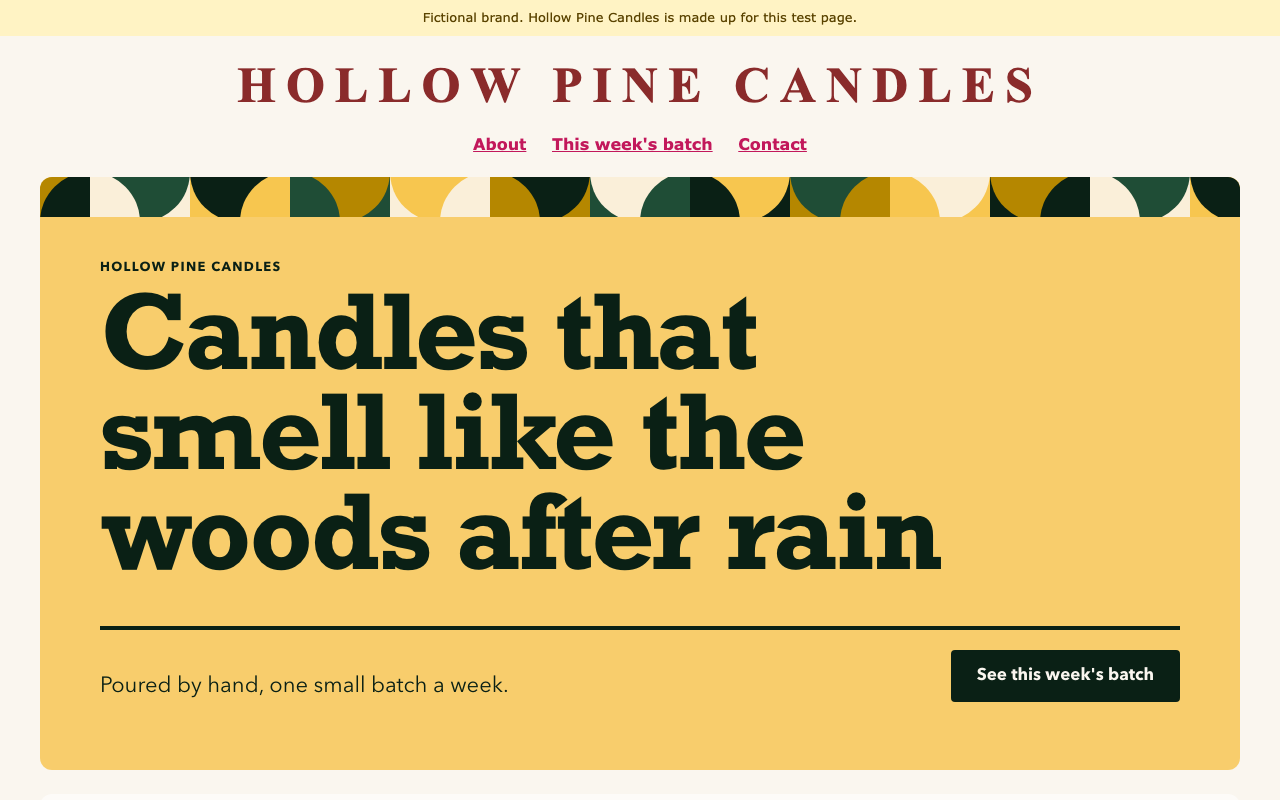
One test run on a fictional brief. Letterforms can differ on systems without the same fonts.
Finished page sections an agent pastes into someone's existing website and then edits, instead of designing from a blank canvas. Seventeen blocks (six heroes, six testimonial sections, proof row, pricing table, FAQ, footer call to action, optional site header), each as plain HTML and CSS, a React component and a Vue single-file component, all recolouring from two to four brand colours. Use when someone wants a hero, testimonials, pricing, FAQ or a closing section added to a site they already have, in plain HTML, React or Vue, and has real copy, or asks for this kit by name.
What it must pass before delivery
node scripts/check.mjsexits 0 with no--allow-samplesand no--static.node scripts/drive.mjspasses, so every control was really clicked at all three widths, motion on and reduced.- I viewed every chosen block at 1280, 768 and 390 pixels wide.
- Every quote, name, number and price came from the user, and each piece of proof has a true
source. - No sample flag or
data-sampleremains, and no request leaves the page. - Colours came from
scripts/recolour.mjsor a stock theme, not hand edits. - The page has one h1, and the first hero's action is on the first screen.
- Nothing was padded to fill a layout, and no drawn face sits beside a real name without agreement.
- My report lists inferred lines, assumptions and any
#contactlink still waiting for a real target.
Read the full SKILL.md
---
name: section-kit
description: Finished page sections an agent pastes into someone's existing website and then edits, instead of designing from a blank canvas. Seventeen blocks (six heroes, six testimonial sections, proof row, pricing table, FAQ, footer call to action, optional site header), each as plain HTML and CSS, a React component and a Vue single-file component, all recolouring from two to four brand colours. Use when someone wants a hero, testimonials, pricing, FAQ or a closing section added to a site they already have, in plain HTML, React or Vue, and has real copy, or asks for this kit by name.
version: 1.0.0
---

# Section Kit

Seventeen finished sections in a flat cut-tile style. You choose blocks, copy them in with one command, replace the samples with the user's real copy, and run the checker. You do not design anything, and you do not rewrite the CSS.

The source is theirs after pasting: readable files, no package to keep upgrading. The look is written down in one file: `tokens.css`. Your page uses the copy in `sections/`, so all changes go there, never in the kit's `assets/`. Read `references/style.md` before changing a token.

## Inputs to ask for

Ask once, in one message, for whatever the brief does not already say.

Required:
1. Their stack: plain HTML, React or Vue.
2. What the business does and who it is for, in their own words.
3. Which sections they want, or the goal of the page. If they do not know, propose from the table below.
4. Where the main button should go: a URL, an email address or a phone number.

Needed only for the block that uses them:
5. Real quotes, with the person's name and agreement to be named, and where each quote came from.
6. Real numbers, with where each number comes from.
7. Real prices and what each option includes.
8. Questions customers really ask, with confirmed answers.
9. Their own photos, as local files. Optional: every block looks finished with its drawings.

## Honesty rule

Blocks never invent proof, and neither do you. Never write a quote, name, job title, number, price, client, award or result the user did not give you. Tidying a real quote means cutting words, never adding them.

Every sample is marked three ways: it says "Sample" in the copy, the block shows a visible flag, and the block carries `data-sample`. `scripts/check.mjs` refuses a page that still has any of them, and also refuses sample sentences that have lost their markings.

Each piece of proof carries a `source` (`data-source` in HTML): who gave it and when, for example `Email from Ana, 3 March 2026`. It is not shown on the page. If nobody can name the source, the proof cannot be used.

**Fictional pages.** `source: fictional` passes only if the page has a visible element carrying the `data-sk-fictional` attribute, with text that says the page is fictional. Example: `<p data-sk-fictional>Fictional example. This bakery is made up.</p>`. On a real page, never use it: stop and ask for the real source.

**No faces beside real quotes, by default.** A drawn face next to a real name reads as a likeness of that person, and nobody agreed to it. So the `portrait` field is empty for real quotes and no face shows. `quote-portrait` then shows a tile picture. Set `portrait: photo` with `image` for their real photo, or `portrait: drawn` only if the person agreed or the page is labelled fictional. Samples use `portrait: sample`, which the checker refuses.

**Never pad.** Item counts are limits, not targets. If the brief has two facts, the FAQ has two questions, even one. Never add an item to fill a layout, and never reuse a line as an answer to a question it does not answer. If a block's minimum is more than you have (for example one quote in `quotes-grid`), use another block.

### What to use instead

| They do not have | Do not use | Use instead |
|---|---|---|
| Testimonials | `quotes-grid`, `quotes-mosaic`, `quote-single`, `quote-portrait`, `quotes-fan`, `case-note` | `proof-row` with plain facts they can back up, plus `faq` |
| Any checkable fact either | `proof-row` | `faq` alone. Say in your report that the page has no proof yet |
| One real number | `hero-stat` | `hero-poster` or `hero-arch` |
| A client story with facts | `case-note` | `proof-row` |
| Real step names | `hero-steps` | `hero-poster` |
| Fixed prices | invented prices | `pricing-table` with `Ask for a quote`, or `faq` |
| Their own photos | fetched stock | Keep the drawings. They are abstract figures, not claims about real people |

## Steps

1. Choose blocks from the catalogue. One hero per page. Do not put two testimonial blocks next to each other.
2. Copy them in:
   ```
   node scripts/scaffold.mjs --stack html --blocks hero-poster,proof-row,faq --out ./site
   ```
   Use `--stack react` or `--stack vue` for those stacks. It writes a `sections/` folder and a runnable usage example: `index.html` for plain HTML, `SectionsExample.jsx` or `SectionsExample.vue` otherwise. Add `--app` for a small Vite app you can run at once (`npm install`, then `npm run dev`). `--theme` picks a theme.
3. Paste into the real site:
   - Plain HTML: put the `<section>` where it belongs. Link `tokens.css`, `base.css`, then the block's CSS, in `<head>`. Add the block's `.js` before `</body>` if it has one.
   - React or Vue: import `tokens.css`, then `base.css`, once at the app entry, before the components.
4. Replace every sample with real copy using the field table below.
   - Plain HTML: edit the text between tags with `data-slot`, each link with `data-slot-href` and each `data-source`. Limits are beside each slot. Delete `data-sample` and the `data-sk-flag` paragraph.
   - React or Vue: edit the `COPY` object at the top of the component, or pass your own through the `copy` prop. Delete `sample: true` and `flag`.
   - Optional element with nothing real to say: delete it. In React and Vue, an empty string hides it. Never keep a filler.
   - Set `lang` on each block. One language per block, including button labels and `aria-label` values.
5. Recolour, if asked, with one command. See "Recolouring". For a stock look, set `data-sk-theme` on a block or any ancestor. On a page that already has a site around the blocks, read "Joining the host page".
6. Run the checker until it passes, then drive the page:
   ```
   node scripts/check.mjs site/index.html
   node scripts/check.mjs src/sections --url http://localhost:5173/
   node scripts/drive.mjs site/index.html --shots ./shots
   ```
   The second form is for React and Vue: it reads the source folder, then renders your running app.
7. Look at every chosen block yourself, at 1280, 768 and 390 pixels wide, in the theme you will ship. The drive script saves these. The checker catches a lot, but it has no taste.

## Catalogue

**Heroes**

| Block | Component | Use it when | Items | Fields |
|---|---|---|---|---|
| `hero-steps` | HeroSteps | The offer has two to four clear steps and showing them explains it better than a claim. | 2-4 | `eyebrow` `title` `lead` `cta` `cta_href` `steps_label` `label` `text` |
| `hero-angled` | HeroAngled | There is a lot to look at: rooms, products or work. Best with the user's own photos. | 4-6 | `eyebrow` `title` `lead` `cta` `cta_href` `cta2` `cta2_href` |
| `hero-stat` | HeroStat | The user has one real number they can source, and that number is the story. | none | `eyebrow` `stat` `stat_label` `stat_source` `title` `lead` `cta` `cta_href` |
| `hero-contact` | HeroContact | Local or service businesses where the next step is to call, write or walk in. | 2-4 | `eyebrow` `title` `lead` `contact_label` `contact_value` `contact_href` |
| `hero-poster` | HeroPoster | Thin brief with no images, numbers or quotes. One sentence, very large. The safest first choice. | none | `eyebrow` `title` `lead` `cta` `cta_href` `cta2` `cta2_href` |
| `hero-arch` | HeroArch | A place or person is at the centre: one image and one fact beside it. | none | `eyebrow` `title` `lead` `cta` `cta_href` `note_label` `note` |

**Testimonials: real quotes only**

| Block | Component | Use it when | Items | Fields |
|---|---|---|---|---|
| `quotes-grid` | QuotesGrid | Two to six real quotes of similar length. Only with real quotes. None yet: use proof-row or faq. | 2-6 | `eyebrow` `title` `lead` `quote` `name` `role` `portrait` |
| `quotes-mosaic` | QuotesMosaic | Three to five real quotes of mixed length, for a loud, colourful proof section. Only with real quotes. None yet: use proof-row or faq. | 3-5 | `eyebrow` `title` `quote` `name` `role` `portrait` |
| `quote-single` | QuoteSingle | One great real quote deserves the whole section. Only with real quotes. None yet: use proof-row or faq. | none | `quote` `name` `role` `portrait` |
| `quote-portrait` | QuotePortrait | One real quote from a named person, on a dark, serious ground. Shows a tile picture unless they give a photo. Only with real quotes. None yet: use proof-row or faq. | none | `eyebrow` `quote` `name` `role` `portrait` |
| `quotes-fan` | QuotesFan | Two to five real quotes when space is tight. A fanned stack the reader deals through. Only with real quotes. None yet: use proof-row or faq. | 2-5 | `eyebrow` `title` `lead` `prev_label` `next_label` `quote` `name` `role` `portrait` |
| `case-note` | CaseNote | A real client story with a before and an after, told as a working document. Needs real facts. None yet: use proof-row. | none | `eyebrow` `title` `client` `before_label` `did_label` `after_label` `before` `did` `after` `stat` `stat_label` `quote` `name` `role` `portrait` |

**Others**

| Block | Component | Use it when | Items | Fields |
|---|---|---|---|---|
| `site-header` | SiteHeader | Optional. The host has no header, or its owner agrees to replace a header that clashes. A small bar with a name, links and one button. | 0-5 | `brand_name` `brand_href` `nav_label` `link` `link_href` `cta` `cta_href` |
| `proof-row` | ProofRow | The honest replacement when there are no testimonials and no client logos: plain facts anyone can check. | 2-4 | `title` `value` `fact_label` `fact_source` |
| `pricing-table` | PricingTable | Two or three real options. Unset price: write "Ask for a quote". One price only: delete the toggle. | 2-3 | `eyebrow` `title` `lead` `period_a` `period_b` `plan` `blurb` `price` `price_alt` `per` `per_alt` `featured` `featured_label` `cta` `cta_href` `feature` |
| `faq` | Faq | One or more questions people really ask. Works with no JavaScript. Also a good honest stand-in for proof. | 1-8 | `eyebrow` `title` `lead` `q` `a` |
| `footer-cta` | FooterCta | The last section of the page: one final ask, then links and the legal line. | 0-6 | `eyebrow` `title` `lead` `cta` `cta_href` `cta2` `cta2_href` `link` `link_href` `legal` |

Copy a block with `scaffold.mjs`. Every block is at `assets/blocks/<id>/` as `<id>.html`, `<id>.css`, a React `.jsx`, a Vue `.vue` and, if interactive, `<id>.js`. Interactive blocks: `hero-steps` (step tabs), `quotes-fan` (deal through cards), `pricing-table` (price switch). `faq` uses native `<details>` and needs no script. `example/gallery.html` shows them all.

## Fields

Limits are in units: a Latin character, digit or space is 1, a CJK character is 2. The checker enforces them. Every field is here, with its meaning and what to do when the brief is thin.

| Field | Limit | What it means | If the brief is thin |
|---|---|---|---|
| `lang` | 8 | Language of this block: en, zh-CN and so on. One language per block. | Use the language the user wrote to you in. |
| `anchor` | 30 | Optional id of this section, so links such as #contact can land on it. Add it only where a link points. | Leave it out unless a link on the page targets this block. |
| `featured` | 5 | true highlights this option in the brand colour; false leaves it plain. | Use false everywhere unless the user recommends one option. |
| `seam` | 8 | Optional. How the block meets the host page: gap, rule or card. See "Joining the host page". Leave out for edge to edge. | Leave it out on a page the kit owns. On a host page, try gap first. |
| `heading` | 2 | Hero only. h1 by default. Use h2 when the host page already has its h1, so the page keeps exactly one. | If the host has an h1, set h2 and leave the host alone. |
| `portrait` | 6 | Face beside a real quote. Empty by default: no face. photo uses image. drawn shows a drawing, only if that person agreed or the page is labelled fictional. sample is refused by the checker. | Leave it empty. A drawn face beside a real name reads as a likeness of them. |
| `brand_name` | 32 | The business name in the header. | Use the name the user gave. Never invent one. |
| `brand_href` | 200 | Where the name links: usually the home page. | No home page known: use #contact and list it. |
| `nav_label` | 40 | Screen-reader name of the links. | Use "Main". |
| `flag` | 60 | Visible sample notice. Delete it together with the samples; never reword it. | Never keep it on a delivered page. |
| `eyebrow` | 32 | Small label above the headline: section name or who it is for. | Use the business name or the user's own category word. Delete it if neither is known. |
| `title` | 64 | Headline: one plain claim the user would say aloud. | Restate the user's own sentence about what they do. Never add a superlative they did not give. List it as inferred. |
| `lead` | 180 | One or two sentences saying what happens next or who it is for. | Restate facts already given. If there are none, delete it. |
| `cta` | 24 | Main button label: a verb plus the thing. | Use "Get in touch" or the language's equivalent with a real contact target. |
| `cta_href` | 200 | Main button target: URL, mailto:, tel: or a section anchor. | No real link: use #contact and list it as an assumption. Never a bare #. |
| `cta2` | 24 | Second, quieter button label. | Delete the button if there is no second action. |
| `cta2_href` | 200 | Second button target, same rules as cta_href. | Delete with the button. |
| `steps_label` | 40 | Screen-reader name of the step list. | Use "Steps". |
| `label` | 28 | Short name of this step: three words at most. | Use the user's own step names. If they gave none, ask; otherwise pick a different hero. |
| `text` | 140 | What happens in this step, one sentence. | Only what the user described. Delete the step rather than invent one; two steps are enough. |
| `art` | 20 | Which drawn image to show: scene-1 to scene-8, portrait-1 to portrait-8. | Keep the default. |
| `image` | 200 | Optional local path to the user's own photo. Empty means the drawing shows. | Leave empty. Never fetch or generate a photo of a real person. |
| `image_alt` | 120 | What the photo shows, for screen readers. Required when image is set. | Describe only what is in the photo. |
| `stat` | 8 | The big number, with its unit. It must be the user's real figure. | No real number: do not use hero-stat. Use hero-poster or hero-arch instead. |
| `stat_label` | 64 | What the number counts, in plain words. | Use the user's exact description. If unclear, ask. |
| `stat_source` | 60 | Visible note saying where the number comes from and when. | Use the place the user took it from. No source means no stat block. |
| `source` | 80 | Hidden attestation: who gave this proof and when. "fictional" is allowed only on a page with a visible element carrying data-sk-fictional whose text says it is fictional. | If the user cannot name the source, the proof cannot be used. Switch block. |
| `icon` | 12 | Contact icon: icon-phone, icon-mail, icon-pin or icon-clock. | Match the kind of contact. |
| `contact_label` | 16 | Kind of contact: Phone, Email, Visit, Hours. | Delete the cell if its value is unknown; two cells are enough. |
| `contact_value` | 34 | The real phone, email, address or hours. | Only what the user gave. Never make one up. |
| `contact_href` | 200 | tel:, mailto: or map link for this cell. | No link for this contact: use #contact. |
| `note_label` | 20 | Small label on the note card. | Delete the note card if there is no note. |
| `note` | 80 | One factual line beside the image: place, hours, opening date. | Use a fact the user gave. Otherwise delete the note card. |
| `quote` | 220 | The customer's own words, unedited apart from trimming. | No real quote: never write one. Use proof-row or faq instead of any quote block. |
| `name` | 32 | The person who said it, as they agreed to be named. | Use a first name and initial if that is what they agreed to. Unknown name: do not use the quote. |
| `role` | 48 | Their role or how they know the business, as they agreed. | Delete it if unknown. Never guess a job title. |
| `prev_label` | 20 | Screen-reader name of the back button. | Use "Previous". |
| `next_label` | 20 | Screen-reader name of the forward button. | Use "Next". |
| `client` | 40 | Who the case is about, as they agreed to be named. | Unnamed clients are fine as "A family bakery in Leeds" if that is true. No real case: use proof-row. |
| `before_label` | 16 | Heading of the first column. | Use "Before". |
| `did_label` | 16 | Heading of the second column. | Use "What we did". |
| `after_label` | 16 | Heading of the third column. | Use "After". |
| `before` | 160 | The situation before, in facts. | Only what the user told you. Too little: do not use case-note. |
| `did` | 160 | What was actually done. | Only what the user told you. |
| `after` | 160 | What changed afterwards, in facts. | No measured change: describe the plain outcome and delete the stat tile. |
| `value` | 14 | A checkable fact, short: a number, year or licence word. | Use only facts the user gave. Two facts are enough. Words count: "Since 2009", "Family run". |
| `fact_label` | 64 | What the fact means, in plain words. | Use the user's words. |
| `fact_source` | 48 | Where someone could check it. | Delete it if there is nowhere to check. |
| `period_a` | 14 | Label of the first price view, such as Monthly. | One price only: delete the toggle. |
| `period_b` | 14 | Label of the second price view, such as Yearly. | Delete with the toggle. |
| `plan` | 20 | Name of the option. | Use the user's own option names. |
| `blurb` | 80 | Who this option suits, one line. | Delete it if the user did not say. |
| `price` | 16 | The real price. No price yet: a plain phrase such as "Ask for a quote" is allowed. | Never estimate a price. Use "Ask for a quote" or the language's equivalent. |
| `price_alt` | 14 | Price shown after the toggle. | Delete with the toggle. |
| `per` | 16 | Unit after the price: per month, per class. May be blank with a quote. | Use the user's unit. |
| `per_alt` | 16 | Unit after the toggled price. | Delete with the toggle. |
| `feature` | 44 | One thing this option includes. | Only what the user listed. Two lines are enough. |
| `featured_label` | 18 | Tag on the highlighted option. | Delete it unless the user actually recommends one option. Never "Most popular" without evidence. |
| `q` | 80 | A question customers really ask. | Use questions the user has heard. If the brief gives only facts, write the plain question each fact answers and list it as inferred. Never write an answer they did not confirm. |
| `a` | 320 | The answer, in the user's facts. | Only confirmed facts. If unknown, delete the pair; one pair is enough. Never pad with a question that has no fact of its own. |
| `link` | 20 | Footer link label. | Delete links that do not exist yet. |
| `link_href` | 200 | Footer link target. | Delete with the link. |
| `legal` | 90 | Business name and legal line. | Use the business name and the current year only. Delete it if the host page has its own footer. |

Item counts are in the catalogue. To add or remove items: in plain HTML copy or delete the repeated element whole; in React and Vue edit the array. A pasted block with too many or too few items fails the checker.

## Photos

Plain HTML: replace the `<svg>` inside a `data-slot-image` element with `<img src="photos/shop.jpg" alt="What the photo shows">`. React and Vue: set `image` and `image_alt` in `COPY`, with the path your bundler serves (a `public/` folder in Vite). Store photos locally; the checker refuses a remote image. Use only photos the user owns or has permission to use.

## Recolouring

Do not edit colours by hand. Give the kit two to four brand inputs and it derives the other colours, computes each pair's contrast and refuses a pair it cannot make pass:

```
node scripts/recolour.mjs site/sections/tokens.css --brand "#1f4d36" --second "#f7c64f"
```

- `--brand`: the main colour. Required.
- `--second`: the colour for big warm fields such as `hero-stat`. Without it, one is derived.
- `--paper`: the page background. Optional, and a dark colour gives a dark page. Use the host's own background when joining a site.
- `--ink`: the text colour. Optional.

Run it on the pasted copy your page links, usually `sections/tokens.css`, or pass the same flags to `scaffold.mjs`. It removes the stock themes, because the page no longer uses them, and the checker then measures only your palette. The checker re-derives every colour from the inputs. It fails if any block shows a colour the brand did not choose, such as a stock coral hero left behind by editing a few tokens by hand, or if blocks on one page use different palettes.

Each coloured field has its own focus ring colour, derived from that field. The checker tabs through the page with a real keyboard and measures each ring against what is really behind it: 3:1 at least.

## Joining the host page

Blocks are built to survive any host, and that can make them look pasted on. When the page already has a site around the blocks, do these in order.

1. **Colour.** Pass the host's background as `--paper` and its main colour as `--brand` if it has a usable one.
2. **Font, only if asked.** The kit's headline face is much of its look, so keep it unless the owner wants the site's own face. `--font host` inherits the host's font everywhere. `--font host-body` keeps the kit's headlines and inherits body text.
3. **Radius and spacing.** Measure the host's cards. `--radius 12` matches its corners. `--space 24` matches its vertical rhythm. `--max 1100` caps a card-seamed block at the host's width. Tokens: `--sk-join-radius`, `--sk-join-space`, `--sk-join-max`, `--sk-radius-sm`, `-md`, `-lg`, `--sk-max`.
4. **Seam.** Set `seam` on each block that touches host content (`data-sk-seam` in plain HTML):
   - `gap`: full width with breathing room above and below. Try this first.
   - `rule`: a line across the top, for a block directly under a plain header.
   - `card`: an inset rounded panel, for a host built from cards.
   Leave it out on blocks that touch each other, so they stack as one.
5. **First screen.** The hero fits common screens by itself under a modest header. If the checker reports the action below the first screen, set `--host-header` to the number it names. Setting it shrinks the headline, so do not set it otherwise.
6. **One h1.** If the host has an h1, set `heading: h2` on the hero (change the tag in plain HTML) and leave the host's alone. The checker fails a page with two.
7. **Order.** Hero first, under the host's header. Host sections stay in their order between kit sections. Do not put two kit blocks' worth of decoration around a small host section. If the host has its own footer, keep `footer-cta` as the last ask and delete its `legal` and `links`, so the two do not repeat each other.

**When to restyle the host header.** Only with the owner's agreement, because it is their site. Ask when the header clashes badly, or is so tall that the hero's action cannot reach the first screen. Then either use the optional `site-header` block with the same name and links, or leave the header and report that the join is limited by it. Never restyle it silently. Keep the kit's links after the host's CSS; load order made no difference when measured. SLOT comments and `data-slot` attributes may stay: they do nothing on the page, and the checker reads them.

## When things are not simple

- **Thin brief.** Restate only the user's own facts. Use `hero-poster`, `proof-row` or `faq`, the blocks that survive with little. Use the thin-brief column above. List every line you inferred in your report so they can correct it.
- **Nobody can answer.** Proceed with the blocks that need no proof, list your assumptions, and name any missing item as a question in your report. Never fill the gap with an invented claim.
- **No real link.** An existing anchor on the host page is fine if it fits; list it as an assumption. Otherwise use `#contact`, and put `anchor: contact` (`id="contact"`) on the section people should land on, or list it as an assumption. Never a bare `#`.
- **No price yet.** `Ask for a quote` passes the checker and fits the layout.
- **Different length.** Limits are hard for a reason: long and short copy at the limit have been laid out in every block. Over the limit, cut the copy; do not edit the CSS. Very short copy is fine.
- **A headline fails with a stranded word.** Reword it. Do not add line breaks: they will be wrong at another width.
- **The host page has its own external scripts, fonts or overflow.** Add `--host-ok` to the checker, so it judges only the blocks. Mention those requests in your report.
- **The action falls below the first screen.** The checker tests the first hero at nine common sizes, under whatever sits above it. Set `--host-header`, shorten the headline or lead, or ask about the host header. Never shrink the CSS.
- **Host styles still win.** The kit defeats element and class rules. A host rule with an `#id` or `!important` can still beat it. The checker reports this as `host css` or a colour problem. Remove the host rule for that area, or scope it.
- **Narrow column.** Blocks respond to their container, not the window, so they work inside a column. They look best at 700 pixels or more.
- **Two FAQ blocks on one page.** Give the second a different `name` on its `<details>`, otherwise they share one open answer.
- **The user wants several languages.** One block per language version. Do not mix languages in a block.

## Before delivering

- [ ] `node scripts/check.mjs` exits 0 with no `--allow-samples` and no `--static`.
- [ ] `node scripts/drive.mjs` passes, so every control was really clicked at all three widths, motion on and reduced.
- [ ] I viewed every chosen block at 1280, 768 and 390 pixels wide.
- [ ] Every quote, name, number and price came from the user, and each piece of proof has a true `source`.
- [ ] No sample flag or `data-sample` remains, and no request leaves the page.
- [ ] Colours came from `scripts/recolour.mjs` or a stock theme, not hand edits.
- [ ] The page has one h1, and the first hero's action is on the first screen.
- [ ] Nothing was padded to fill a layout, and no drawn face sits beside a real name without agreement.
- [ ] My report lists inferred lines, assumptions and any `#contact` link still waiting for a real target.

## When not to use it

- A whole new brand or site from nothing, where the look itself is the job.
- A web app's working interface: tables, forms, dashboards. These are marketing sections.
- A site with a strict design system the blocks would have to match exactly.
- Proof the user cannot back up. The kit will refuse it.

## Requirements

Node 18 or later. Nothing else is needed for the static checks or for the blocks. Render checks and the drive script need Playwright: `npm install playwright && npx playwright install chromium`, or set `NODE_PATH` to a `node_modules` that has it. Without it, `check.mjs` exits 3, not 0, because nothing visible has been verified; `--static` runs the source checks alone and says that is no delivery pass. The checker takes about 20 seconds a page. The drive script takes about 30 seconds for all 17 blocks. Blocks need a browser with container queries (2023 onward). Vite in `--app` is only for the example. No block needs a package beyond the framework.
Used in these workflows
- Launch a product step 2
- Open an online shop step 2
- Build a personal site or portfolio step 3
- Refresh brand visuals step 4
- Prototype an internal tool step 2
- Run a campaign step 2

