

Free
Soft Crew
Five soft felt toys build your launch film live in an editor, using your real screens.
Install
Install the "Soft Crew" skill into ~/.claude/skills/soft-crew.
Download each file and save it under that folder:
https://skilllift.pages.dev/packs/soft-crew/SKILL.md → SKILL.md
https://skilllift.pages.dev/packs/soft-crew/references/style.md → references/style.md
https://skilllift.pages.dev/packs/soft-crew/assets/film.html → assets/film.html
https://skilllift.pages.dev/packs/soft-crew/scripts/build.mjs → scripts/build.mjs
https://skilllift.pages.dev/packs/soft-crew/scripts/render.mjs → scripts/render.mjs
https://skilllift.pages.dev/packs/soft-crew/scripts/check.mjs → scripts/check.mjs
https://skilllift.pages.dev/packs/soft-crew/scripts/shoot.mjs → scripts/shoot.mjs
https://skilllift.pages.dev/packs/soft-crew/scripts/live.mjs → scripts/live.mjs
https://skilllift.pages.dev/packs/soft-crew/scripts/drive.mjs → scripts/drive.mjs
Then read SKILL.md, tell me what it does, and remind me to start a new session.
Unpack it into ~/.claude/skills
Same skill, different brief
The left is the preview. The right was made by a separate agent from a different brief, using only the installed skill and without seeing the preview.
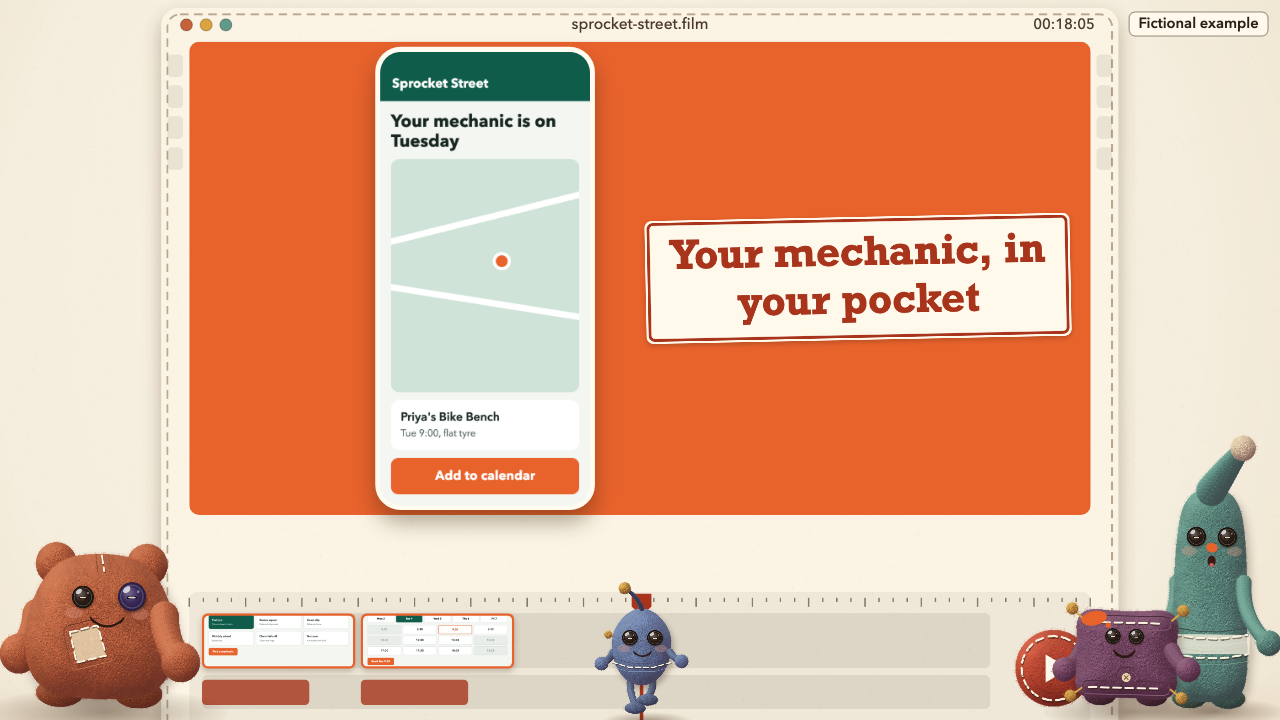
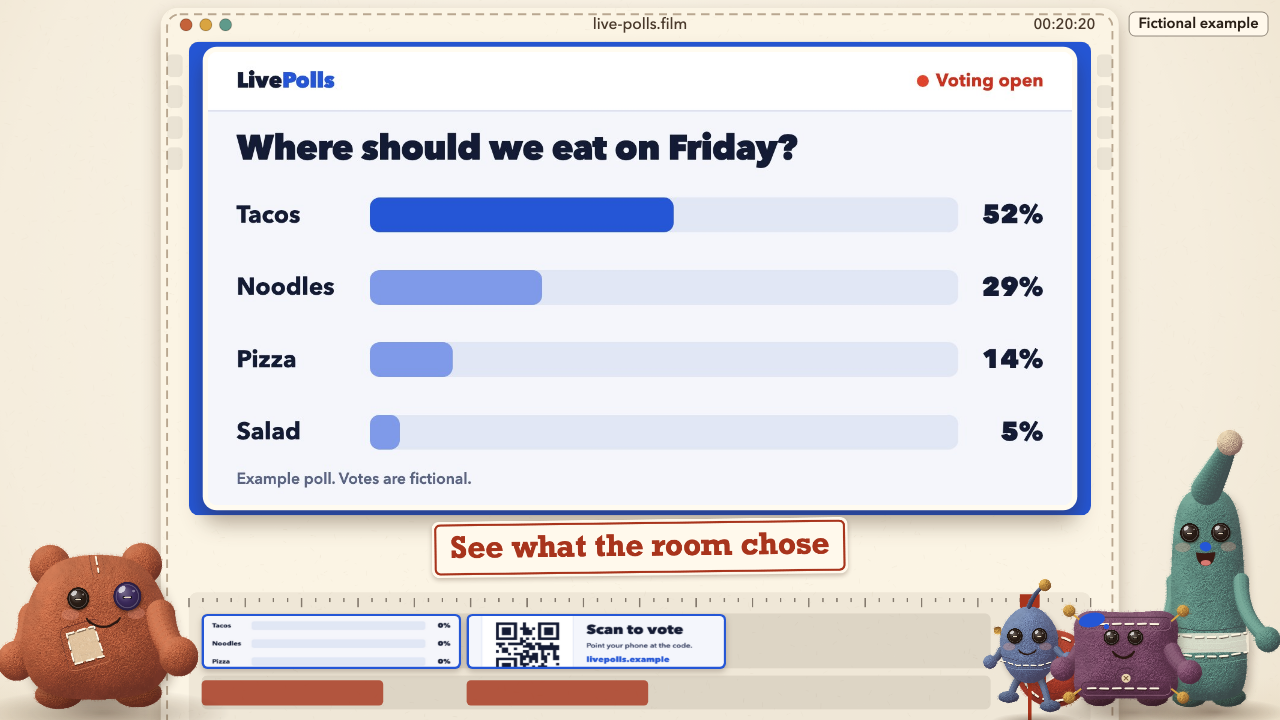
One test run on a fictional brief. Letterforms can differ on systems without the same fonts.
Makes a cute launch film of about 30 to 40 seconds for a founder or indie maker, from their own website or facts. Five soft felt toys build the product's film live inside an animated editor, showing its real screenshots and real outputs, then end on its logo and address. Output is a 1920x1080, 30 fps, H.264 yuv420p MP4 under 25 MB in English or Chinese, an editable HTML film scrubbable in a browser, and a storyboard. Silent by default, with on-screen captions and an optional supplied music file. Needs no image, video or audio model. Use when someone asks for a launch video, product film, demo teaser, Product Hunt or social launch clip, or a cute or plush product video made from real screens.
What it must pass before delivery
node scripts/check.mjs film.mp4exits 0, with--real --brand "Name"for a real productnode scripts/check.mjs film.htmlandnode scripts/drive.mjs film.htmlexit 0- I extracted real frames from the final MP4 and opened them, including the first 3 seconds and each screen
- Every screen in the film is real product material, or a labelled placeholder I have told the user about
- Every caption and the line are true of the product, in the user's facts, with no invented features or numbers
- One language throughout, apart from product terms
- The logo and address are right on the last frame
- Every assumed value is listed for the user
Read the full SKILL.md
---
name: soft-crew
description: Makes a cute launch film of about 30 to 40 seconds for a founder or indie maker, from their own website or facts. Five soft felt toys build the product's film live inside an animated editor, showing its real screenshots and real outputs, then end on its logo and address. Output is a 1920x1080, 30 fps, H.264 yuv420p MP4 under 25 MB in English or Chinese, an editable HTML film scrubbable in a browser, and a storyboard. Silent by default, with on-screen captions and an optional supplied music file. Needs no image, video or audio model. Use when someone asks for a launch video, product film, demo teaser, Product Hunt or social launch clip, or a cute or plush product video made from real screens.
version: 1.0.0
---

# Soft Crew

`assets/film.html` is the whole film engine. Every frame is a pure function of its number, drawn on one canvas with `window.renderFrame(n)`. The characters, their jokes, the timing and the layout are already in the file. Your job is to gather real material, fill one brief, render, and look. You never redraw the crew or rewrite the story.

Read `references/style.md` if you need the exact tokens or the reasoning behind a rule. You do not need to read the engine's source.

**Open source first.** Lemo-Opuscar's brick-toy style (a film style, MIT licensed, listed on SkillLift) is the nearest open-source alternative. It is a different look, built from toy bricks and not soft felt. If the user prefers bricks, or wants that project's own tooling, tell them it exists and point them to its listing.

## The crew

| Name (zh) | Body | Job | Running joke |
|---|---|---|---|
| Tug (阿拽) | Wide rust potato, repair patch, mismatched buttons | Hauls a screen in on a rope | Pulls too hard, falls on its back, and the rope lands on its head |
| Dab (小抹) | Tall teal sock with a floppy tip | Paints the product's colour across the frame | Stretches to reach, then a drop lands on its nose |
| Thump (咚咚) | Square plum cushion with tassels | Rides a stamp down to stamp every caption | Hops about the whole film and shakes the camera |
| Tick (嘀嗒) | Small blue egg on long legs with an aerial | Runs the timeline and pushes Play | Gets flung off the end of the timeline |
| Late (迟迟) | Long pink bolster, big ears, flying scarf | Brings things | Always late; arrives with five coffees after the group photo |

## Inputs to ask for

Ask once, in one message, for whatever the brief does not give.

1. Product name.
2. One line saying what it does, in their words.
3. 3 to 6 real screenshots or real outputs, or the website to capture them from. If the product's point is that something changes (votes rising, a build finishing, a repair moving on), ask for a screen recording or a page that can play. See "Live screens".
4. The address to end on.
5. Language: English or Chinese. One language per film.
6. Optional: logo file, product colour, a supplied music file they have the right to use.

If the brief supplies no screens and no website, ask for them **once**. If nobody answers, build with labelled placeholder cards, and say so at the top of your delivery note.

## Steps

1. **Get the real material.** From a website: `node scripts/shoot.mjs https://their.site/page screens/a.png --size 1440x900` (a few seconds each; use `--size 390x844 --dsf 3` for a phone view). `shoot.mjs` takes an address, a plain path, or a `file://` path. Choose screens that show the product doing its job, with the result visible. Open each one. Only material that really is the product may appear.

   **Screens you build yourself** (a page the product really shows, or a fictional demo): build at **1440x740**, which fills the preview exactly, and capture with `--size 1440x740 --dsf 1.5`. A phone is 390x844. Keep body type at 20 px or larger at those sizes, or it reads under 14 px on film.

   **Fictional demos:** here every screen is made up, and that is allowed only because the film carries the label, so set `fictional` to `true`, and say so on any figure on screen. For anything real, a screen you drew counts as invented: it must be a capture of the product, or a rebuild the owner confirms matches it.
2. **Write `brief.json`** using the fields below.
3. **Build:** `node scripts/build.mjs brief.json out/film.html`. It rejects anything over a limit and says which.
4. **Short test first:** `nice -n 10 node scripts/render.mjs out/film.html out/test.mp4 --short`. About 20 seconds. It is a real cut: the opening, every screen, the ending. Add `--scale 0.5` while iterating (about 8 seconds), but readability is only measured at 1280 wide or more.
5. **Check it:** `node scripts/check.mjs out/test.mp4 --short`. Fix what it reports, in the brief, and go back to step 3.
6. **Look at real frames from that MP4.** See "Viewing" below. To re-render one frame: `node scripts/render.mjs out/film.html frame.png --frame 300`, under 5 seconds.
7. **Render the film:** `nice -n 10 node scripts/render.mjs out/film.html out/film.mp4`. About 30 seconds on a laptop for a 38-second film, and it prints the real time. Also writes `out/storyboard.html`, and prints every beat's frames and time, which you need for viewing. Run one render at a time, in the foreground.
8. **Check the film:** `node scripts/check.mjs out/film.mp4 --real --brand "Name"` for a real product. Drop `--real` only for a labelled fictional demo or a film with placeholder cards. Keep `--brand` for every film, fictional too; it prints a line when the name matches. Then `node scripts/check.mjs out/film.html`. Then `node scripts/drive.mjs out/film.html` to drive the scrubber, Play, and reduced motion.
9. **View frames from the final MP4,** then deliver.

Install Playwright with `npm install playwright` (set `NODE_PATH` to the `node_modules` that holds it if it is elsewhere). `render.mjs`, `shoot.mjs`, `live.mjs` and `drive.mjs` need it. `check.mjs` and `build.mjs` need only Node and ffmpeg. Every script closes its own browser.

Length follows the screens: 3 give 30.5 s, 4 give 33.5 s, 5 give 37.5 s, 6 give 40.5 s, and a live screen adds up to about 1.5 s. You do not set it.

## Brief fields

| Field | Meaning | Limit | If the brief is thin |
|---|---|---|---|
| `lang` | Film language | `en` or `zh` | The language of the request |
| `name` | Product name, stamped large and on the end card | en 28, zh 14 characters | Use the name given, exactly. No name: ask; if nobody answers, stop, because a film cannot end on no name |
| `line` | What it does, under the name | en 70, zh 36 | Restate the user's own words or the site's own headline. Never add claims, audiences or numbers. List it as inferred |
| `url` | Address on the end card | 40, no `https://` | Use the real one. No real link: use the product name as plain text, and say so |
| `accent` | Dab's paint, and the background behind later screens | `#RRGGBB` | Sample the product's main colour from its screens. None: leave it out for `#D9532C` |
| `logo` | Image path shown above the name on the end card | PNG, JPG, WebP or SVG with a transparent or plain ground | Leave out; the name becomes a large wordmark. Never draw a logo for them |
| `fictional` | Shows a label on every frame | `true` only for a made-up demo | `false` for anything real |
| `fictionalLabel` | Words on that label | en 22, zh 11; must contain "Fictional" or 虚构 | Keep "Fictional example" or 虚构示例 |
| `screens` | The real material, in film order | 3 to 6 entries | Fewer than 3 real ones: fill with placeholder cards and say so. More than 6: choose the ones that show results |
| `screens[].file` | Image path, relative to the brief | PNG, JPG, WebP or SVG | Capture with `shoot.mjs`. Shapes from a portrait phone to a very wide dashboard are handled |
| `screens[].sequence` | Folder of numbered images: a live screen played through its hold, in place of `file` | 2 to 60 images, sorted by name | Leave out for a still. Use it when the product's point is that something changes. See "Live screens" |
| `screens[].moments` | Fractions of a live screen's play where something happens. The crew gasps at each and cheers at the last | list of 0 to 1 | `[1]`: a single cheer at the end. For a change you can see, watch the frames and put it where it happens |
| `screens[].caption` | What this screen shows, stamped beside it | en 44, zh 22 | Restate what is visibly on that screen, in plain words. Never name a feature the screen does not show, and no invented numbers |
| `screens[].crop` | Enlarges part of the image: `[x,y,w,h]` as fractions | each 0 to 1 | Leave out, unless the checker says unreadable. Then crop to the part that matters |
| `screens[].placeholder` | `true` for a labelled card when no screen exists | Use instead of `file` | Use only after asking once. The card reads "Placeholder: real screen goes here" and passes the checker, with a warning you must pass on. `--real` refuses it |

Which screen gets which joke is fixed by how many you supply: 3 are rope, paint, scrub; 4 are rope, paint, scrub, Late; 5 are rope, stamp, paint, scrub, Late; 6 add a second rope last. **Order, at any count:** first the screen a stranger understands at once; last the best result, because the last screen has the longest hold, unless a live screen exists, which is the hero of the premiere wherever it sits. With 3 screens that means: what it is, how it works, the result. Screens do not have to keep the brief's order.

Each joke brings its own trouble and fix during the hold: a pin pops and Tug stomps the screen straight; a paint drip runs from Thump to Dab's nose; Tick lands on Dab's head; a crooked caption gets knocked straight; Late delivers the screen upside down. The crew stays off the screen while this happens, and you do not need to arrange anything.

Example:

```json
{"lang":"en","name":"Acme Notes","line":"Turns a meeting into a to-do list.","url":"acmenotes.example","accent":"#2F6FEB",
 "screens":[{"file":"screens/a.png","caption":"Paste your meeting notes"},
            {"file":"screens/b.png","caption":"Get a clean to-do list"},
            {"file":"screens/c.png","caption":"Send it to your team"}]}
```

## Live screens

A still cannot show "as it happens". If that is the promise, use a live screen. There are two routes, and both end as a folder for `screens[].sequence`.

**1. A page with a hook.** Give the page `window.setScreenFrame(n)`, with `n` from 0 to frames minus 1. It must draw that frame at once from `n` alone, with no timers, animation or randomness. Then: `node scripts/live.mjs screens/results-live.html screens/results-seq --size 1440x740 --frames 45`, about 0.1 s a frame. It refuses a page with no hook, a page that draws differently on a second try, and a page that never changes.

```html
<script>
window.setScreenFrame = (n) => {
  const q = n / (window.SCREEN_FRAMES - 1);          // 0 to 1
  document.querySelector('#bar').style.width = q * 52 + '%';
  document.querySelector('#pct').textContent = Math.round(q * 52) + '%';
};
</script>
```

**2. Real captures.** Extract frames from a real screen recording: `ffmpeg -i demo.mov -vf "fps=15,scale=1440:-2" -t 3 -threads 2 screens/seq/frame-%03d.jpg`. Keep it to 60 images.

Brief entry: `{"sequence":"screens/results-seq","caption":"See what the room chose","moments":[0.45,0.95]}`. The screen plays once through its hold, starts on its first frame, and ends on its last. A live screen also plays out as the hero of the premiere. Only one needs to be live, and two is the sensible most: each one adds up to 5 MB to `film.html`. The numbers it plays must be real, or the film must be labelled fictional. Put every moment in the sequence where a stranger would see the change, and open a frame from each moment.

## What the checker reads

`check.mjs` works from any folder on any MP4, and reads a report the renderer stores inside the file. It measures what a viewer sees: type overflowing, near the frame edge or under a character; a character over a screen during its clear moment; a character over a screen on any frame of the premiere; a live screen that barely changes; over 2.6 s with no gag or reaction; a screen clear for under 1.8 s; frozen scenes; blank filler; a weak first 3 seconds; washed-out screens; common text under 8 px tall at film size; low contrast measured in the real frame; mixed languages; template or sample text. A file without a report, for example one you re-encoded, gets the general checks only and a warning, which is not a pass on layout. So do not re-encode after rendering. `--crf` and `--music` are in the renderer for that reason.

**When it says unreadable:** set a `crop`, or use a screen with larger type. **Long name:** it wraps to two lines and shrinks to the size floor. If the checker says a character sits on it, shorten the name or line.

## Viewing

Extract real frames from the final MP4 and open each one: `ffmpeg -ss 2.2 -i out/film.mp4 -frames:v 1 -threads 2 v1.png`. At least one frame every second, using the beat times the render prints. Look hardest at 0.3 s, 1.2 s, the swing, drip or flip in each hold, the premiere, and the last frame. **The checker cannot judge charm or truth.** Only you can see whether the first three seconds would make a stranger smile, whether every caption is true of its screen, and whether any screen reads wrongly.

Test unusual material before trusting it: a dark product, a portrait phone and a very wide dashboard each lay out differently.

## Music

Silent by default, with captions carrying the meaning. If the user supplies a file they have the right to use: `node scripts/render.mjs out/film.html out/film.mp4 --music song.mp3 --music-start 0 --music-gain 0.7`. It fades in and out and trims to the film. The motion is cut at 120 BPM with a beat every 15 frames, so a 120 BPM track lands on the jokes; use `--music-start` to line up its first beat. Never generate music or run any audio model. Do not add music nobody supplied.

## When things are missing

- **Thin brief:** restate the user's facts, never invent, and list every inferred line when you deliver.
- **Nobody can answer:** proceed with the fallbacks in the table and list your assumptions.
- **No real link:** the name as plain text in `url`, and say so.
- **A different length:** change the number of screens, within 30.5 to 40.5 s. For a shorter clip, use `--from` and `--to` with frame numbers from the storyboard, and tell the user it no longer meets the launch-film length. Do not cut the end card.
- **Wants a change in the jokes or characters:** that is an engine edit. Say so; the brief does not cover it.
- **Fails the render:** `--crf 25` makes the file smaller. The renderer already raises it by itself above 25 MB.

Never invent customers, numbers, testimonials or credentials, and never show a screen you made up as the product's. Fictional demos carry the label.

## Deliverables

- `film.mp4`: 1920x1080, 30 fps, H.264 yuv420p, under 25 MB.
- `film.html`: the editable film. Opens by double-click, needs no server and makes no requests. Scrub with the slider or the arrow keys; Space plays. Edit the JSON in the `film-config` block to change text.
- `storyboard.html`: every beat, with a real frame, its timing, and what happens.
- A short list of inferred values and any placeholder cards.

## Before delivering

- [ ] `node scripts/check.mjs film.mp4` exits 0, with `--real --brand "Name"` for a real product
- [ ] `node scripts/check.mjs film.html` and `node scripts/drive.mjs film.html` exit 0
- [ ] I extracted real frames from the final MP4 and opened them, including the first 3 seconds and each screen
- [ ] Every screen in the film is real product material, or a labelled placeholder I have told the user about
- [ ] Every caption and the line are true of the product, in the user's facts, with no invented features or numbers
- [ ] One language throughout, apart from product terms
- [ ] The logo and address are right on the last frame
- [ ] Every assumed value is listed for the user

## When not to use it

- A serious, formal or sensitive subject, where soft toys would be wrong: medical results, grief, legal.
- A product with nothing to show yet: this film is built on real screens.
- A demo that must teach step by step. This is a 35-second teaser.
- Anything needing voiceover or generated music.
- A wish for a known character or a brand mascot in the crew: the crew is fixed and original.

## Requirements

Node 18 or later and ffmpeg with libx264. Playwright for rendering, capture and the drive test. Measured on an M-series Mac, with other work running: full 1080p film 25 to 35 s; short test about 25 s; one frame under 5 s; checker about 15 s. No network, no account, no model. Fonts are system stacks with fallbacks.

