

Free
Transit Atlas
Turn any system into a transit map you can search, zoom and question, with every unknown still marked.
Install
Install the "Transit Atlas" skill into ~/.claude/skills/transit-atlas.
Download each file and save it under that folder:
https://skilllift.pages.dev/packs/transit-atlas/SKILL.md → SKILL.md
https://skilllift.pages.dev/packs/transit-atlas/references/style.md → references/style.md
https://skilllift.pages.dev/packs/transit-atlas/references/schema.md → references/schema.md
https://skilllift.pages.dev/packs/transit-atlas/assets/template.html → assets/template.html
https://skilllift.pages.dev/packs/transit-atlas/assets/ui.en.json → assets/ui.en.json
https://skilllift.pages.dev/packs/transit-atlas/assets/ui.zh.json → assets/ui.zh.json
https://skilllift.pages.dev/packs/transit-atlas/assets/starter.system.json → assets/starter.system.json
https://skilllift.pages.dev/packs/transit-atlas/scripts/build.mjs → scripts/build.mjs
https://skilllift.pages.dev/packs/transit-atlas/scripts/check.mjs → scripts/check.mjs
https://skilllift.pages.dev/packs/transit-atlas/scripts/handoff.mjs → scripts/handoff.mjs
https://skilllift.pages.dev/packs/transit-atlas/scripts/drive.mjs → scripts/drive.mjs
Then read SKILL.md, tell me what it does, and remind me to start a new session.
Unpack it into ~/.claude/skills
Same skill, different brief
The left is the preview. The right was made by a separate agent from a different brief, using only the installed skill and without seeing the preview.
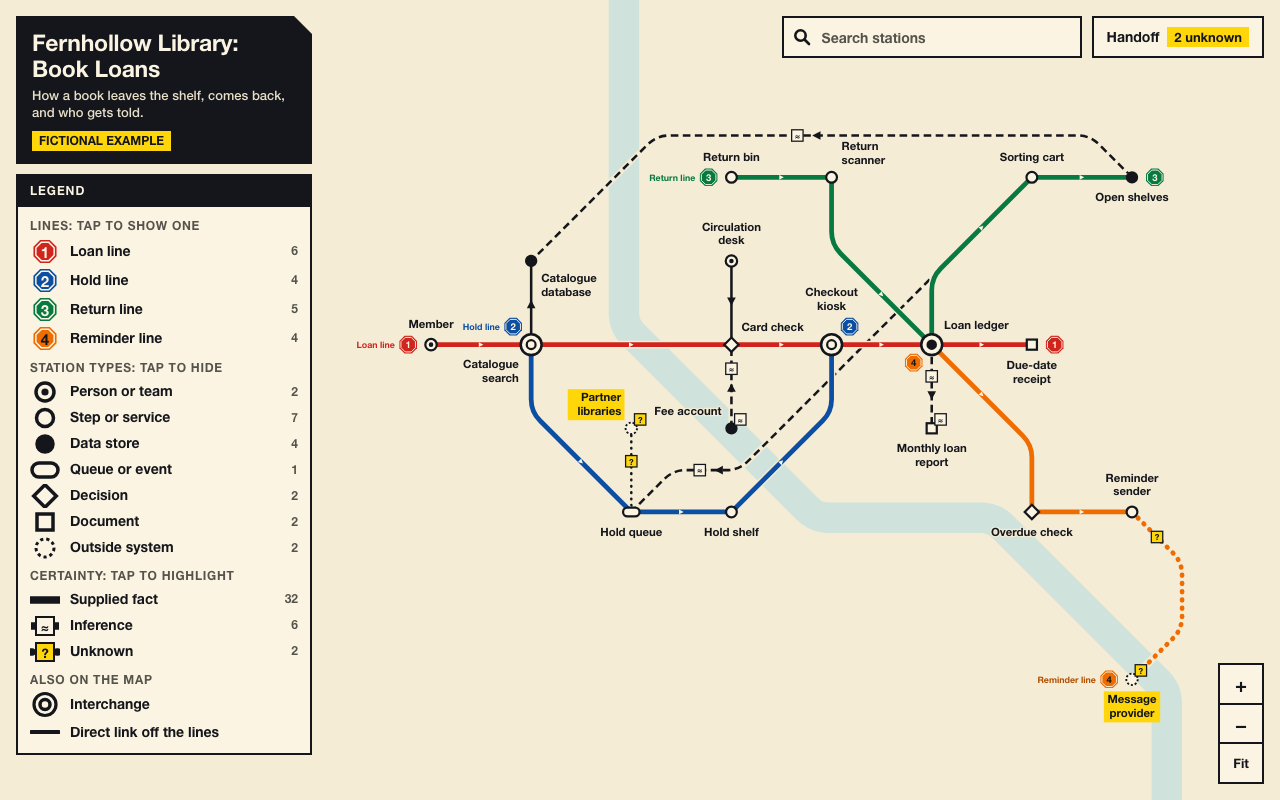
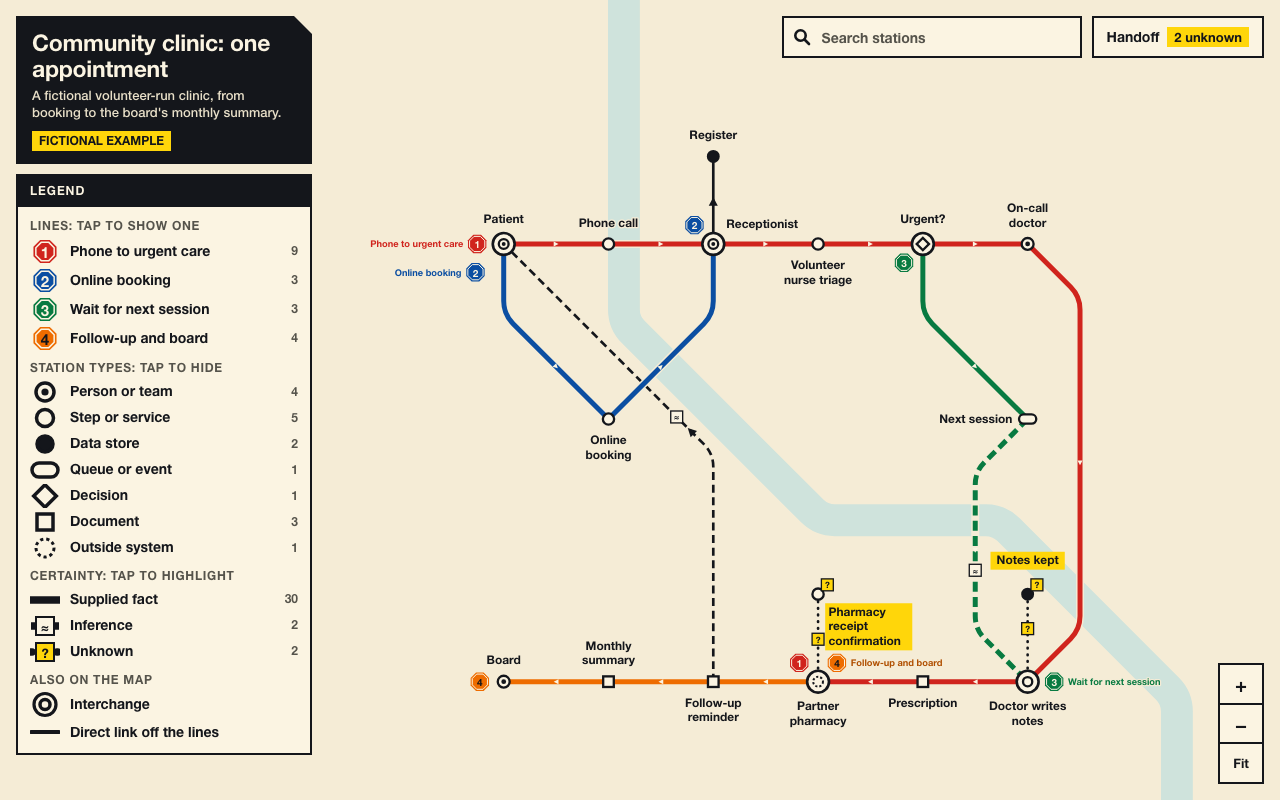
One test run on a fictional brief. Letterforms can differ on systems without the same fonts.
Turns a description of a system (architecture, data flow, workflow or lifecycle) into one offline, interactive HTML system map drawn as a city transit map, with search, zoom and pan, click-to-focus with a side dossier of relationships, and a filter by node type. The handoff separates supplied facts, inferences and unknowns, and unknowns stay marked on the map. Use when someone asks for an architecture diagram, system map, data-flow map or process map they can explore, or asks for a transit or subway style diagram.
What it must pass before delivery
check.mjspasses on the final file.drive.mjspasses, with motion on and reduced.- I looked at every screenshot, desktop and phone, and the map reads.
- Every
fact, and everynote, traces to something the user supplied. - Every
inferredhas a basis, and everyunknownhas a question. - Unknowns are visible on the map, one marker is on the phone's opening screen, and each open question is listed once in the handoff.
- There are no invented names, numbers, customers or links.
- All the text is in one language, and a fictional map is labelled.
- The handoff separates facts, inferences and unknowns.
Read the full SKILL.md
---
name: transit-atlas
description: Turns a description of a system (architecture, data flow, workflow or lifecycle) into one offline, interactive HTML system map drawn as a city transit map, with search, zoom and pan, click-to-focus with a side dossier of relationships, and a filter by node type. The handoff separates supplied facts, inferences and unknowns, and unknowns stay marked on the map. Use when someone asks for an architecture diagram, system map, data-flow map or process map they can explore, or asks for a transit or subway style diagram.
version: 1.0.0
---

# Transit Atlas

You write one JSON object. The look and the layout are computed from it, so every system comes out in the same style. You never set a position or a colour, and you never edit the template.

The schema and limits are in `references/schema.md`. The tokens and rules are in `references/style.md`.

## Inputs to ask for

Ask once, in one message, and only for what the brief does not already give.

Required:
1. What the system is, in the user's own description. Pasted notes, a document or code are all fine.
2. Nothing else is required.

Optional:
3. Who will read the map. It changes which journeys you make lines and how you name them. There is no field for it, and if nobody says, proceed without guessing.
4. The journeys that matter most. These become lines.
5. Language: English or Chinese. Default to the language of the brief.
6. Whether the map is of a real system or a fictional example.

## Steps

1. **Sort every statement.** List what the user actually said (`fact`), what you worked out from it (`inferred`, with a `basis` saying why), and what is missing (`unknown`, with a `basis` phrased as the question to ask).
2. **Choose lines.** Pick up to eight journeys through the system. Each must be a single route with no branches; a branch is another line that shares a station. A loop back to its start is allowed.
3. **Write the JSON.** Copy `assets/starter.system.json` to a working file and fill it. Reads and dependencies are usually edges without a `line`.
4. **Build.** `node /abs/path/to/transit-atlas/scripts/build.mjs /abs/work/system.json /abs/work/map.html`. Under one second. Use absolute paths, because your working file usually lives outside the skill folder. The last argument is the output path, so any name works: pass `/abs/work/index.html` for `index.html`.
5. **Check.** `node /abs/path/to/transit-atlas/scripts/check.mjs /abs/work/map.html`. Fix the JSON and rebuild until it passes. It fails labels that would open below 11 px at Fit on a 1280x800 screen, labels that sit close enough to read as one caption, and labels that cover track. Takes up to about 2 seconds at the 60-station limit.
6. **Drive and look.** `node /abs/path/to/transit-atlas/scripts/drive.mjs /abs/work/map.html /abs/work/shots`. 15 to 40 seconds. It tests search, zoom, pan, focus, dossier, filter and handoff with motion on and reduced, at 1280 and 1440 wide and on a phone. Open every screenshot it writes. If the map tangles, change which journeys are lines, or turn a line into direct links, then rebuild.
7. **Write the handoff.** `node /abs/path/to/transit-atlas/scripts/handoff.mjs /abs/work/map.html` prints the three lists from the file itself. Send them with the map.

## How to record what you know

- **Edge, fact or inferred.** An edge is `fact` when the brief says these two things connect in this direction. Consecutive steps are a fact only when the brief states that order, with "then", "after" or a sequence given as a process. Things merely listed or mentioned next to each other are not: if the brief lists a pharmacy and then a reminder without saying one leads to the other, that edge is `inferred`. Any mechanism the brief does not state (who reads, writes or triggers what) is `inferred`, even if it seems obvious.
- **Edge type for a delivery.** Use `sends` for a message, reminder or item delivered to someone. Use `returns` only when something truly goes back.
- **Actor or process.** If the brief names who, it is an `actor`: a person, role or team. If it names something done, it is a `process`, with `owner` when the brief says who does it. Apply this one test to every station, so similar things look alike. "Nurse triages" is a `process` called triage, owned by the nurse, unless the nurse must also appear as someone others hand work to.
- **Compound questions.** Split a question when someone could answer one part and not the other, or when different people would answer. Each part then gets its own `basis`. "How are notes retained, and who can delete them" is two if the records keeper and the doctor answer separately; keep it as one only when one answer settles both.
- **One open question.** The count is of questions, not of items. Prefer one unknown station. If tracks exist only because of it, mark them `unknown` with the identical `basis` text: they count once, and the handoff lists the question once. Different wording counts as a different question.
- **`note` on a thin brief.** The handoff prints `note` under "Stated in the brief", so it holds only what the brief says. If the brief only names a station, leave `note` out. Your own explanation goes in `basis` on an `inferred` item, never in `note`.
- **Line `role`.** Optional. It appears under Lines in the handoff panel and in `handoff.mjs`, separate from the facts, so it may be your own short description.
- **Physical places.** Choose by what the place does: things wait there to be collected, `queue`; things are kept there, `store`; people do a step there, `process`. A step whose nature is the open question is a `process` with status `unknown`.
- **What a filter click does.** In the legend, a line shows only that line, a station type hides that type, and a certainty level highlights it. Unknown stations stay on the map, named, when their type is hidden. A track's plate hides with its track. Show all resets everything. Clicking a station frames it with everything it connects to. Tell readers this if they will use the filters.

To install Playwright for step 6: `npm install playwright`, then `npx playwright install chromium`. Set `NODE_PATH` to its `node_modules` folder if it lives elsewhere.

## Deliverables

- `map.html`: one file, no outside requests. It opens from disk.
- A handoff message in three separate parts: supplied facts, inferences to confirm, unknowns still open.

## When things are not ideal

- **The brief is thin.** Restate the user's facts in the map and invent nothing. Mark every line you worked out yourself as `inferred`, and list them in the handoff. A small honest map beats a full invented one.
- **Nobody can answer.** Proceed. Keep the item as `unknown` with its question, list your assumptions as `inferred`, and say so in the handoff. Never promote an unknown to a fact to tidy the map.
- **The user wants more or less detail.** Long chains fold automatically, so a typical map of 10 to 20 stations opens readable. Every station on a chain still takes one column, and every extra line can take a row, so if `check.mjs` fails the reading size, split into one overview and one map per area. For less, merge steps and drop to fewer lines. The hard limit is 60 stations, 8 lines, 120 edges.
- **There is no real link.** The map holds no links and needs none. If a document or owner is mentioned but not named, record that as an unknown; never make up a URL, a name, a number or a customer.
- **Fictional material.** Set `meta.fictional` to true. The plate then says so.
- **Language.** Write everything in one language. In a Chinese map, a product name that must stay in Latin letters goes in `meta.keepLatin`.
- **check.mjs reports overlapping or caption-like labels.** Shorten the labels it names, or change which journeys are lines. You cannot set positions.
- **A backward link.** Keep it direct if it is a real link. The router sends it along a clear channel; if it still looks tangled after you view it, ask whether it should be a line of its own.

## Before delivering

- [ ] `check.mjs` passes on the final file.
- [ ] `drive.mjs` passes, with motion on and reduced.
- [ ] I looked at every screenshot, desktop and phone, and the map reads.
- [ ] Every `fact`, and every `note`, traces to something the user supplied.
- [ ] Every `inferred` has a basis, and every `unknown` has a question.
- [ ] Unknowns are visible on the map, one marker is on the phone's opening screen, and each open question is listed once in the handoff.
- [ ] There are no invented names, numbers, customers or links.
- [ ] All the text is in one language, and a fictional map is labelled.
- [ ] The handoff separates facts, inferences and unknowns.

## When not to use it

- For exact sequence or timing between services: a sequence diagram shows that better.
- For a precise database schema, or a system over 60 stations that cannot be split.
- When the reader needs a printed page: this map's value is in the interaction.
- When the system is really a simple straight list of steps: a list will do.

## Requirements

- Node 18 or newer, for the build and check scripts, which have no dependencies.
- Playwright with Chromium, only for `scripts/drive.mjs`.
- The result runs in any current browser, with no server and no network.

