

Free
True CV
Turn your notes and a job ad into a beautifully set resume you can edit in Word, with every line traced to what you actually did. Not yet opened in real Word, and the PDF comes from a matching page: open the Word file once before sending.
Install
Install the "True CV" skill into ~/.claude/skills/true-cv.
Download each file and save it under that folder:
https://skilllift.pages.dev/packs/true-cv/SKILL.md → SKILL.md
https://skilllift.pages.dev/packs/true-cv/NOTICE.txt → NOTICE.txt
https://skilllift.pages.dev/packs/true-cv/references/style.md → references/style.md
https://skilllift.pages.dev/packs/true-cv/assets/designs.json → assets/designs.json
https://skilllift.pages.dev/packs/true-cv/assets/resume-template.json → assets/resume-template.json
https://skilllift.pages.dev/packs/true-cv/scripts/build.mjs → scripts/build.mjs
https://skilllift.pages.dev/packs/true-cv/scripts/pdf.mjs → scripts/pdf.mjs
https://skilllift.pages.dev/packs/true-cv/scripts/check.mjs → scripts/check.mjs
Then read SKILL.md, tell me what it does, and remind me to start a new session.
Unpack it into ~/.claude/skills
Same skill, different brief
The left is the preview. The right was made by a separate agent from a different brief, using only the installed skill and without seeing the preview.
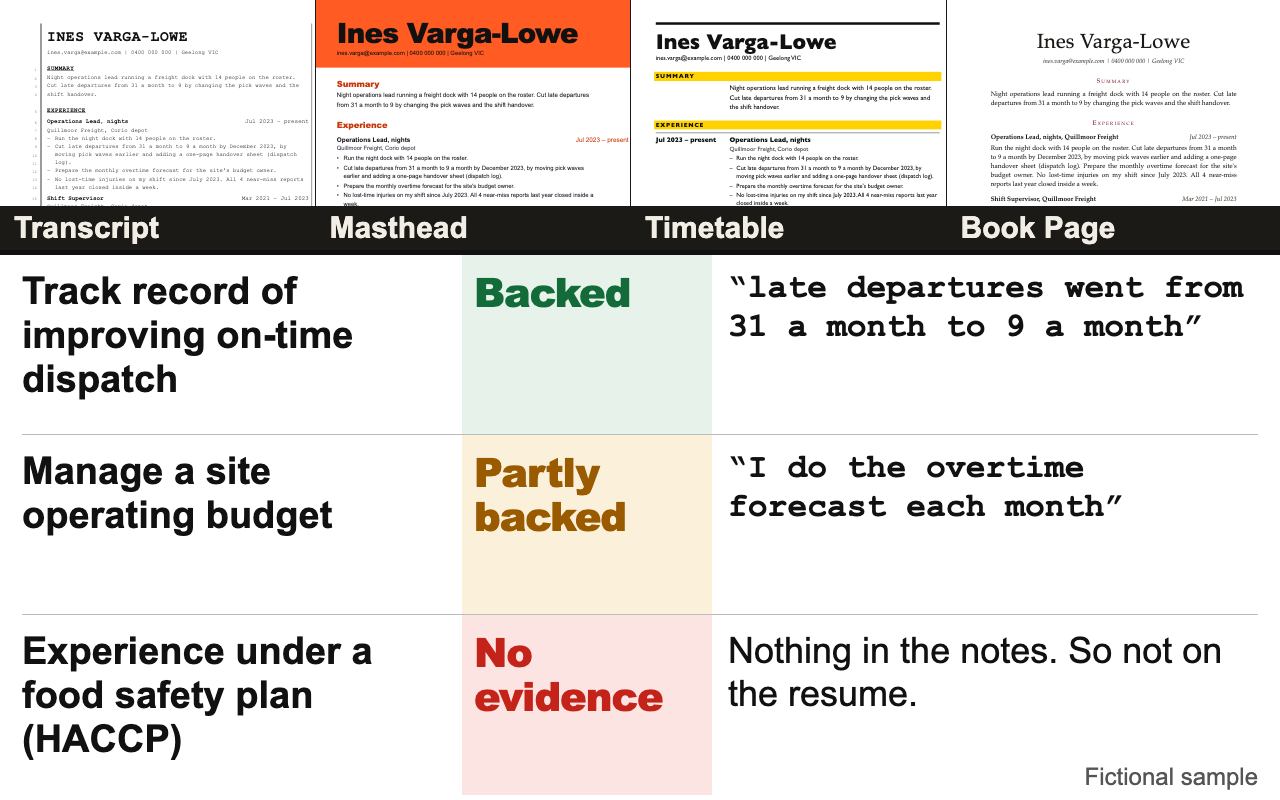
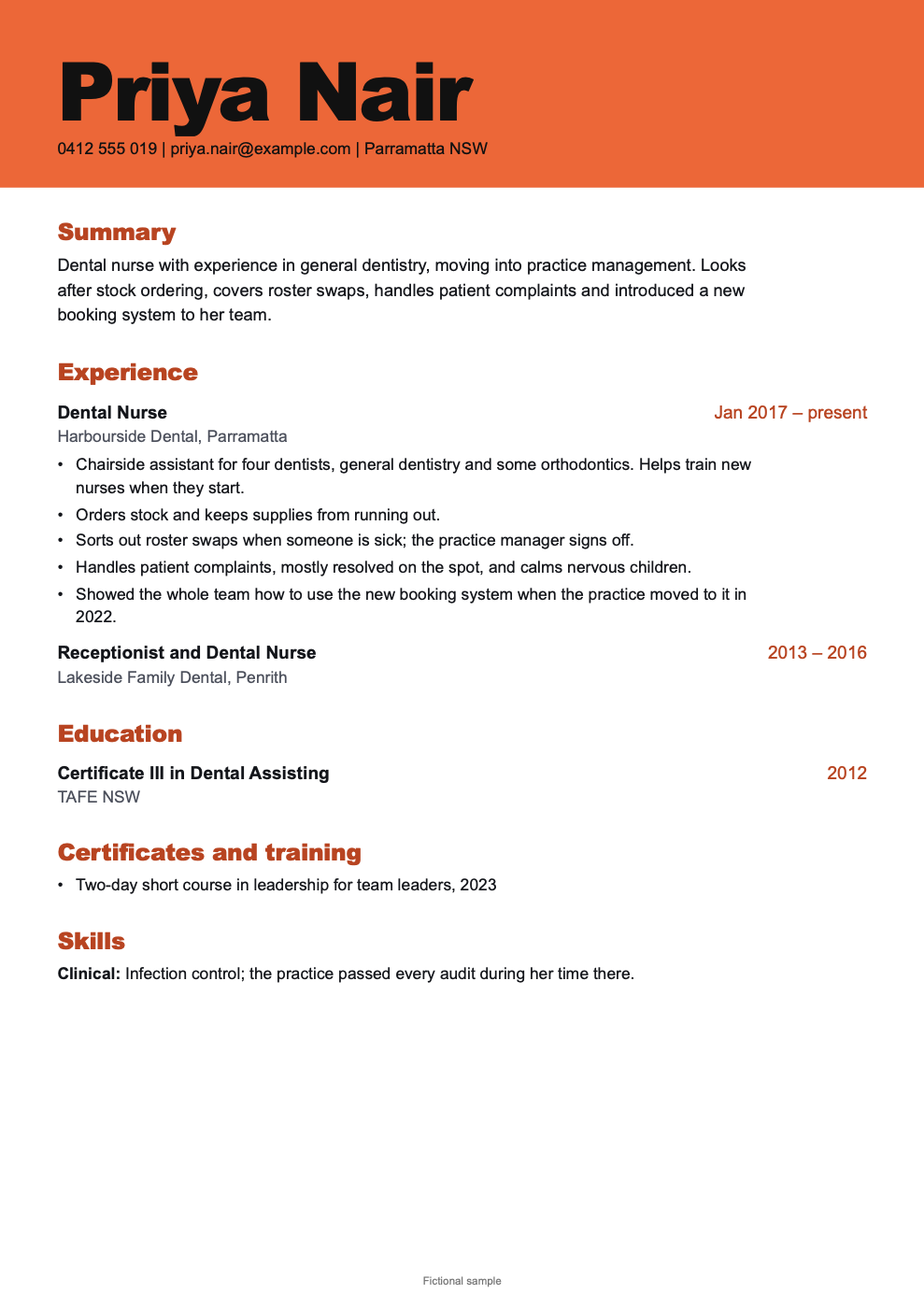
One test run on a fictional brief. Letterforms can differ on systems without the same fonts.
Turns someone's work notes or old resume, plus a target job, into a beautifully typeset resume they can keep editing in Word, without any made-up facts. Delivers a native DOCX with real styles and no layout tables or text boxes, a matching PDF, a plain text copy, and a private evidence sheet listing each job requirement as backed, partly backed or no evidence, with the line from the notes that proves it. Four designs, English and Chinese. Use when someone asks for a resume or CV, wants to tailor one to a job, wants to know how well they fit a job ad, or asks for this pack by name.
What it must pass before delivery
node scripts/check.mjs outputexits 0, and you read everynote:.- Convert the Word file with whatever is here and look at it:
soffice --headless --convert-to pdfif present; otherwisetextutil -convert txton a Mac to confirm it reads in the right order. - You opened the PDF as an image and looked at every page: name not cut off, no heading alone at a page bottom, nothing overflowing.
- You read the resume once as the person's old boss would. Would any line make them raise an eyebrow? Then change it or ask.
- Every number traces to a note. Every requirement has a standing.
- Every action verb is no stronger than its note, and you read each line for who did the thing.
- Questions nobody answered are at the end of your handover, under "Still open".
- No fictional-sample label on a real person's file (
sampleLabelis empty). - Tell them plainly: the Word file hasn't been opened in real Word, the PDF came from a matching page unless
pdfEnginesayslibreoffice, and they should open the Word file once before sending.
Read the full SKILL.md
---
name: true-cv
description: Turns someone's work notes or old resume, plus a target job, into a beautifully typeset resume they can keep editing in Word, without any made-up facts. Delivers a native DOCX with real styles and no layout tables or text boxes, a matching PDF, a plain text copy, and a private evidence sheet listing each job requirement as backed, partly backed or no evidence, with the line from the notes that proves it. Four designs, English and Chinese. Use when someone asks for a resume or CV, wants to tailor one to a job, wants to know how well they fit a job ad, or asks for this pack by name.
version: 1.1.0
---

# True CV

A resume where every line can be traced to something the person actually said. Your job is to read, sort, ask and write. The look lives in `assets/designs.json` and `scripts/build.mjs`. `scripts/check.mjs` refuses anything invented.

## The rules that never bend

1. **Nothing invented.** Every line on the resume comes from the person's notes or their answers.
2. **Numbers only if they gave them.** Never estimate, round up or "make it more impressive". If there is no number, write the line without one.
3. **Ask about gaps. Never fill them.**
4. **The verb is no stronger than the note.** If she showed everybody how to use a system, she did not "introduce" it. If he helped, he did not "lead". Use the note's own verb, or the plainest true one.
5. **Never imply a qualification they lack.** A two-day course is a two-day course, not a certification. Helping with a budget is not managing one. If they ask you to claim it anyway, say plainly that you won't, and offer the true version.
6. **No skill bars, ratings, percentages, or sidebars.** No photo or personal details such as date of birth, ID number, marital status, unless the person asks.

## For someone who just wants the result

Most people using this are not technical. Do all the setup yourself. Never mention JSON, scripts, styles, Node or Playwright. Say "your resume" and "the proof sheet". At the end, hand over the files and say what each is for, in one line each.

Ask in plain words, once, in one message:

1. "Paste whatever you've got: an old resume, notes, a list of what you've done. Messy is fine."
2. "Paste the job ad you're going for. If there isn't one yet, tell me the kind of job."
3. "What phone, email and city should go at the top?"
4. "Which look do you want?" Show the four names with their one-line descriptions, and offer `preview/poster.png`. If they don't care, use Masthead for roles where standing out helps, Timetable for a long work history, Book Page for senior or academic work, Transcript if they like the idea of a plain record.

Language: follow the job ad. Paper: A4, unless they are applying in the US or Canada (then Letter). Chinese is always A4.

## Steps

1. Make a working folder for this person. Save their notes **word for word** as `notes.txt`, one thought per line. Don't tidy them: the proof sheet quotes these lines. Save the job ad as `job-ad.txt`.
2. List the job ad's requirements, in its own words, at most 10. For each, search the notes and mark it:
   - `backed`: a line in the notes plainly shows it.
   - `partly`: a line shows something near it, but less. Say what is missing.
   - `none`: nothing in the notes.
3. **Ask before writing.** Show the person the `partly` and `none` items as plain questions, the most important 5 at most. For example: "The ad wants someone who has managed a budget. Your notes say you do the overtime forecast. Have you ever approved spending yourself?" Add each answer to the end of `notes.txt` as a new line, in their words. Answers are evidence. Your guesses are not. Then re-mark the requirements.
4. Copy `assets/resume-template.json` to `resume.json` and fill it in. Every `src` lists the `notes.txt` line numbers that prove the text. Limits are in the template, and the build stops if a slot is too long. Where a real thing is near what the job wants, use the job's plain words only if they are true. Check each action verb against its note, from weakest to strongest: *helped, used, showed < ran day to day, trained < led, managed < introduced, built, set up, owned < cut, improved, grew*. Ask who did it: "IT did the system side" means the system is not hers. Add `mustNotClaim` terms for every requirement they don't meet.
5. Build all of it:
   ```
   node scripts/build.mjs resume.json --notes notes.txt --out output --design masthead
   ```
   Takes under 10 seconds. To see all four, use `--design all`. Designs: `transcript`, `masthead`, `timetable`, `bookpage`.
6. Check it, and fix what it reports:
   ```
   node scripts/check.mjs output
   ```
   Point it at the same folder for one design or for `--design all`: it checks each design inside. A `note:` means re-read that line against its source. Don't dismiss it without looking.

   It fails a line whose verb is stronger than the note it cites, such as "introduced" when the note says "showed". Fix the verb. Only if the note truly backs it in other words, add `"verbOk"` to that line with the words copied from the note. This is a word check and it cannot tell who did the thing ("Dale introduced it, I helped" still passes), so reading each line against its note is still your job.

   It ends by listing every question nobody has answered. Those go at the end of your handover, as they are.
7. Look at the work (see "Before delivering"). Then hand over the Word file, the PDF, the plain text copy and the proof sheet.

## The PDF

`build.mjs` uses LibreOffice if it is installed, which turns the Word file itself into the PDF. Otherwise it prints a matching page with Playwright. If neither is there, install Playwright yourself in a temporary folder: `npm install playwright && npx playwright install chromium`, then set `NODE_PATH` to that folder's `node_modules`. The person should not have to do this.

Never open or script Word, Excel, Pages or any other desktop app to make or check these files. If the person edits the Word file later, the PDF does not update by itself: they use File, Save As, PDF in Word, or you rebuild.

## What has and hasn't been tested

Tell the person this in plain words, every time:

- **The Word file has not been opened in real Word.** It has been checked by reading its contents, not by looking at it in Word, here or when this pack was built. Fonts, line breaks and shading could look different there.
- **Without LibreOffice, the PDF comes from a matching HTML page, not from the Word file.** It uses the same words and the same sizes, but it could differ from the Word file. `manifest.json` says which: `pdfEngine` is `page` or `libreoffice`.
- **Open the Word file once before sending it.** If it matters that the PDF matches, save the PDF from Word yourself.

## Editing later

Tell the person: to add a line, click at the end of a bullet and press Enter. Everything is set with named styles (Title, Heading 1, Heading 2, List Bullet, Body Text), so changing a style changes every use of it.

## Chinese resumes

Write `"lang": "zh"`. Then follow Chinese convention:
- Order: 姓名 and contact, 求职意向 with 期望城市, then 工作经历 and 项目经历, 教育背景. For someone with under three years of work, put 教育背景 first through `order`. 项目经历 is expected, so use it whenever the notes support it.
- Dates are `2021.03 – 2024.06`, with `至今`.
- Full-width punctuation. No words like 精通 or 熟练 unless they said so themselves.
- No photo, 身份证号, 出生日期, 籍贯, 民族, 婚育, 政治面貌, 身高体重, unless they ask. Some Chinese employers do expect a photo: tell them it is left out, and that they can ask for it. If they ask, set `allowPersonalDetails: true` and add only what they give you.
- Fonts are set for you: 仿宋 and 黑体 (笔录), 雅黑 and 黑体 (报头), 雅黑 (时刻表), 宋体 and 楷体 (书页).

## When things are thin or strange

- **The notes are thin:** restate what they told you, ask the questions, and build only from what you have. A short true resume beats a long false one. Don't pad.
- **Nobody can answer** (you're working from files alone): proceed, keep gaps as `partly` or `none`, and never fill them with assumptions. Finish your handover with a section called "Still open: please answer these", listing each question from `check.mjs`, so they are not lost. Say the resume can get stronger once they are answered.
- **They ask you to exaggerate:** decline that part in one sentence, then offer the strongest true wording. Put the item in `leftOut`.
- **The old resume has claims with no detail:** the old resume counts as their notes, but a claim you can't connect to any detail is worth a question.
- **They want one page or two:** one page is the default. To cut, remove the oldest or least relevant lines, never shrink the type. Two pages are fine for 10 years or more. Keep the design's type sizes.
- **No job ad:** use the kind of job they named, write requirements as `general expectations` from what they told you, and say the proof sheet is weaker without an ad.
- **No link to give:** leave it out. Never invent a URL or a profile.

## Deliverables

- `<Name> CV.docx`: native Word, real styles, no tables, no text boxes, so applicant tracking systems read it in order.
- `<Name> CV.pdf`: the same resume for sending. Printed from a matching page unless LibreOffice is installed, so it could differ from the Word file.
- `<Name> CV.txt`: plain text for pasting into online application forms.
- `Evidence sheet.docx` and `.pdf`: private. Every requirement, its standing, the proving line, the questions and what was left out. This one does use a real table, because nobody's parser reads it.

## Before delivering

- [ ] `node scripts/check.mjs output` exits 0, and you read every `note:`.
- [ ] Convert the Word file with whatever is here and look at it: `soffice --headless --convert-to pdf` if present; otherwise `textutil -convert txt` on a Mac to confirm it reads in the right order.
- [ ] You opened the PDF as an image and looked at every page: name not cut off, no heading alone at a page bottom, nothing overflowing.
- [ ] You read the resume once as the person's old boss would. Would any line make them raise an eyebrow? Then change it or ask.
- [ ] Every number traces to a note. Every requirement has a standing.
- [ ] Every action verb is no stronger than its note, and you read each line for who did the thing.
- [ ] Questions nobody answered are at the end of your handover, under "Still open".
- [ ] No fictional-sample label on a real person's file (`sampleLabel` is empty).
- [ ] Tell them plainly: the Word file hasn't been opened in real Word, the PDF came from a matching page unless `pdfEngine` says `libreoffice`, and they should open the Word file once before sending.

## When not to use it

For a designer's portfolio-style resume where the visual is the point and online systems don't matter. For a cover letter or LinkedIn profile alone. For academic CVs with long publication lists, or anything needing a government form layout. And not to write a resume for someone who isn't there to confirm it.

## Requirements

Node 18 or newer. Nothing else for the Word file and text copy. For the PDF: LibreOffice or Playwright, as above. No accounts, no paid services, nothing is sent anywhere.
Used in these workflows
- Apply for a job step 2

