

Free
Lesson Sheet
Give a topic, a level and a lesson length. Get a printable plan with a minute-by-minute bar, the handouts it runs on, a student quiz and a separate answer page. A script checks the format, not whether facts or answers are right, and the sheet says so. No teacher has reviewed this pack yet.
Install
Install the "Lesson Sheet" skill into ~/.claude/skills/lesson-sheet.
Download each file and save it under that folder:
https://skilllift.pages.dev/packs/lesson-sheet/SKILL.md → SKILL.md
https://skilllift.pages.dev/packs/lesson-sheet/NOTICE.txt → NOTICE.txt
https://skilllift.pages.dev/packs/lesson-sheet/references/style.md → references/style.md
https://skilllift.pages.dev/packs/lesson-sheet/assets/template.html → assets/template.html
https://skilllift.pages.dev/packs/lesson-sheet/assets/lesson.template.json → assets/lesson.template.json
https://skilllift.pages.dev/packs/lesson-sheet/assets/engine/rules.mjs → assets/engine/rules.mjs
https://skilllift.pages.dev/packs/lesson-sheet/assets/engine/sheet.mjs → assets/engine/sheet.mjs
https://skilllift.pages.dev/packs/lesson-sheet/assets/fonts/NotoSerifSC-Regular-subset.woff2 → assets/fonts/NotoSerifSC-Regular-subset.woff2
https://skilllift.pages.dev/packs/lesson-sheet/assets/fonts/NotoSansSC-Bold-subset.woff2 → assets/fonts/NotoSansSC-Bold-subset.woff2
https://skilllift.pages.dev/packs/lesson-sheet/assets/fonts/BricolageGrotesque-ExtraBold.woff2 → assets/fonts/BricolageGrotesque-ExtraBold.woff2
https://skilllift.pages.dev/packs/lesson-sheet/assets/fonts/Figtree-Regular.woff2 → assets/fonts/Figtree-Regular.woff2
https://skilllift.pages.dev/packs/lesson-sheet/assets/fonts/Figtree-Bold.woff2 → assets/fonts/Figtree-Bold.woff2
https://skilllift.pages.dev/packs/lesson-sheet/assets/fonts/zh-coverage.txt → assets/fonts/zh-coverage.txt
https://skilllift.pages.dev/packs/lesson-sheet/assets/fonts/LICENSES.txt → assets/fonts/LICENSES.txt
https://skilllift.pages.dev/packs/lesson-sheet/scripts/build.mjs → scripts/build.mjs
https://skilllift.pages.dev/packs/lesson-sheet/scripts/check.mjs → scripts/check.mjs
https://skilllift.pages.dev/packs/lesson-sheet/scripts/print-test.mjs → scripts/print-test.mjs
https://skilllift.pages.dev/packs/lesson-sheet/scripts/pages.mjs → scripts/pages.mjs
https://skilllift.pages.dev/packs/lesson-sheet/scripts/pdf-lib.mjs → scripts/pdf-lib.mjs
https://skilllift.pages.dev/packs/lesson-sheet/scripts/test-rules.mjs → scripts/test-rules.mjs
https://skilllift.pages.dev/packs/lesson-sheet/scripts/test-print.mjs → scripts/test-print.mjs
Then read SKILL.md, tell me what it does, and remind me to start a new session.
Unpack it into ~/.claude/skills
Same skill, different brief
The left is the preview. The right was made by a separate agent from a different brief, using only the installed skill and without seeing the preview.
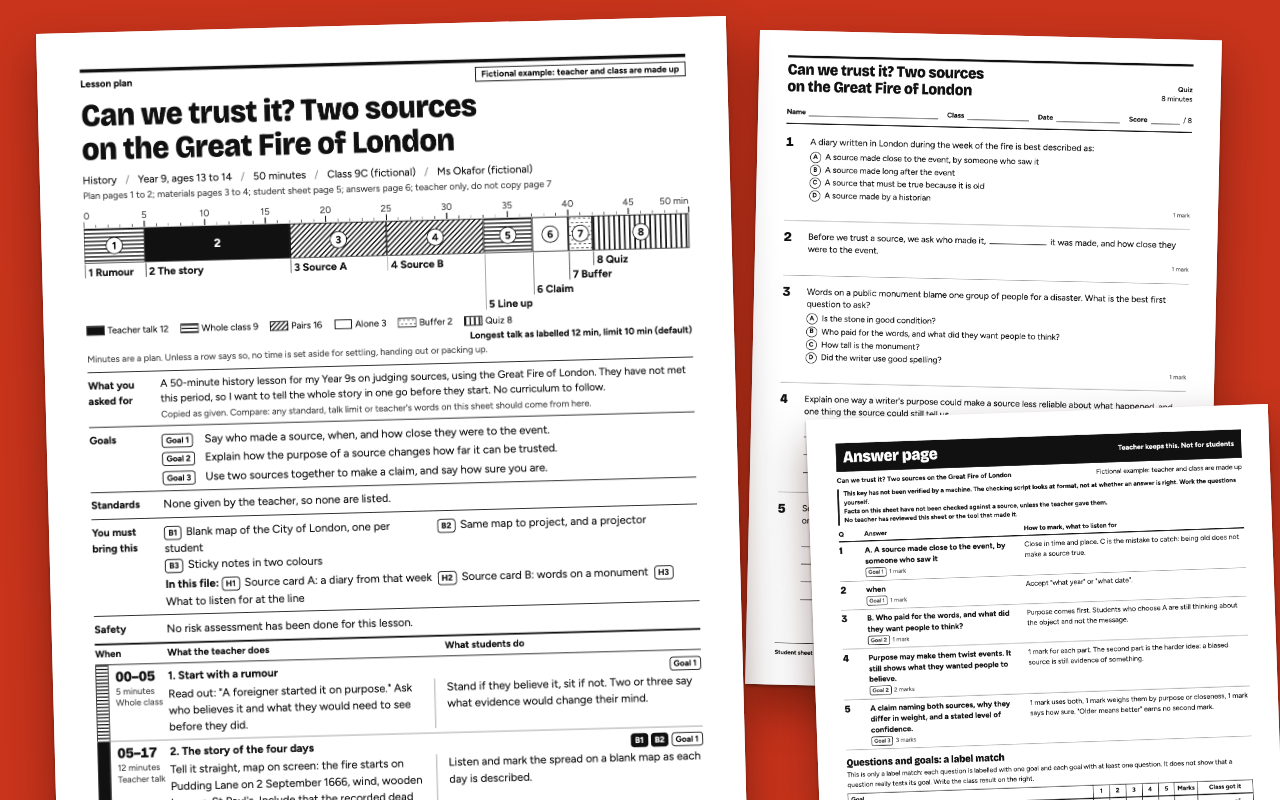
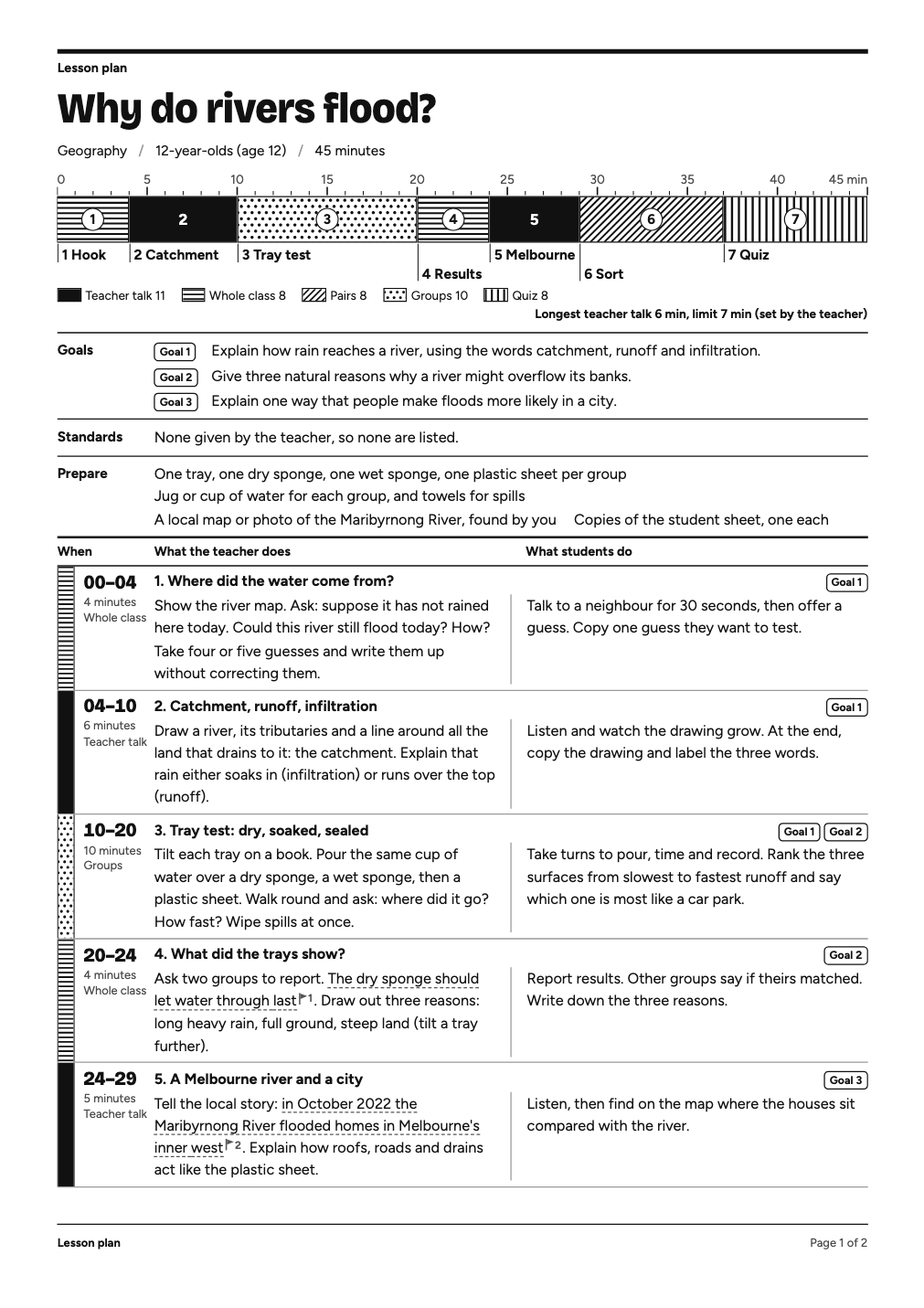
One test run on a fictional brief. Letterforms can differ on systems without the same fonts.
Makes a printable lesson plan, the handouts it runs on, and a matching quiz from a topic, a student level and a lesson length. A4 or Letter PDF in Chinese or English: a minute-by-minute bar, what teacher and students do, support, a student quiz with no answers, a separate answer page. A script checks the format: minutes add up, talk stays under a stated limit, goal and question labels match, named handouts exist, known curriculum names are in the teacher's words, other code-like wording is named on the plan. It does not check that facts, answers or codes are right, and the sheet says so. The teacher's request prints on the plan to compare. No teacher has reviewed this pack yet. Use when a teacher, tutor or trainer wants a lesson plan, class exercise or quiz for one lesson.
What it must pass before delivery
check.mjsprinted FORMAT OK and I read its NOT CHECKED lineprint-test.mjsprinted PRINT OK, layout only- I told the teacher about anything they must draw themselves
- Every row: what the teacher needs in hand is written as a handout or listed under bring
- I answered every question fresh without the key, compared, and recorded
keyWorkedThrough - Every fact-like item is accounted for, and I read for what the list missed
- Any risk in an activity is in
safety, and a buffer is planned before the quiz - I opened every page image, in black and white
- The timeline adds up to exactly the lesson length
- Every goal has a question that really tests it, not only a matching label
- Every curriculum code or scheme on the sheet is in the teacher's words, or the sheet says none were given
- Every fact I was unsure of is flagged, and I told the teacher which
- Any override of the talk limit quotes the teacher
- The student page has no answers on it
- Everything I assumed is listed on the plan
- I said no teacher has reviewed this pack yet
Read the full SKILL.md
---
name: lesson-sheet
description: Makes a printable lesson plan, the handouts it runs on, and a matching quiz from a topic, a student level and a lesson length. A4 or Letter PDF in Chinese or English: a minute-by-minute bar, what teacher and students do, support, a student quiz with no answers, a separate answer page. A script checks the format: minutes add up, talk stays under a stated limit, goal and question labels match, named handouts exist, known curriculum names are in the teacher's words, other code-like wording is named on the plan. It does not check that facts, answers or codes are right, and the sheet says so. The teacher's request prints on the plan to compare. No teacher has reviewed this pack yet. Use when a teacher, tutor or trainer wants a lesson plan, class exercise or quiz for one lesson.
version: 1.1.0
---

# Lesson Sheet

You write the lesson and everything it runs on. The pack does the layout, and a script refuses a lesson whose format does not add up. Fill in a lesson file, run one command, look at every page and hand over a PDF.

**No teacher has reviewed this pack yet.** The plan and the answer page print that, and you say it at handover.

**What the checks do not do.** They do not know your subject. A wrong fact, a wrong answer key, or a question that does not test its goal can all pass. An OK means the format is right. It does not mean the content is. The sections marked *yours* below are the part no script can do.

## Ask for

Ask once, in one short message, in everyday words:

1. What is the topic?
2. Who are the students: grade or age, and what they already know?
3. How long is the lesson?
4. Do you have a curriculum, standard or scheme to follow? If so, paste it exactly. If you don't know, leave it.
5. Is there a limit on how long you want to talk in one go? (Otherwise 10 minutes.)
6. Chinese or English?

Work out the paper yourself: Letter in the US or Canada, otherwise A4. Ask only if you cannot tell.

## What to do when

- **The brief is thin:** restate what they told you, never invent details about the class, and put everything you filled in yourself under `assumptions`. It prints on the plan.
- **Nobody can answer:** go ahead, with a 10-minute talk limit, `talkLimitFrom: "default"`, and list every assumption. Give the level and length you were given. If you have no length, use 40 minutes and list it.
- **They want a different length:** change the segments and run it again. The script will not pass until the minutes add up. Do not squeeze: cut an activity.
- **They want to talk longer than the limit:** only if the teacher says so. Quote their reason word for word from `teacherWords` in `talkOverride`. It prints on the plan as their words. You never decide this for them. Talk separated by anything under 3 minutes counts as one stretch. A limit other than 10 must be the teacher's, and the number must be in `teacherWords`. "Under 7 minutes" is limit 7: keep the longest stretch to 6.
- **No standards given:** leave `standards` empty. The sheet says none were given. Do not look any up from memory, do not write a code that seems right, do not name a textbook, exam board or scheme anywhere on the sheet. If they gave one, copy it exactly with `"givenBy": "teacher"`. It must appear in `teacherWords`, and it prints as given by the teacher. Any other wording shaped like a code or a textbook reference is named on the Standards line, so the sheet never says none while holding one. Remove it unless the teacher gave it.
- **There is a link or source you can't open:** say you could not read it. Do not guess what it says.
- **A language lesson that needs both languages on the sheet:** set `mixedLanguageOK: true`. Otherwise an English sheet has no Chinese on it, and a Chinese sheet keeps English to what the lesson needs.

## What the lesson runs on (yours)

A plan that says "hand out three flawed openings" is useless unless the openings exist. Write them.

- **`handouts`:** everything you can write: passages, sample texts, cards, sort items, worksheets, record tables, a script. Each prints on its own page. Write the whole thing, not a description of it: text such as "goes here" fails. Every handout needs `audience`. `student` prints with the materials as plain text, with no flags. `teacher` is for anything with answers or a script: it prints last, under the same black band as the answer page, and the page map lists it apart from the materials.
- **`bring`:** everything you cannot supply: objects, maps, pictures, equipment. It prints under "You must bring this".
- **`uses` on each segment:** the ids it needs. The script fails a segment that names a handout, card, map, picture and so on, or says "hand out" or "show the", when nothing in `uses` has that word in its name. It matches whole words, and only the words on its list. Read every row and ask: what does the teacher need in their hand here, and is it in the file? If a row says "two examples" or "the story", that is your job too.

## What it cannot draw (yours)

The sheet prints text, tables, blank lines and blank boxes. It cannot print a stacked fraction, a diagram, a graph or a shaded shape. Write 3/4 or three quarters. For anything that must be drawn:

- `"board"` on a segment prints a "Draw on the board" line in that row. Say exactly what to draw. The teacher draws it.
- `{"type": "box", "height": 60, "label": "Draw the Moon at each stage"}` in a handout prints a blank box for students, or for the teacher to draw in before copying.
- A table with `"header": false` has no heading row, which makes blank shading bars.
- If the drawing is what the lesson depends on, tell the teacher at handover.

## Safety (yours)

If an activity has a risk, such as water on a floor, heat, chemicals, blades or leaving the room, write it in `safety`. It prints on the plan. If there is none, leave the list empty: the sheet then says no risk assessment was done. The script only warns on a few words. This is not the school's risk assessment: say so if it matters.

## Time

Exact minutes leave nothing for settling, handing out or packing up, and the sheet says so. Plan a `buffer` segment of 2 or 3 minutes before the quiz, more if there is equipment to clear, so the time does not come out of the quiz. Large classes take longer to hand out to and collect from: with 30 or more students and under 3 buffer minutes, the build warns you, and you should fix it or say which row pays for it. Ask yourself whether each activity really fits. The sum proves arithmetic only.

## Work the key yourself (yours, required)

A swapped key can pass every format check. So before you build:

1. Cover the key. Answer every question from the question and the handouts alone, as a student would. Do not look at `answer`.
2. Then compare, and record each one in `keyWorkedThrough`: `{"id": "Q1", "freshAnswer": "C", "agrees": true}`.
3. If you disagree with your own key, the question or the key is wrong. Fix it. Do not write `agrees: true` until it is settled.

The script checks only that the record is complete, that choice answers match, and that the marking note does not call the keyed option wrong. Whether you really did it is on you. The answer page says the key has not been verified by a machine.

## Facts (yours)

No script can tell true from false.

Read every date, number, name, quotation and story, in handouts too. If you would not stake the lesson on it, mark it where it stands:

```
{{?the claim as it should print|why you are unsure}}
```

It prints with a flag and a dashed underline on the teacher's pages, and goes on the list "For the teacher to check before class". On student pages it is plain text, so the teacher must settle it before copying. If you can avoid an unsure fact, cut it. Do not soften it into something vague and leave it unflagged. Never write a quotation from memory without a flag.

Every build lists likely claims on `LOOK:` lines: numbers with units, Chinese numerals, dates, attributed quotations, titles, names, claims about who first did something, and code-like wording. It is a prompt to read, not a fact check, and it deliberately leaves out script lines and small classroom counts. A false sentence with no number or name in it will not be listed at all. Each listed item must be accounted for in `factLedger`, or the build fails:

```
{"item": "1666", "basis": "sure", "note": "the year of the fire, in any history of it"}
```

`basis` is `sure`, `notfact` or `teacher`, and a note is required on every entry: why you are sure, or what it is if it is not a fact. A token with the same unit in `teacherWords` counts as the teacher's by itself, and the build lists all of these so you can check they mean the same thing. Saying `sure` does not make it true: the plan and answer page still print that facts have not been checked against a source, unless the teacher gave them. The list misses things, Chinese names above all. Read for what it missed. If you have read everything and flagged nothing, set `nothingToFlag: true`.

A `LOOK:` line about a character not in the embedded fonts needs no action unless it looks wrong: it prints in a system font. Find it in your page images. If it shows a box or looks out of place, reword or tell the teacher.

## Setup

Needs Node 18 or newer. In a temporary folder:

```
npm install playwright pdfjs-dist && npx playwright install chromium
```

Run the commands below from that folder, using the full path to this skill. If they are installed elsewhere, set `NODE_PATH` to that `node_modules`. The first install takes a few minutes. After that, a lesson builds in under 15 seconds.

**If `npx playwright install chromium` sits silent for more than a minute,** another session may hold the browser-cache lock. Look in the cache (`~/Library/Caches/ms-playwright` on a Mac, `~/.cache/ms-playwright` on Linux). A `__dirlock` there means another install is running. If a `chromium-*` folder is already there, stop only your own install and carry on: the browser is present. If it is not, or the version does not match, set `LESSON_SHEET_CHROME` to the path of any Chromium or Chrome program, and the scripts will use it. Never kill another session's process.

## Steps

1. Copy `assets/lesson.template.json` and fill it in. Paste the teacher's request into `teacherWords` word for word. It prints on the plan as "What you asked for" so the teacher can compare it with any standard, limit or override on the sheet. Never add to it. Limits for each piece of text are in the file, and the checker enforces them. Write `teacher` and `students` as what actually happens, in plain words. Goals say what a student can do by the end. Each segment has a `mode`: `talk` (teacher talking), `whole`, `pairs`, `groups`, `solo`, `buffer` or `quiz`. If students mostly listen, it is `talk`, whatever else you call it: the limit relies on your being honest here. A `pairs` or `groups` row where the teacher lectures or explains and students have no action fails unless `talkOverride` quotes the teacher. Other listening words only get a warning. Each question has one `goal`. If a goal says explain or make, give it a written question: the labels matching does not mean the question tests it. `lines` on a written question prints exactly that many lines, so give what the marks deserve.
2. Build. It runs every rule first and writes nothing if the lesson fails:
   ```
   node <skill>/scripts/build.mjs lesson.json --out out --base mylesson --paper a4
   ```
   Fix each `FAIL:` line in the lesson, not in the scripts. Do not change a limit, drop a goal or add a padding question just to pass. Fix the plan.
3. Check the file: `node <skill>/scripts/check.mjs out/mylesson.html`. It must print FORMAT OK. Read its NOT CHECKED line: those are still yours.
4. Test the real PDF: `node <skill>/scripts/print-test.mjs out/mylesson.html`. It checks paper size, page order and numbers, overflow, no answer text on a student page or handout, answers on the answer page, and that the notices print. It must print PRINT OK, layout only. It also fails a page holding only blank lines, touching bar labels (shorten them), and a teacher handout without its band. It says nothing about content.
5. Look at every page of the real PDF, in black and white:
   ```
   node <skill>/scripts/pages.mjs out/mylesson.pdf out/pages --grey
   ```
   Open each image. Tests do not see an awkward page, a line that reads badly, a wrong fact or a question too hard for the age. Read it as the subject teacher would, not only as a designer. Fix and rebuild.
6. Hand over `mylesson.pdf`, with the flagged list in your message.

## What they get

A PDF, in this order: the plan, the student handouts, the student sheet, the answer page and any teacher-only handouts. Pages are numbered across the whole file, and the top of the plan says what is on which page. Say something like: "Here is the lesson, six pages. Print at actual size; black and white is fine. Pages 3 and 4 are the handouts, page 5 is for students, and you keep page 6. You need to bring the map and the sticky notes. I flagged two things for you to check before class. I have not checked the facts against a source, and I worked the answers through myself but nothing has verified them. No teacher has reviewed this tool yet, so read it as a draft."

Do not send anyone the HTML unless they ask.

## Example

`example/` holds two fictional lessons: a Chinese science lesson for ages 10 to 11 and an English history lesson for ages 13 to 14, which also shows an override quoting the teacher. Both include handout pages. Teachers and classes are made up and labelled so.

## Before delivering

- [ ] `check.mjs` printed FORMAT OK and I read its NOT CHECKED line
- [ ] `print-test.mjs` printed PRINT OK, layout only
- [ ] I told the teacher about anything they must draw themselves
- [ ] Every row: what the teacher needs in hand is written as a handout or listed under bring
- [ ] I answered every question fresh without the key, compared, and recorded `keyWorkedThrough`
- [ ] Every fact-like item is accounted for, and I read for what the list missed
- [ ] Any risk in an activity is in `safety`, and a buffer is planned before the quiz
- [ ] I opened every page image, in black and white
- [ ] The timeline adds up to exactly the lesson length
- [ ] Every goal has a question that really tests it, not only a matching label
- [ ] Every curriculum code or scheme on the sheet is in the teacher's words, or the sheet says none were given
- [ ] Every fact I was unsure of is flagged, and I told the teacher which
- [ ] Any override of the talk limit quotes the teacher
- [ ] The student page has no answers on it
- [ ] Everything I assumed is listed on the plan
- [ ] I said no teacher has reviewed this pack yet

## When not to use it

- A whole unit or a term's scheme of work. This is one lesson. Run it once per lesson.
- High-stakes or official exams. The quiz checks one lesson's goals. It is not a validated test.
- Anything that must meet a set curriculum when nobody can give you the text of it.
- Very young children who cannot read a question. The plan is still useful, the student sheet is not.
- As a risk assessment. Chemicals, heat or trips need the school's own: write the risks in `safety` and tell the teacher.

## Requirements

Node 18+. Playwright with Chromium, and pdf.js for the tests (both free, no account). Fonts are in this skill, and nothing goes online after the install. See `NOTICE.txt`. Tested only in Chromium on macOS.
Used in these workflows
- Run a lesson step 1

