

Experimental
Magazine Press
One command turns your article into a print-ready magazine PDF, type-led or photo-led, in ten real designs, in English or Chinese.
Experimental: in blind tests, issues made without real photographs did not pass for a real magazine. Use it with your own photographs and check every page.
Install
Install the "Magazine Press" skill into ~/.claude/skills/magazine-press.
Download each file and save it under that folder:
https://skilllift.pages.dev/packs/magazine-press/SKILL.md → SKILL.md
https://skilllift.pages.dev/packs/magazine-press/references/style.md → references/style.md
https://skilllift.pages.dev/packs/magazine-press/scripts/render.mjs → scripts/render.mjs
https://skilllift.pages.dev/packs/magazine-press/scripts/check.mjs → scripts/check.mjs
https://skilllift.pages.dev/packs/magazine-press/scripts/probe.swift → scripts/probe.swift
https://skilllift.pages.dev/packs/magazine-press/scripts/probe-chromium.mjs → scripts/probe-chromium.mjs
https://skilllift.pages.dev/packs/magazine-press/scripts/install-typst.mjs → scripts/install-typst.mjs
https://skilllift.pages.dev/packs/magazine-press/scripts/segment.swift → scripts/segment.swift
https://skilllift.pages.dev/packs/magazine-press/assets/engine/scenes.mjs → assets/engine/scenes.mjs
https://skilllift.pages.dev/packs/magazine-press/scripts/publications.json → scripts/publications.json
https://skilllift.pages.dev/packs/magazine-press/assets/article-template.md → assets/article-template.md
https://skilllift.pages.dev/packs/magazine-press/assets/THIRD-PARTY.txt → assets/THIRD-PARTY.txt
https://skilllift.pages.dev/packs/magazine-press/assets/TYPST-LICENSE.txt → assets/TYPST-LICENSE.txt
https://skilllift.pages.dev/packs/magazine-press/assets/engine/lib.typ → assets/engine/lib.typ
https://skilllift.pages.dev/packs/magazine-press/assets/engine/parse.mjs → assets/engine/parse.mjs
https://skilllift.pages.dev/packs/magazine-press/assets/engine/plan.mjs → assets/engine/plan.mjs
https://skilllift.pages.dev/packs/magazine-press/assets/engine/plates.mjs → assets/engine/plates.mjs
https://skilllift.pages.dev/packs/magazine-press/assets/engine/presets.mjs → assets/engine/presets.mjs
https://skilllift.pages.dev/packs/magazine-press/assets/engine/pdfbox.mjs → assets/engine/pdfbox.mjs
https://skilllift.pages.dev/packs/magazine-press/assets/presets/couture.typ → assets/presets/couture.typ
https://skilllift.pages.dev/packs/magazine-press/assets/presets/longform.typ → assets/presets/longform.typ
https://skilllift.pages.dev/packs/magazine-press/assets/presets/global-brief.typ → assets/presets/global-brief.typ
https://skilllift.pages.dev/packs/magazine-press/assets/presets/slow-living.typ → assets/presets/slow-living.typ
https://skilllift.pages.dev/packs/magazine-press/assets/presets/markets.typ → assets/presets/markets.typ
https://skilllift.pages.dev/packs/magazine-press/assets/presets/signal.typ → assets/presets/signal.typ
https://skilllift.pages.dev/packs/magazine-press/assets/presets/riot.typ → assets/presets/riot.typ
https://skilllift.pages.dev/packs/magazine-press/assets/presets/field.typ → assets/presets/field.typ
https://skilllift.pages.dev/packs/magazine-press/assets/presets/newsdesk.typ → assets/presets/newsdesk.typ
https://skilllift.pages.dev/packs/magazine-press/assets/presets/handbook.typ → assets/presets/handbook.typ
https://skilllift.pages.dev/packs/magazine-press/assets/vendor/pdfjs/pdf.min.mjs → assets/vendor/pdfjs/pdf.min.mjs
https://skilllift.pages.dev/packs/magazine-press/assets/vendor/pdfjs/pdf.worker.min.mjs → assets/vendor/pdfjs/pdf.worker.min.mjs
https://skilllift.pages.dev/packs/magazine-press/assets/vendor/pdfjs/LICENSE → assets/vendor/pdfjs/LICENSE
https://skilllift.pages.dev/packs/magazine-press/assets/fonts/Anton-Regular.ttf → assets/fonts/Anton-Regular.ttf
https://skilllift.pages.dev/packs/magazine-press/assets/fonts/Archivo.ttf → assets/fonts/Archivo.ttf
https://skilllift.pages.dev/packs/magazine-press/assets/fonts/BarlowCondensed-Black.ttf → assets/fonts/BarlowCondensed-Black.ttf
https://skilllift.pages.dev/packs/magazine-press/assets/fonts/BarlowCondensed-Bold.ttf → assets/fonts/BarlowCondensed-Bold.ttf
https://skilllift.pages.dev/packs/magazine-press/assets/fonts/BarlowCondensed-ExtraBold.ttf → assets/fonts/BarlowCondensed-ExtraBold.ttf
https://skilllift.pages.dev/packs/magazine-press/assets/fonts/BarlowCondensed-Medium.ttf → assets/fonts/BarlowCondensed-Medium.ttf
https://skilllift.pages.dev/packs/magazine-press/assets/fonts/BodoniModa-Italic.ttf → assets/fonts/BodoniModa-Italic.ttf
https://skilllift.pages.dev/packs/magazine-press/assets/fonts/BodoniModa.ttf → assets/fonts/BodoniModa.ttf
https://skilllift.pages.dev/packs/magazine-press/assets/fonts/Cormorant-Italic.ttf → assets/fonts/Cormorant-Italic.ttf
https://skilllift.pages.dev/packs/magazine-press/assets/fonts/Cormorant.ttf → assets/fonts/Cormorant.ttf
https://skilllift.pages.dev/packs/magazine-press/assets/fonts/EBGaramond-Italic.ttf → assets/fonts/EBGaramond-Italic.ttf
https://skilllift.pages.dev/packs/magazine-press/assets/fonts/EBGaramond.ttf → assets/fonts/EBGaramond.ttf
https://skilllift.pages.dev/packs/magazine-press/assets/fonts/IBMPlexSansCondensed-Bold.ttf → assets/fonts/IBMPlexSansCondensed-Bold.ttf
https://skilllift.pages.dev/packs/magazine-press/assets/fonts/IBMPlexSansCondensed-Medium.ttf → assets/fonts/IBMPlexSansCondensed-Medium.ttf
https://skilllift.pages.dev/packs/magazine-press/assets/fonts/IBMPlexSansCondensed-Regular.ttf → assets/fonts/IBMPlexSansCondensed-Regular.ttf
https://skilllift.pages.dev/packs/magazine-press/assets/fonts/IBMPlexSerif-Bold.ttf → assets/fonts/IBMPlexSerif-Bold.ttf
https://skilllift.pages.dev/packs/magazine-press/assets/fonts/IBMPlexSerif-Italic.ttf → assets/fonts/IBMPlexSerif-Italic.ttf
https://skilllift.pages.dev/packs/magazine-press/assets/fonts/IBMPlexSerif-Regular.ttf → assets/fonts/IBMPlexSerif-Regular.ttf
https://skilllift.pages.dev/packs/magazine-press/assets/fonts/IBMPlexSerif-SemiBold.ttf → assets/fonts/IBMPlexSerif-SemiBold.ttf
https://skilllift.pages.dev/packs/magazine-press/assets/fonts/InterTight.ttf → assets/fonts/InterTight.ttf
https://skilllift.pages.dev/packs/magazine-press/assets/fonts/JetBrainsMono.ttf → assets/fonts/JetBrainsMono.ttf
https://skilllift.pages.dev/packs/magazine-press/assets/fonts/Jost.ttf → assets/fonts/Jost.ttf
https://skilllift.pages.dev/packs/magazine-press/assets/fonts/LibreCaslonDisplay-Regular.ttf → assets/fonts/LibreCaslonDisplay-Regular.ttf
https://skilllift.pages.dev/packs/magazine-press/assets/fonts/LibreCaslonText-Italic.ttf → assets/fonts/LibreCaslonText-Italic.ttf
https://skilllift.pages.dev/packs/magazine-press/assets/fonts/LibreCaslonText.ttf → assets/fonts/LibreCaslonText.ttf
https://skilllift.pages.dev/packs/magazine-press/assets/fonts/NotoSansSC.ttf → assets/fonts/NotoSansSC.ttf
https://skilllift.pages.dev/packs/magazine-press/assets/fonts/NotoSerifSC.ttf → assets/fonts/NotoSerifSC.ttf
https://skilllift.pages.dev/packs/magazine-press/assets/fonts/PT_Serif-Web-Bold.ttf → assets/fonts/PT_Serif-Web-Bold.ttf
https://skilllift.pages.dev/packs/magazine-press/assets/fonts/PT_Serif-Web-Italic.ttf → assets/fonts/PT_Serif-Web-Italic.ttf
https://skilllift.pages.dev/packs/magazine-press/assets/fonts/PT_Serif-Web-Regular.ttf → assets/fonts/PT_Serif-Web-Regular.ttf
https://skilllift.pages.dev/packs/magazine-press/assets/fonts/PlayfairDisplay-Italic.ttf → assets/fonts/PlayfairDisplay-Italic.ttf
https://skilllift.pages.dev/packs/magazine-press/assets/fonts/PressKai-Medium.ttf → assets/fonts/PressKai-Medium.ttf
https://skilllift.pages.dev/packs/magazine-press/assets/fonts/PressKai-Regular.ttf → assets/fonts/PressKai-Regular.ttf
https://skilllift.pages.dev/packs/magazine-press/assets/fonts/SmileySans-Oblique.ttf → assets/fonts/SmileySans-Oblique.ttf
https://skilllift.pages.dev/packs/magazine-press/assets/fonts/SourceSans3.ttf → assets/fonts/SourceSans3.ttf
https://skilllift.pages.dev/packs/magazine-press/assets/fonts/SourceSerif4-Italic.ttf → assets/fonts/SourceSerif4-Italic.ttf
https://skilllift.pages.dev/packs/magazine-press/assets/fonts/SourceSerif4.ttf → assets/fonts/SourceSerif4.ttf
https://skilllift.pages.dev/packs/magazine-press/assets/fonts/Spectral-Italic.ttf → assets/fonts/Spectral-Italic.ttf
https://skilllift.pages.dev/packs/magazine-press/assets/fonts/Spectral-Light.ttf → assets/fonts/Spectral-Light.ttf
https://skilllift.pages.dev/packs/magazine-press/assets/fonts/Spectral-LightItalic.ttf → assets/fonts/Spectral-LightItalic.ttf
https://skilllift.pages.dev/packs/magazine-press/assets/fonts/Spectral-Regular.ttf → assets/fonts/Spectral-Regular.ttf
https://skilllift.pages.dev/packs/magazine-press/assets/fonts/Spectral-SemiBold.ttf → assets/fonts/Spectral-SemiBold.ttf
https://skilllift.pages.dev/packs/magazine-press/assets/fonts/ZenMaruGothic-Black.ttf → assets/fonts/ZenMaruGothic-Black.ttf
https://skilllift.pages.dev/packs/magazine-press/assets/fonts/ZenMaruGothic-Bold.ttf → assets/fonts/ZenMaruGothic-Bold.ttf
https://skilllift.pages.dev/packs/magazine-press/assets/fonts/ZenMaruGothic-Medium.ttf → assets/fonts/ZenMaruGothic-Medium.ttf
https://skilllift.pages.dev/packs/magazine-press/assets/fonts/ZenMaruGothic-Regular.ttf → assets/fonts/ZenMaruGothic-Regular.ttf
https://skilllift.pages.dev/packs/magazine-press/assets/fonts/licenses/OFL-Anton.txt → assets/fonts/licenses/OFL-Anton.txt
https://skilllift.pages.dev/packs/magazine-press/assets/fonts/licenses/OFL-Archivo.txt → assets/fonts/licenses/OFL-Archivo.txt
https://skilllift.pages.dev/packs/magazine-press/assets/fonts/licenses/OFL-BarlowCondensed.txt → assets/fonts/licenses/OFL-BarlowCondensed.txt
https://skilllift.pages.dev/packs/magazine-press/assets/fonts/licenses/OFL-BodoniModa.txt → assets/fonts/licenses/OFL-BodoniModa.txt
https://skilllift.pages.dev/packs/magazine-press/assets/fonts/licenses/OFL-Cormorant.txt → assets/fonts/licenses/OFL-Cormorant.txt
https://skilllift.pages.dev/packs/magazine-press/assets/fonts/licenses/OFL-EBGaramond.txt → assets/fonts/licenses/OFL-EBGaramond.txt
https://skilllift.pages.dev/packs/magazine-press/assets/fonts/licenses/OFL-IBMPlexSansCondensed.txt → assets/fonts/licenses/OFL-IBMPlexSansCondensed.txt
https://skilllift.pages.dev/packs/magazine-press/assets/fonts/licenses/OFL-IBMPlexSerif.txt → assets/fonts/licenses/OFL-IBMPlexSerif.txt
https://skilllift.pages.dev/packs/magazine-press/assets/fonts/licenses/OFL-InterTight.txt → assets/fonts/licenses/OFL-InterTight.txt
https://skilllift.pages.dev/packs/magazine-press/assets/fonts/licenses/OFL-JetBrainsMono.txt → assets/fonts/licenses/OFL-JetBrainsMono.txt
https://skilllift.pages.dev/packs/magazine-press/assets/fonts/licenses/OFL-Jost.txt → assets/fonts/licenses/OFL-Jost.txt
https://skilllift.pages.dev/packs/magazine-press/assets/fonts/licenses/OFL-LXGWWenKai.txt → assets/fonts/licenses/OFL-LXGWWenKai.txt
https://skilllift.pages.dev/packs/magazine-press/assets/fonts/licenses/OFL-LibreCaslonDisplay.txt → assets/fonts/licenses/OFL-LibreCaslonDisplay.txt
https://skilllift.pages.dev/packs/magazine-press/assets/fonts/licenses/OFL-LibreCaslonText.txt → assets/fonts/licenses/OFL-LibreCaslonText.txt
https://skilllift.pages.dev/packs/magazine-press/assets/fonts/licenses/OFL-NotoSansSC.txt → assets/fonts/licenses/OFL-NotoSansSC.txt
https://skilllift.pages.dev/packs/magazine-press/assets/fonts/licenses/OFL-NotoSerifSC.txt → assets/fonts/licenses/OFL-NotoSerifSC.txt
https://skilllift.pages.dev/packs/magazine-press/assets/fonts/licenses/OFL-PTSerif.txt → assets/fonts/licenses/OFL-PTSerif.txt
https://skilllift.pages.dev/packs/magazine-press/assets/fonts/licenses/OFL-PlayfairDisplay.txt → assets/fonts/licenses/OFL-PlayfairDisplay.txt
https://skilllift.pages.dev/packs/magazine-press/assets/fonts/licenses/OFL-SmileySans.txt → assets/fonts/licenses/OFL-SmileySans.txt
https://skilllift.pages.dev/packs/magazine-press/assets/fonts/licenses/OFL-SourceSans3.txt → assets/fonts/licenses/OFL-SourceSans3.txt
https://skilllift.pages.dev/packs/magazine-press/assets/fonts/licenses/OFL-SourceSerif4.txt → assets/fonts/licenses/OFL-SourceSerif4.txt
https://skilllift.pages.dev/packs/magazine-press/assets/fonts/licenses/OFL-Spectral.txt → assets/fonts/licenses/OFL-Spectral.txt
https://skilllift.pages.dev/packs/magazine-press/assets/fonts/licenses/OFL-ZenMaruGothic.txt → assets/fonts/licenses/OFL-ZenMaruGothic.txt
https://skilllift.pages.dev/packs/magazine-press/assets/fonts/licenses/README.txt → assets/fonts/licenses/README.txt
https://skilllift.pages.dev/packs/magazine-press/assets/engine/phrases.mjs → assets/engine/phrases.mjs
https://skilllift.pages.dev/packs/magazine-press/assets/vendor/budoux/zh-hans.json → assets/vendor/budoux/zh-hans.json
https://skilllift.pages.dev/packs/magazine-press/assets/vendor/budoux/LICENSE → assets/vendor/budoux/LICENSE
Then read SKILL.md, tell me what it does, and remind me to start a new session.
Unpack it into ~/.claude/skills
Same skill, different brief
The left is the preview. The right was made by a separate agent from a different brief, using only the installed skill and without seeing the preview.
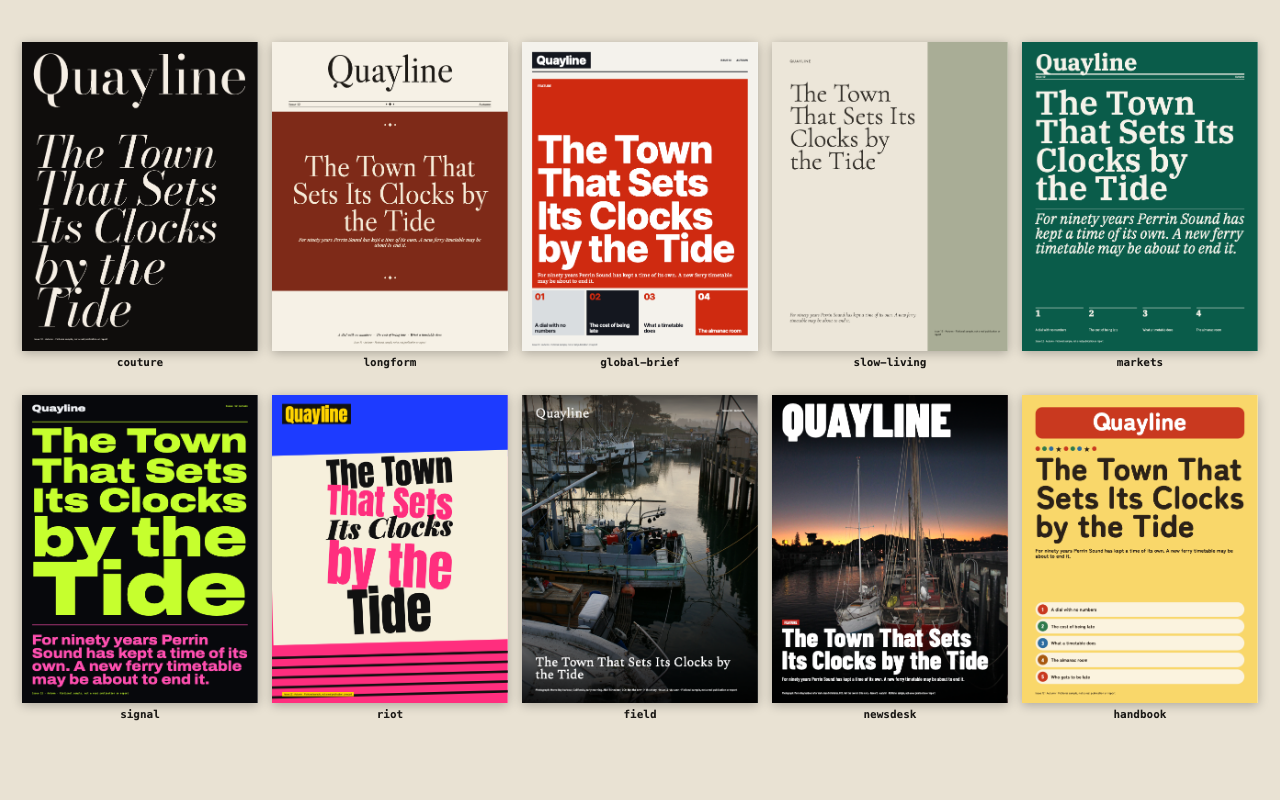
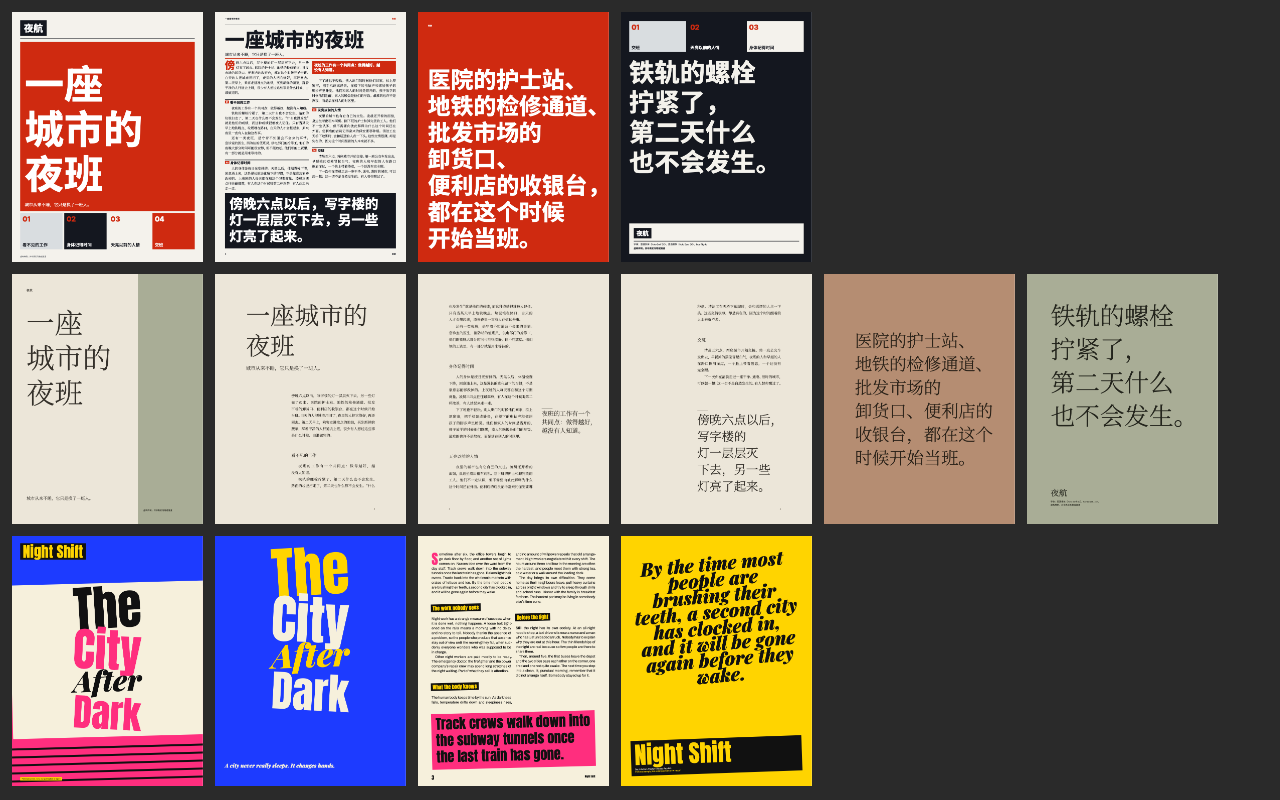
One test run on a fictional brief. Letterforms can differ on systems without the same fonts.
One command turns an article or Markdown file, with or without images, into a finished print-ready magazine PDF in one of ten real designs, with cover, contents, multi-column feature pages, pull quotes, drop caps, captions, sidebars, folios and a back page. English and Chinese. Fonts embedded and open-licensed, text selectable, optional 3 mm bleed and crop marks. Use when someone wants a magazine, zine or print feature from their writing, asks for a magazine PDF, or says "make it look like" a well-known magazine.
What it must pass before delivery
check.mjspassed on the final PDF, with.source.jsonbeside it.- Every page viewed as PNG from Apple's renderer, and any effect pages from Chromium.
- Every quote, name, number and caption is from the user. Pull quotes are word for word.
- The masthead is the user's own title, and no publication is named or implied in the PDF.
- Any
--platespicture is captioned as an illustration. Fictional samples are labelled. - Inferred lines and assumptions are listed in your reply.
Read the full SKILL.md
---
name: magazine-press
description: One command turns an article or Markdown file, with or without images, into a finished print-ready magazine PDF in one of ten real designs, with cover, contents, multi-column feature pages, pull quotes, drop caps, captions, sidebars, folios and a back page. English and Chinese. Fonts embedded and open-licensed, text selectable, optional 3 mm bleed and crop marks. Use when someone wants a magazine, zine or print feature from their writing, asks for a magazine PDF, or says "make it look like" a well-known magazine.
version: 1.0.0
---
# Magazine Press
You supply words and choices. The engine does layout: `scripts/render.mjs` runs [Typst](https://typst.app) (open source, Apache-2.0) with ten locked designs in `assets/presets/`. Do not edit those files for a job, and never need to read them. `scripts/check.mjs` then inspects the finished PDF.
## Inputs to ask for
Ask once, in one message, for anything the brief does not give.
Required:
1. The article: a file, or text you save as Markdown.
2. The masthead: the user's own title for the magazine.
3. The style, by preset name or "like <publication>" (see the lookup below).
4. Pictures. A magazine needs them, so ask once: "Do you have photographs for this? With them, photographs lead. Without them it will be a type-led issue: huge headlines, colour fields, rules and large quotes from your own text, and no pictures at all." Proceed either way.
Optional: page size, bleed, issue, date, author, section.
**If the user asks for generated pictures.** If your own agent has an image model, and the user asks and accepts using their own model and quota, generate pictures from the article, save them as files, and supply them as images with captions saying they were generated. This pack has no image model and never calls one.
## Fields
Copy `assets/article-template.md`, or put these at the top of the Markdown file. Omit an optional line and its space closes up; nothing is left empty. The render stops with a message if a limit is passed.
| Field | Meaning | Limit (English / Chinese) | Thin brief |
|---|---|---|---|
| `masthead` | The magazine's own name, set large on the cover. Just the name, without 《》 marks | 28 / 12 characters | Ask. If nobody can answer, omit it: the article title is used. Never invent one, never use a real publication's name |
| `title` | The headline | 180 / 90 | Use the writer's headline. If there is none, use their first short sentence and list it as inferred |
| `dek` | One sentence under the headline | 220 / 110 | Omit. Do not copy the opening sentence: it would print twice. Do not write new claims |
| `author` | Byline | 60 | Omit if not given. Never invent a name |
| `section` | Label such as Feature | 24 | Omit |
| `issue`, `date` | Issue line on the cover | 24 each | Omit. Never invent a number or date |
| `cover_image`, `cover_focus` | Cover picture and its focal point, x,y from 0 to 1 | At least 1300 x 1700 px | Omit: the first supplied image, or a type-led cover |
| `pull_quotes` | List of exact sentences to pull out | Word for word from the text, 8 to 28 words / 14 to 44 characters | Omit: sentences are picked from the text |
| `cover_caption` | Caption for the cover picture | 160 / 80 | Omit. Never invent one |
| `fictional` | `true` only for invented samples. Prints a fictional label | true or false | Omit |
| `lang` | `en` or `zh`, if detection gets it wrong | | Omit |
| `plate` | Only with `--plates`: a mood (`night`, `dusk`, `dawn`, `day`) and or a subject (`city`, `rail`, `street`, `harbour`, `land`, `room`) | | Omit |
In the body, use plain Markdown:
- `## Subheading`. These fill the contents page. No subheadings is fine.
- A first paragraph of one short line (28 words / 40 characters) with no `dek` becomes the standfirst and moves out of the body.
- `> A line` is set as a callout in the writer's words, and is not repeated elsewhere.
- `{focus=0.5,0.3}` places a picture. JPEG or PNG. Caption limit 160 / 80 characters. No caption means none is printed: never invent one. Focus keeps that point in frame.
- `:::sidebar Title` ... `:::` is a boxed sidebar. Only text the user gave.
- `:::listings Title` ... `:::` with `- Name: description` lines is a directory. Only what the user gave. The global-brief preset gives it a section of its own.
- `| tables |` print only the user's figures. No table is ever invented.
- Advertising and contributor pages exist only if the user supplies them. Give them as a sidebar.
The drop cap goes on the first paragraph long enough to wrap it (200 / 70 characters). Inline formatting in that paragraph is dropped.
## Steps
1. Install once. Typst 0.15 or newer: `node scripts/install-typst.mjs` (puts it in the skill's `.bin`, no admin rights), or `brew install typst`. On a Mac nothing else is needed: the check uses `swift` with PDFKit. A second renderer is optional and large (18 MB of npm packages plus about 575 MB of browsers): in any folder outside the skill, `npm install playwright` then `npx playwright install chromium`, and set `NODE_PATH` to that `node_modules`. Without it the check says one renderer was tested. Off a Mac, Playwright is required.
2. Save the article as Markdown with the fields above. Images are paths relative to it.
3. Render:
```
node scripts/render.mjs article.md --style longform --masthead "Your Title" --out issue.pdf
```
`--style` is a preset name. `--size 210x275` (default), `a4` or `letter`. `--bleed` adds 3 mm bleed and crop marks. `--min-ppi 150` sets the failure limit for pictures. `--contents on|off` overrides the contents rule below. `--plates` draws generic scenes where there are no pictures, with a warning; see below. Takes 5 to 40 seconds including the check; run one at a time.
4. Render runs the check. If it fails, read the message, change the words or pictures, render again. Do not change the checker or the limits to get a pass.
5. Rasterise and view every page yourself:
```
swift scripts/probe.swift issue.pdf pages-apple 100 png
node scripts/probe-chromium.mjs issue.pdf pages-chromium 100 png
```
Open each PNG. A passing check does not replace looking. Compare both renderers on any page with gradients or see-through effects.
6. Deliver the PDF. Keep `issue.source.json` beside it if the check will be rerun: it is how the check proves no supplied text went missing.
## Presets
| `--style` | What you get |
|---|---|
| `couture` | Didone display type, vast white, one full-bleed cover image, tiny captions |
| `longform` | Literary old-style serif, ruled three columns, illustrated cover in a framed panel, section ornaments |
| `global-brief` | Dense modular grid, small sans labels, many small numbered items, one strong accent, a listings section |
| `slow-living` | One narrow column, wide margins, quiet serif, muted paper |
| `markets` | Compact four columns, one-colour rule system, data tables. With no table supplied it never invents one: it lifts up to four of the writer's own sentences that hold numbers into a ruled figures strip, or does without if there are none |
| `signal` | Oversized grotesque, neon on near-black |
| `riot` | Colliding oversized words, rotated type, a loud page for each pull quote, body text that stays plain |
| `field` | Picture-led, huge opening spread, strong numbered captions, restrained serif. Needs photographs; the spread needs one 2500 px wide or more, or the title opens on paper |
| `newsdesk` | Portrait cover with the headline over it, tight news columns |
| `handbook` | Warm lifestyle magazine, playful small drawings, numbered guides |
**Columns and drop caps.** couture 2 columns, drop cap. longform 3, drop cap. global-brief and markets 4, or 3 for Chinese and short pieces, drop cap. slow-living 1, no drop cap, by design. signal, riot and field 2, drop cap. newsdesk 3, drop cap. handbook 2, no drop cap, numbered headings instead.
**Contents.** Printed only for 1,000 words or more, with at least three headed sections falling on at least three pages. Otherwise there is no contents page, and no index strip on the cover.
**With no pictures.** Every preset has its own type-led structure, and the words on covers, panels and back pages are lifted from the supplied text. couture: black cover, title stacked in Didone, a title page on white. longform: brick field holding the title under a centred masthead, ornaments. global-brief: red hero module over numbered modules. slow-living: tall colour field beside light display type, quotes hung in the margin. markets: green front page with big figures from the text and rules. signal: the title fills the cover line by line, a hot opening field, giant section numbers. riot: colliding words on a tilted sheet. newsdesk: headline stacked in capitals on a red field. handbook: yellow cover, numbered guide pills, round type. No quote sits within about 300 characters of its source. No picture is ever used twice: spare pictures close the piece, otherwise type does.
**`field` needs photographs.** With no images, render stops and suggests `longform` or `slow-living`. `--force` lets it run type-only, in its weakest form.
**`--plates`.** Draws generic code-made scenes, each subject once, captioned as illustrations. They are not about the article, and look like a template. Do not offer them first. Use them only if the user asks after seeing the type-led version.
## "Like <publication>" lookup
A plain lookup from a familiar reference to a preset. These publications have no connection with this pack, and nothing of theirs is used.
| They say | Use |
|---|---|
| like Vogue | `couture` |
| like The New Yorker | `longform` |
| like Monocle | `global-brief` |
| like Kinfolk | `slow-living` |
| like The Economist | `markets` |
| like Wired | `signal` |
| like Bloomberg Businessweek | `riot` |
| like National Geographic | `field` |
| like Time | `newsdesk` |
| like Newsweek | `newsdesk` |
| like Brutus | `handbook` |
The output never uses any real publication's name, masthead, logo, proprietary typeface or registered marks, such as a signature coloured border frame, and never claims a connection. Do not name the publication to the reader of the PDF.
If asked for a replica, or to use the real masthead, refuse and offer the preset from the table above: "I can't reproduce that magazine or its masthead. I can set your piece in the `<preset from the table>` preset under your own title." `render.mjs` refuses real names too. Do not work around it.
## When
- **The brief is thin.** Restate the user's facts, invent nothing, and list every inferred line in your reply.
- **Nobody can answer.** Proceed with the omissions in the table and list your assumptions.
- **They want a different length.** Layout follows the text: 1,800 words makes 6 to 14 pages depending on preset. A 300-word piece makes 4 to 6 pages; 6,000 words makes 8 to 24. In Chinese, about 1.8 characters count as one word: 800 characters is roughly a 450-word piece, 4 to 6 pages. Short pieces get fewer, fuller pages: larger body type and a closing panel set from the writer's own words. Do not pad or cut their text to hit a count without asking. If they want fewer pages, use a denser preset (`markets`, `global-brief`, `newsdesk`); for more, an airier one (`slow-living`, `couture`).
- **There are no images.** The issue is type-led, as described above. Tell the user that is what they will get.
- **There are many images.** Those the text cannot carry go to gallery pages at the end; none are dropped.
- **An image is too small.** The check fails below 150 ppi as printed and warns below 220. Ask for a larger file, or use the image smaller by placing it in a preset with small slots such as `global-brief`.
- **Chinese text in the PDF.** Words of 2 to 5 characters are kept together where a line has a choice, using Apple's tokenizer on a Mac and `Intl.Segmenter` everywhere, so a few splits can remain. Copying text out with PDFKit can add spaces in stretched lines and reorder lines around a drop cap; the check reports both figures. Printed pages are not affected.
- **A rare Chinese character is in the text.** The fonts cover GB2312 in the serifs and GBK in Noto Sans SC, which also catches the rest. A character outside GBK stops the render with a message naming it: ask the user how to write it.
## Deliverables
- `issue.pdf`: print-ready, all fonts embedded, text selectable, even page count.
- With `--bleed`: TrimBox and BleedBox set, 3 mm bleed, crop marks outside the bleed.
- A short note of inferred lines, warnings and the page count.
## Before delivering
- [ ] `check.mjs` passed on the final PDF, with `.source.json` beside it.
- [ ] Every page viewed as PNG from Apple's renderer, and any effect pages from Chromium.
- [ ] Every quote, name, number and caption is from the user. Pull quotes are word for word.
- [ ] The masthead is the user's own title, and no publication is named or implied in the PDF.
- [ ] Any `--plates` picture is captioned as an illustration. Fictional samples are labelled.
- [ ] Inferred lines and assumptions are listed in your reply.
## When not to use it
For a web magazine, a slide deck or a one-page poster. For a book with chapters, notes and an index. For a replica of an existing publication. For text in scripts the fonts do not cover, such as Arabic or Devanagari.
## Requirements
Install size: the pack's `files` list is about 41 MB, nearly all fonts. `example/` and `preview/` are not installed. The Typst binary is one more download of about 40 MB. Node 20 or newer; Typst 0.15 or newer. The check needs swift with PDFKit (macOS) or Playwright with Chromium, and uses both when present, which adds about 575 MB of browsers; with neither it exits 3 rather than guess. No network at render time, no image model. Fonts ship in `assets/fonts` with licences in `assets/fonts/licenses`. Engine credit: Typst; BudouX for Chinese phrase breaks; pdf.js for rasterising in Chromium; see `assets/THIRD-PARTY.txt`. The credit stays in the pack and is not printed in the PDF.
For exact tokens and layouts, see `references/style.md`.
Used in these workflows
- Make a report deck step 5

