

Free
Statement Sorter
Turn a messy bank statement into a live Excel workbook. Lines it can't be sure of stay marked "needs you", the totals say how much money is still undecided, and the script fails loudly if it doesn't tie to the statement.
Install
Install the "Statement Sorter" skill into ~/.claude/skills/statement-sorter.
Download each file and save it under that folder:
https://skilllift.pages.dev/packs/statement-sorter/SKILL.md → SKILL.md
https://skilllift.pages.dev/packs/statement-sorter/NOTICE.txt → NOTICE.txt
https://skilllift.pages.dev/packs/statement-sorter/references/style.md → references/style.md
https://skilllift.pages.dev/packs/statement-sorter/references/formats.md → references/formats.md
https://skilllift.pages.dev/packs/statement-sorter/assets/overview.html → assets/overview.html
https://skilllift.pages.dev/packs/statement-sorter/assets/keywords.json → assets/keywords.json
https://skilllift.pages.dev/packs/statement-sorter/assets/samples/brief-en.json → assets/samples/brief-en.json
https://skilllift.pages.dev/packs/statement-sorter/assets/samples/brief-zh.json → assets/samples/brief-zh.json
https://skilllift.pages.dev/packs/statement-sorter/assets/samples/statement-en.txt → assets/samples/statement-en.txt
https://skilllift.pages.dev/packs/statement-sorter/assets/samples/statement-zh.txt → assets/samples/statement-zh.txt
https://skilllift.pages.dev/packs/statement-sorter/assets/samples/statement-en.csv → assets/samples/statement-en.csv
https://skilllift.pages.dev/packs/statement-sorter/assets/samples/wallet-alipay-zh.csv → assets/samples/wallet-alipay-zh.csv
https://skilllift.pages.dev/packs/statement-sorter/assets/samples/wallet-wechat-zh.csv → assets/samples/wallet-wechat-zh.csv
https://skilllift.pages.dev/packs/statement-sorter/scripts/make.py → scripts/make.py
https://skilllift.pages.dev/packs/statement-sorter/scripts/labels.py → scripts/labels.py
https://skilllift.pages.dev/packs/statement-sorter/scripts/parse_statement.py → scripts/parse_statement.py
https://skilllift.pages.dev/packs/statement-sorter/scripts/classify.py → scripts/classify.py
https://skilllift.pages.dev/packs/statement-sorter/scripts/reconcile.py → scripts/reconcile.py
https://skilllift.pages.dev/packs/statement-sorter/scripts/build_workbook.py → scripts/build_workbook.py
https://skilllift.pages.dev/packs/statement-sorter/scripts/formula_eval.py → scripts/formula_eval.py
https://skilllift.pages.dev/packs/statement-sorter/scripts/verify.py → scripts/verify.py
https://skilllift.pages.dev/packs/statement-sorter/scripts/overview.py → scripts/overview.py
https://skilllift.pages.dev/packs/statement-sorter/scripts/shot.mjs → scripts/shot.mjs
https://skilllift.pages.dev/packs/statement-sorter/scripts/preview.mjs → scripts/preview.mjs
https://skilllift.pages.dev/packs/statement-sorter/scripts/check.mjs → scripts/check.mjs
https://skilllift.pages.dev/packs/statement-sorter/scripts/test_no_false_finish.py → scripts/test_no_false_finish.py
Then read SKILL.md, tell me what it does, and remind me to start a new session.
Unpack it into ~/.claude/skills
Same skill, different brief
The left is the preview. The right was made by a separate agent from a different brief, using only the installed skill and without seeing the preview.
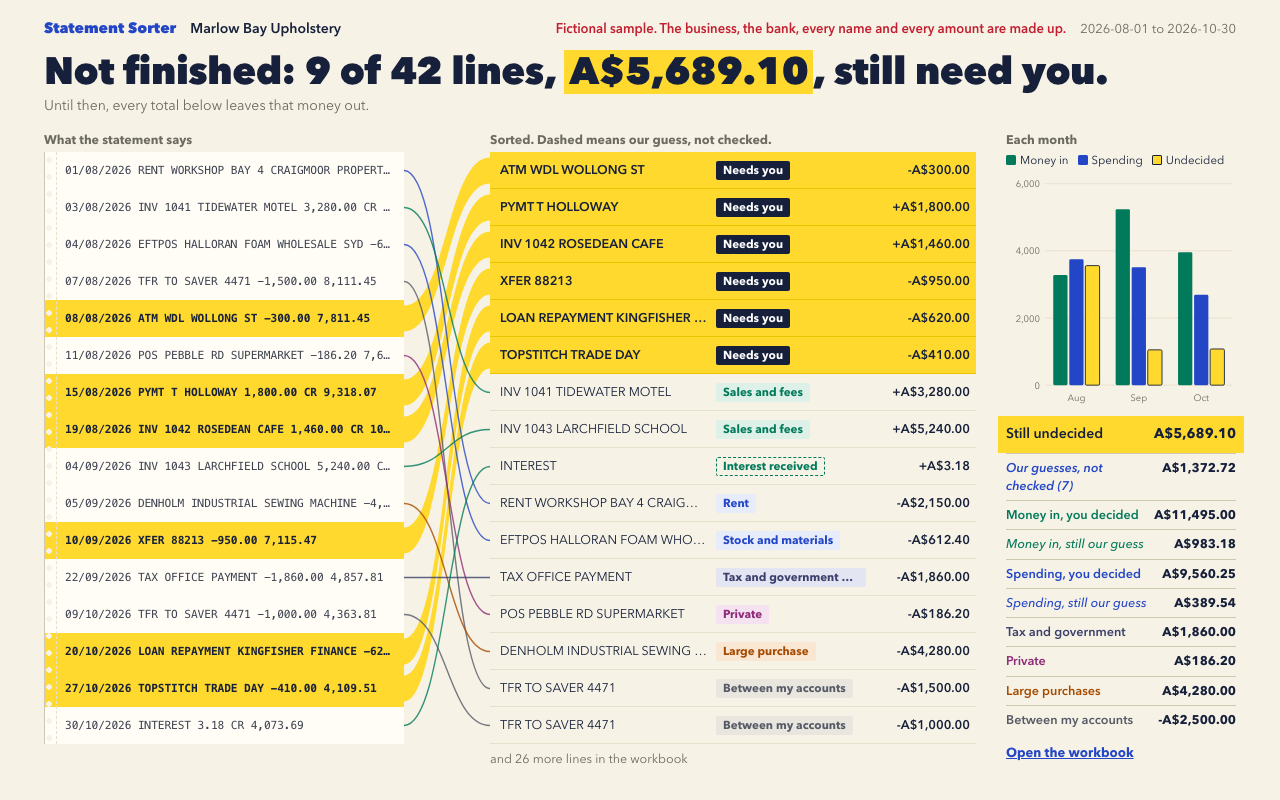
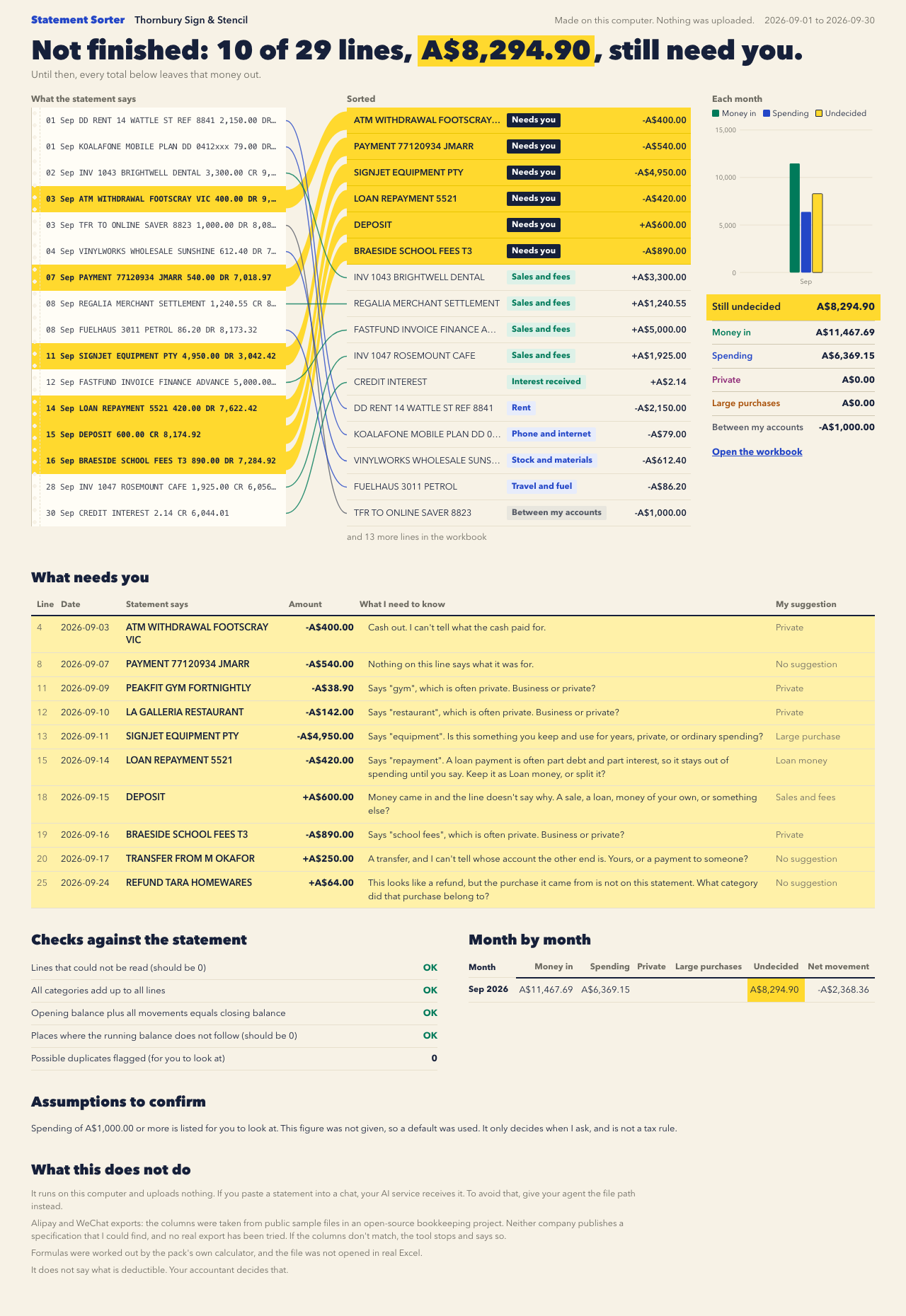
One test run on a fictional brief. Letterforms can differ on systems without the same fonts.
Sorts a pasted bank statement or CSV into a live Excel workbook for freelancers and small shop owners, with a dropdown to change each category, category and monthly totals, and a first sheet saying what needs the person's decision. Each line is marked needs you, you said, or our guess not checked, with the reason. Private spending, large purchases and transfers between their own accounts are kept apart, and undecided money stays visible, so it never looks finished when it is not. A script reconciles it to the statement and fails loudly on any mismatch. Works in English and Chinese, runs locally and uploads nothing. Alipay and WeChat columns come from public sample files, not an official specification, and have not been tried on a real export. It gives no tax advice. Use when someone wants to sort, categorise or tidy a bank statement, a CSV of transactions, or an Alipay or WeChat bill.
What it must pass before delivery
make.pyexited 0 andcheck.mjspasses. If not, the person is told exactly which check failed and by how much.- Every source line is accounted for, and lines not read is 0 or each one is listed for them.
- Categories add up to all lines, and opening plus movements equals closing when balances exist. If there are no balances, they were told that check could not be done.
- Each line is marked needs you, you said, or our guess, with a reason, and no suggestion was used as a decision.
- They were told to scan the lines marked our guess, and that tying only means the sums add up.
- If a rule was used, what it caught on the first sheet, line by line, is what they meant.
- Loan decisions and anything set aside on the first sheet were read out to them.
- Private, large purchases and transfers between their accounts are separate, and transfers are out of money in and spending.
- If anything is undecided, the first line of the message and the first sheet say how much. If a check fails, they say the difference and the first line where the balance breaks.
- If the statement can't be shown complete, they were told, including any balance worked back from a line.
- Possible duplicates are flagged for them to decide.
- The message says it was not opened in real Excel and that nothing was uploaded.
- Nothing says what is deductible.
- The Chinese version has Chinese labels and the right currency, if used.
- Alipay and WeChat limits were mentioned if that format was used.
Read the full SKILL.md
---
name: statement-sorter
description: Sorts a pasted bank statement or CSV into a live Excel workbook for freelancers and small shop owners, with a dropdown to change each category, category and monthly totals, and a first sheet saying what needs the person's decision. Each line is marked needs you, you said, or our guess not checked, with the reason. Private spending, large purchases and transfers between their own accounts are kept apart, and undecided money stays visible, so it never looks finished when it is not. A script reconciles it to the statement and fails loudly on any mismatch. Works in English and Chinese, runs locally and uploads nothing. Alipay and WeChat columns come from public sample files, not an official specification, and have not been tried on a real export. It gives no tax advice. Use when someone wants to sort, categorise or tidy a bank statement, a CSV of transactions, or an Alipay or WeChat bill.
version: 1.1.0
---

# Statement Sorter

The person gives a statement and gets back a workbook they can finish themselves. Nothing they see should mention scripts or formulas beyond "the Excel file". You do all the setup.

## Privacy, first

Statements are sensitive. The scripts run on this computer and upload nothing. The only download is the XlsxWriter library, once, and no statement data goes with it.

But if the person pastes a statement into a chat, the AI service running you receives it. Tell them that before they paste. Offer the private way:

1. They save the statement as a file and give you the path.
2. You run `make.py` on the path without opening the file. Its output holds counts and line numbers only.
3. You run `check.mjs`, which reports no line of the statement.
4. You hand over the files without reading the workbook, `overview.html` or `overview.png`. Say you did not view them.

Never copy a real statement into the repo, a shared folder or a sample. Delete temporary copies when done. Real output files are set so only this user can read them.

## Inputs to ask for

Required:
1. The statement: a file path (best), or pasted text. Bank statement or CSV, or an Alipay or WeChat bill export.

Ask next, a few at a time, and accept "I don't know":
2. Business name and language (English or Chinese). Default the language to the one they write in.
3. Currency. One workbook takes one currency.
4. Their own other accounts, as the words that appear on the statement ("SAVER 4471"). Only these count as confirmed transfers.
5. Payees they already know, as rules: "ROSEDEAN CAFE is a customer", "SEWPRO is software".
6. From what amount they want to be asked whether something is a large purchase. This decides when to ask and nothing else. It is not a tax rule, so never present it as one. If they don't know, leave it out: the default is A$1,000 or ¥5,000, and the workbook lists it as an assumption.
7. Opening and closing balance, if the statement doesn't print them.
8. Date style, only if dates like 03/04/2026 could be read two ways.

## Rules

- Never guess silently. Every line has one of these states:
  - **Needs you**: waiting, with the question it needs answered. Its money is in Still undecided and in no total.
  - **You said**: the person confirmed it, through a rule, one of their accounts, or a line decision.
  - **Our guess, not checked**: one word that is rarely private suggested it (an invoice number, a bank fee, a bookkeeper). Nobody has confirmed it. The first sheet asks them to scan these, and the finish sentence won't appear until they are ticked or changed.
- One word never settles anything that could be private or a loan. Rent, phone, insurance, electricity, fuel, subscriptions, wholesale and the like wait for a rule or a choice. Loan-like wording (advance, finance, deposit, bond, loan) is never a guess and never income. On any route (rule, account or line decision), it stays waiting unless the category is Loan money or Leave out, or the rule has `not_a_loan: true` or the line is in `not_a_loan_lines`. Use those only when the person said so. Every such line is on the first sheet under Loan decisions.
- "Tie" only means the sums add up. It never means a category is right. Say so whenever you say something ties.
- Your own opinion goes in `suggestions`, never in `rules`. A suggestion is shown beside the line and the line stays undecided. Put something in `rules` only when the person said it.
- These stay undecided unless the person has a rule: cash withdrawals, likely private spending, explicit asset words, transfers that don't match their accounts, loan payments, money in with no reason given, refunds whose whole payee name isn't on a purchase in this statement, and possible duplicates.
- Every line at or above the amount they gave, in or out, is on the first sheet. With no rule it waits. With a rule it is listed as already answered. If lines couldn't be read or were set aside, the sentence saying so doesn't print, and those lines are listed.
- Transfers between their own accounts and loan money are left out of money in and spending. Private, large purchases and tax and government payments are kept apart from spending. Refunds go back to the purchase's category and lower it.
- A rule matches whole words in Latin text, so ATO doesn't catch CURATOR. The first sheet shows the wording and amount of every line each rule caught, and warns when short rules answered most of the statement.
- An own account must look like an account number or a name: "SAVER 4471", not "TFR" or "SAVER".
- A rule or account must name something: three characters or more (two if Chinese), not an everyday word. One that catches most of the statement stops the run with exit 3. Name it more exactly. Use `broad_ok: true` only when the person confirms it really is one payee.
- Never adjust a figure to make something tie. If a check fails, say which one and by how much.
- Don't say what is deductible, claimable or tax effective, even if asked. Say their accountant decides that. Category names are ordinary bookkeeping words.
- Never invent a line, a balance or a category for a line. Samples are fictional and labelled fictional.

## Thin briefs and other situations

- Which record wins: a dropdown choice or line decision beats a rule, and a rule beats a guess. Rerunning rebuilds from the statement and the brief, so dropdown choices are lost unless you set `carry_from` to the earlier workbook. Always do that on a rerun. Lines added by hand aren't carried, and the message says how many.
- A line pasted twice: exit 5, with the second copy flagged and the first break named. For a clean exit, add `"line_decisions": {"<source line>": "leftout"}` for the second copy, using the source line from `checks.json` or the Detail sheet. Or the person picks Leave out on it in the workbook, and the warning clears. If the bank really took it twice, put it in a category. Editing the statement isn't needed.
- A missing line: the person adds it in the empty rows on Detail. The warning clears when opening plus movements equals closing again.
- Heading lines are fine: a column heading, comma or tab separated or lined up with spaces, doesn't need removing. Use `ignore_lines` only for a line with no real money on it. Anything ignored that has money on it is listed with its amount on the first sheet, and the statement can no longer be called complete.
- Anything dropped that holds a number that could be an amount is listed with its text on the first sheet. A line with an amount is never taken for a page footer.
- A cut statement: printed opening and closing balances that tie, or a wallet's own record count, are the only proof nothing is missing. A balance you pass as `opening` or `closing` is used for the sum and labelled "you typed", but it never counts as printed, and it can't replace a printed one. Without printed balances the finish sentence says it can't be shown complete, and names why.
- Sheet edits: the workbook keeps a hidden copy of what was read and compares it by formula. Changed amounts, dates or balances, added lines, lines marked Leave out on the sheet, and loan wording booked elsewhere all change the finish sentence, which says what changed. Amounts and balances are locked with no password, and the dropdown, the tick column and the empty rows stay open. This isn't tamper-proof, so say so. Lines outside a stated period fail. Pass `period: {"from": "2026-08-01", "to": "2026-08-31"}` if the statement doesn't print one.
- `make.py` exits 0 but `check.mjs` fails: treat it as not done. Report what it printed and don't send the files as finished. Exit 0 only means the file was written and the sums work. `check.mjs` also checks the file against what it says.
- Thin brief: restate what you were given, ask for what is missing, and fill nothing in.
- Nobody can answer the questions: run with what you have and list every gap as an assumption. Undecided lines stay undecided, so the result says plainly it is not finished.
- A format you can't read: `make.py` refuses with exit 4 and says why. Don't reformat their figures by hand to get past it. Ask for a CSV with date, description and amount columns.
- Two accounts or two currencies: one workbook each. A wallet payment made from a card can appear on both the wallet bill and the bank statement, so don't add the two workbooks together.
- A different length: anything up to 24 months and 5,000 lines works. Beyond that, split it.
- No web address or link is needed for this.

## Steps

1. Write the brief to a file such as `brief.json` in a temporary folder. Copy the shape of `assets/samples/brief-en.json`:
   `lang`, `business`, `currency`, `source` (file path) or `text` (pasted), `format` (auto, alipay or wechat), `date_style` (dmy or mdy), `year` (only if the statement's dates leave it out), `asset_ask_from`, `own_accounts`, `rules` and `suggestions` (lists of `{match, category}`, with an optional `direction` of in or out on a rule), `opening`, `closing`, `period`, `ignore_lines`, `line_decisions`, `checked_lines` (source lines the person confirmed), `not_a_loan_lines`, `carry_from`, `assumptions`. Set `fictional: true` only when every line was made up: it prints a fictional label on everything. Never set it on a real statement.
   Valid category names, in English or Chinese: Needs you / 待你决定; Sales and fees / 销售和服务收入; Interest received / 利息收入; Other income / 其他收入; Stock and materials / 进货和材料; Wages and contractors / 工资和外包; Rent / 房租; Power, water and gas / 水电燃气; Phone and internet / 通讯和网络; Software and subscriptions / 软件和订阅; Advertising / 广告推广; Travel and fuel / 交通差旅; Office supplies / 办公用品; Insurance / 保险; Bank and payment fees / 银行和平台手续费; Accountant and legal / 会计和法律; Other spending / 其他支出; Tax and government payments / 税费和政府缴费; Private / 私人开支; Large purchase / 大额购置; Between my accounts / 自己账户之间转账; Loan money / 借贷款项; Leave out (duplicate or never happened) / 不计入(重复或没成交). A wrong name stops the run and prints this list.
2. Run `python3 scripts/make.py brief.json output-folder`. A normal statement takes under a minute, and 3,000 lines about two. It installs XlsxWriter into a temp folder if missing. For the picture it needs Playwright: `npm install playwright` in a temp folder, then set `NODE_PATH` to that `node_modules`. Without it you still get `overview.html`.
   Exit codes: 0 written and the sums work; 3 the brief is wrong or a rule is too broad; 4 it can't be read reliably, so there is no workbook and `message.txt` says amounts may be misread (send that as it is); 5 written, but a check does not tie; 6 the workbook failed its own recalculation, so don't send it.
3. Run `node scripts/check.mjs output-folder`. It fails if a check doesn't tie, a line was lost, a figure isn't a formula, or the first sheet looks finished when it isn't. On exit 4 and 5 it will fail too: that's correct, so report it and don't work around it.
4. Unless you are using the private way, look at `overview.png` and every section of `overview.html`, at 1280 and at phone width, and read the sentence against the figures.
5. Ask the questions on the waiting list, a few at a time, and put answers in `rules`. Run it again. The same brief works next month: the rules carry over.
6. Send the workbook, `overview.png` and the text of `message.txt`. Use the message as written. If anything is still undecided, say so first.
7. If asked to prove the failure handling, `python3 scripts/test_no_false_finish.py` runs about 160 cases on made-up data in a few minutes.

## How the formulas get checked

`make.py` runs `scripts/verify.py`. `formula_eval.py` works out every formula from the formula text in the file, and a separate plain-Python sum over the Detail sheet says what the totals should be. It then tries about 14 changes (fewer once nothing is waiting), including switching a category, deciding every line, marking a real line left out, changing the closing balance by a cent, pasting an unknown category, and adding a row. The totals must follow, and the first sheet's sentence must say what they say.

This is the pack's own calculator, not Excel. Say plainly that the file was not opened in real Excel, and that the look of the chart and dropdown there has not been seen.

Do not open, script or send commands to Excel, Numbers or any other app the person may have open. It can freeze their work.

## Deliverables

- `statement-sorter.xlsx` (Chinese: `流水分好类.xlsx`): Your decisions, Detail (dropdown), By category, By month (with chart), Checks, How to use.
- `overview.html` and `overview.png`: the quick read.
- `message.txt`: the plain message.
- `checks.json`: the record of the checks, holding counts and line numbers and no statement wording.

## Before delivering

- [ ] `make.py` exited 0 and `check.mjs` passes. If not, the person is told exactly which check failed and by how much.
- [ ] Every source line is accounted for, and lines not read is 0 or each one is listed for them.
- [ ] Categories add up to all lines, and opening plus movements equals closing when balances exist. If there are no balances, they were told that check could not be done.
- [ ] Each line is marked needs you, you said, or our guess, with a reason, and no suggestion was used as a decision.
- [ ] They were told to scan the lines marked our guess, and that tying only means the sums add up.
- [ ] If a rule was used, what it caught on the first sheet, line by line, is what they meant.
- [ ] Loan decisions and anything set aside on the first sheet were read out to them.
- [ ] Private, large purchases and transfers between their accounts are separate, and transfers are out of money in and spending.
- [ ] If anything is undecided, the first line of the message and the first sheet say how much. If a check fails, they say the difference and the first line where the balance breaks.
- [ ] If the statement can't be shown complete, they were told, including any balance worked back from a line.
- [ ] Possible duplicates are flagged for them to decide.
- [ ] The message says it was not opened in real Excel and that nothing was uploaded.
- [ ] Nothing says what is deductible.
- [ ] The Chinese version has Chinese labels and the right currency, if used.
- [ ] Alipay and WeChat limits were mentioned if that format was used.

## When not to use it

- Tax returns, BAS or audited accounts. This sorts money; an accountant decides what it means.
- Scanned PDFs or photos: get a text or CSV export first.
- Several currencies in one statement. Lines in another currency count as not read.
- Anyone else's statement without their say-so.

## Requirements

Python 3.9 or newer. XlsxWriter (BSD licence), installed by the script into a temp folder. Node for `check.mjs`. Playwright optional, for the picture. `references/formats.md` says what each format was tested on; `references/style.md` holds the look, so don't restyle.
Used in these workflows
- Sort this month's money step 1

